

Walk into any district office at 3 PM on a Tuesday and you'll probably see the same thing: three different staff members updating the same student data in three different systems. The attendance clerk enters absences into one platform, the registrar updates enrollment in another, and the data coordinator manually reconciles both into a state reporting system. Each person owns their piece. Nobody owns the connections between them.
Why the Gaps Between Systems Cost More Than the Systems Themselves
That disconnection costs districts more than staff hours. When transportation doesn't sync with enrollment, buses run empty routes. When food service operates separately from attendance tracking, kitchens prep meals for absent students. When facilities management doesn't connect to master scheduling, maintenance ends up happening during testing windows.
The problem isn't the individual systems — most districts have decent software for each function. The breakdown happens in the gaps, where nobody has clear ownership and handoffs fall through organizational cracks.
Why District Operations Create Natural Silos
School districts organize around departments: instruction, operations, technology, student services. Makes sense structurally. Each team focuses on their core mission. But that same structure creates predictable friction.
Eliminate administrative overload.
GoSkoly helps you manage schedules, attendance, and communications seamlessly.
- Unified student and staff management
- Automated attendance tracking
- Integrated communication tools
No credit card required
Take a mid-year enrollment change. A family moves from one school to another within the district. The sending school marks the student withdrawn. The receiving school processes enrollment. Transportation needs route updates. Food service adjusts meal counts. Special ed transfers IEP records. Technology reassigns device access.
The registrar at Washington Elementary processes the withdrawal Tuesday. Transportation doesn't get notified until Thursday's weekly report. The bus shows up at an empty stop for three days. Meanwhile, the receiving school expects the student Wednesday, but IT processes device requests in 48-hour batches. The cafeteria at the old school orders extra food while the new school runs short.
Every department followed their process. Nobody dropped the ball. The system failed because ownership stops at departmental boundaries.
This compounds as districts grow. A 5-school district manages with informal coordination — quick emails, hallway conversations. Once you're at 15 schools, those informal channels break down. The transportation supervisor can't personally track every enrollment change. The technology coordinator can't manually process every device transfer.
The Ownership Matrix Nobody Builds
Most districts document who owns which system. Transportation owns routing software. Registrars own enrollment platforms. What almost nobody documents: who owns the connections between systems.
An actual ownership matrix needs to capture this:
Cross-System Process Ownership
| Process | Primary Owner | Secondary Owner | SLA | Escalation Path |
|---|---|---|---|---|
| New enrollment data flow | Registrar | Data Coordinator | 4-hour sync | Director of Operations |
| Attendance to transportation sync | Attendance Clerk | Transportation Supervisor | Daily by 4 PM | Assistant Superintendent |
| Schedule changes to facilities | Master Scheduler | Facilities Manager | 48-hour notice | Operations Director |
| IEP updates to classroom | Special Ed Coordinator | Principal | Same-day notification | Director of Student Services |
| Emergency contact updates | School Secretary | Safety Coordinator | Real-time | Principal → District Safety |
Traditional responsibility charts show who manages each system. This matrix shows who ensures data flows between them. The registrar doesn't just own enrollment — they own making sure enrollment changes reach transportation within four hours. The attendance clerk doesn't just record absences — they own the daily sync to transportation by 4 PM so tomorrow's routes can adjust.
Without that clarity, you get the Wednesday afternoon scramble. A parent calls about a bus that didn't show. The principal calls transportation. Transportation says they never got the route change. The registrar says they entered it Monday. IT checks the sync logs and finds the automated export failed silently. Nobody's technically at fault, but a kid stood in the rain for 20 minutes.
SLA Language That Actually Drives Accountability
For Student Data Synchronization:
"Enrollment changes must reflect in downstream systems (transportation, food service, technology) within 4 business hours during school days, 24 hours during breaks. Primary owner monitors sync confirmation logs daily at 10 AM and 3 PM. Failed syncs trigger immediate manual update plus root cause documentation within 24 hours."
For Emergency Communication Systems:
"Safety alerts must reach all parent contacts within 15 minutes of initiation. System owner validates delivery reports within 30 minutes. Delivery failures below 95% trigger backup phone tree activation. Monthly test messages verify contact accuracy, with updates processed within 2 business days of parent notification."
For Academic System Integration:
"Grade book entries sync to parent portal within 24 hours. Report card generation pulls current data with a 48-hour freeze before distribution. Data owner performs a pre-distribution audit comparing source systems to generated reports. Discrepancies exceeding 1% trigger a hold and manual review."
For Operational Vendor Performance:
"Food service vendors receive enrollment adjustments by 2 PM for next-day service. Transportation vendors receive route changes by 3 PM for next-morning routes. Facilities vendors receive schedule updates 72 hours before requested service. Vendor acknowledgment required within 2 hours via designated platform."
The specificity matters. "Timely" means different things to different people. "By 3 PM" means by 3 PM.
Vendor Onboarding Checklist for Multi-System Districts
Districts onboard new vendors constantly — assessment platforms, communication tools, curriculum software. Most reviews focus on features and pricing. Integration requirements get discovered after implementation, usually when something breaks.
Pre-Contract System Requirements:
-
Data format for imports/exports (CSV, XML, API)
-
Authentication method (SAML, OAuth, Active Directory)
-
Required data fields and acceptable values
-
Sync frequency options and limitations
-
Error handling and retry logic
-
Audit trail capabilities
-
Backup data extraction method
Integration Mapping Session (Before signing):
-
Which existing systems need data from this vendor?
-
Which systems will feed data to this vendor?
-
What triggers data movement — scheduled, event-based, or manual?
-
Who monitors successful synchronization?
-
What happens when sync fails?
-
How do we validate data accuracy post-sync?
Technical Validation Tests:
-
Test import with 100 sample records
-
Verify special characters, long names, hyphenated names
-
Confirm handling of duplicate records
-
Test partial sync failure recovery
-
Validate audit reports show all changes
-
Check manual override capabilities
-
Test emergency data extraction process
Operational Readiness Review:
-
Staff trained on monitoring dashboards
-
Escalation contacts documented and tested
-
Integration added to system architecture diagram
-
Ownership matrix updated with new connection points
-
SLAs established for vendor response
-
Backup procedures documented if system fails
Run technical validation tests with representative data before signing the contract.
Skip any of these steps and you'll find problems in production — usually when the state report is due and the new assessment platform won't export scores in the required format because nobody checked during onboarding.
Escalation Flows That Prevent 3 PM Panic Calls
Real escalation paths don't follow org charts. When the student information system goes down during enrollment season, you don't email the vendor and wait.
-
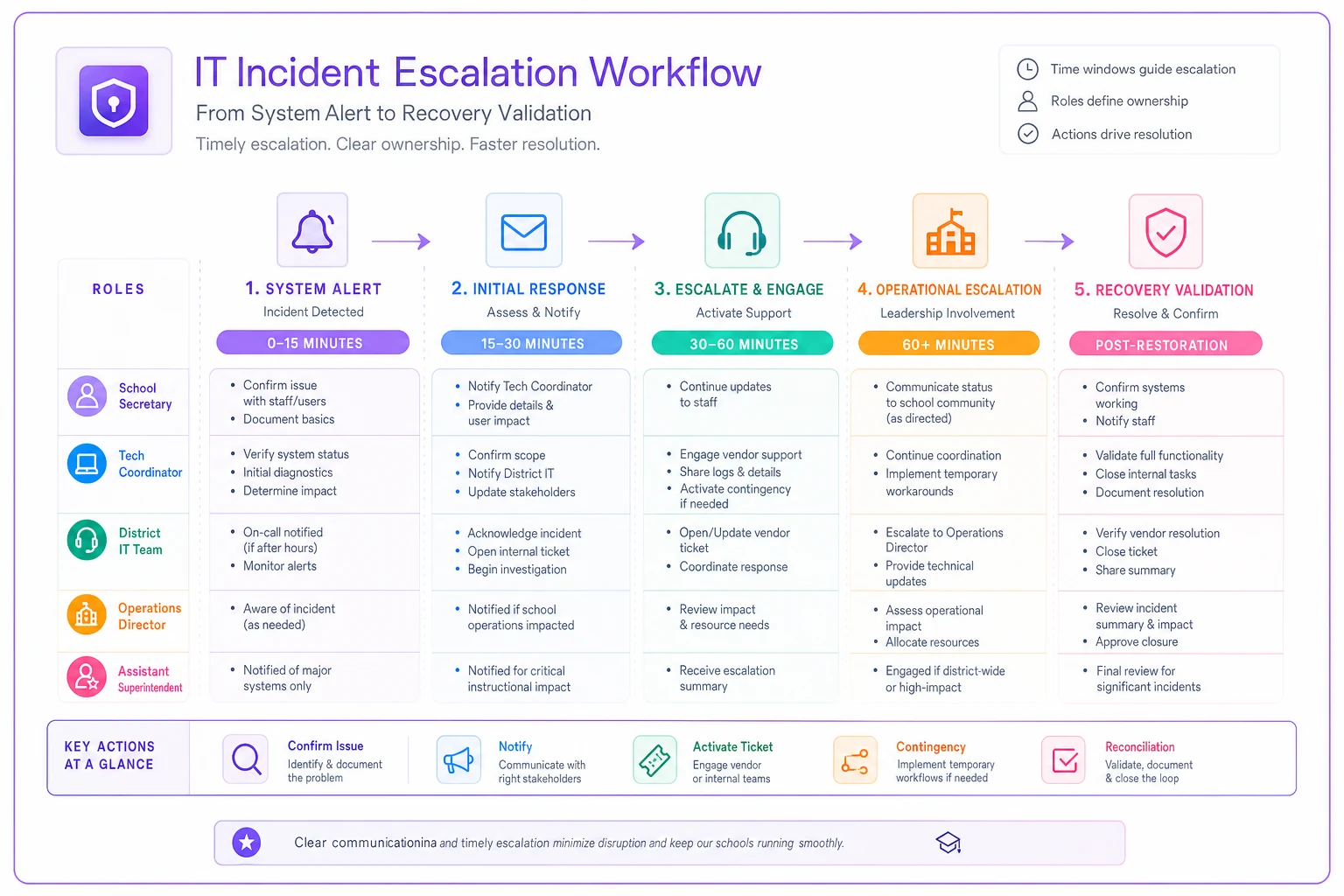
System Alert (0–15 minutes) — School secretary notices the enrollment system won't load. Checks with two other users to confirm the issue is widespread. Notifies building tech coordinator and switches to paper backup forms. Tech coordinator alerts district IT within 5 minutes.
-
Initial Response (15–30 minutes) — District IT confirms scope
single school, multiple schools, or district-wide. Checks if related systems are affected. Activates vendor support ticket if external, notifies data coordinator if internal. Updates district status page with an estimated resolution timeframe.
-
Operational Adjustment (30–60 minutes) — If resolution exceeds 2 hours, operations director activates contingency workflows. Registrars process enrollments on paper. Transportation gets manual route change calls. Food service receives headcount updates by phone. Each department lead confirms their backup process is active.
-
Executive Notification (60+ minutes) — Assistant superintendent notified of extended outage. Determines if parent communication is needed. Approves overtime if staff need to stay late for data entry once the system recovers.
-
Recovery Validation (Post-restoration) — System coming back online doesn't mean the crisis is over. Data coordinator runs reconciliation reports comparing paper records to entered data. Each school confirms their entries processed correctly. Transportation validates tomorrow's routes. Full validation completed before declaring the incident resolved.
The critical difference from standard escalation: each level has specific actions, not just notifications. Too many districts treat escalation as "tell the next person up." That creates informed panic instead of coordinated response.
Here's a visual workflow of the escalation process.
The critical difference from standard escalation: each level has specific actions, not just notifications. Too many districts treat escalation as "tell the next person up." That creates informed panic instead of coordinated response.
Building Your District-Specific Operating Model
Every district needs different SLA thresholds, ownership assignments, and escalation triggers. A 50-school urban district operates nothing like a 5-school rural district. The framework stays consistent even when the specifics don't.
Start with your highest-risk connection points. Where does data move between systems daily? Where do failures immediately affect students or safety? Map those first.
For most districts, critical paths include:
-
Enrollment to transportation
-
Attendance to state reporting
-
Grades to parent communication
-
Safety systems to emergency response
-
Special education to classroom services
-
Facilities scheduling to academic calendar
Document current reality before designing ideal state. How long does enrollment-to-transportation actually take today? Not the official process — the real time from parent signature to bus route update. That baseline tells you whether a 4-hour SLA is aggressive or conservative.
Match roles to strengths, then train specifically for cross-system responsibilities. Build ownership around capability, not just org structure. Your best data coordinator might sit in assessment, not IT. Your most detail-oriented processor might be an attendance clerk.
Test escalations before you need them. Run a simulated enrollment system outage during summer. Practice the transportation sync failure protocol when buses aren't running. You'll probably find the backup phone list is outdated, the paper forms are locked in a cabinet nobody can locate, and half your staff don't know the vendor support number.
The Accountability Framework That Makes It Stick
Creating matrices and SLAs doesn't guarantee execution. Districts generate plenty of documentation that sits in binders. The difference comes from embedding accountability into daily operations, not creating a separate process around it.
Weekly Integration Checkpoints
Every Wednesday at 2 PM, system owners report sync status for the week. Not a lengthy meeting — a 15-minute standup. Transportation confirms all enrollment changes received within SLA. Food service validates headcount matches attendance. Technology reports device assignment lag time. Problems get flagged for immediate attention, not monthly review.
Monthly Cross-Training Rotations
The registrar spends an afternoon with transportation, seeing how enrollment changes affect routing. The attendance clerk shadows food service during count reconciliation. IT sits with special education during IEP data transfers. This cross-functional exposure surfaces pain points that department-specific reviews consistently miss.
Quarterly Vendor Performance Reviews
Not contract negotiations — operational reviews. How many times did the sync fail? What was average resolution time? Did support meet response SLAs? Include actual users, not just IT and procurement. The attendance clerk who deals with daily sync errors has better feedback than the technology director who sees summary reports.
Annual Full-System Simulation
Pick the worst-case scenario and run it. Start of school year, enrollment system crashes, attendance platform has yesterday's data, transportation routes haven't updated in three days. Watch how teams coordinate — or don't. Document what breaks. Fix it before September when it's real.
The accountability structure embeds into existing workflows rather than creating new bureaucracy. The Wednesday check-in replaces random panic emails. The monthly rotations build relationships that smooth daily handoffs. The quarterly reviews prevent vendor drift.
Automation's Role in Reducing Manual Handoff Failures
Most district integration failures aren't technical — they're human workflow breakdowns. The attendance system can export to transportation, but someone has to trigger the export. The grade book can sync to the parent portal, but a person must initiate the sync after grades are finalized.
AI-powered operational platforms now handle these trigger points automatically. Instead of the attendance clerk remembering to run the 3 PM export, the system monitors for attendance finalization and triggers the sync immediately. If unusual patterns appear — like a 50% absence rate suggesting a data entry error — it flags for human review before sending anything downstream.
Operational software tracks SLA compliance automatically as well. When enrollment changes don't reach transportation within 4 hours, alerts go to both the primary and secondary owners. If resolution doesn't happen within the escalation window, the system notifies the next level. No more discovering Monday that Friday's sync failed silently.
For vendor onboarding, AI automation can validate integration requirements against existing system capabilities — upload a vendor's technical spec and the platform identifies potential conflicts with current data formats, suggests field mappings, and flags missing requirements before anyone signs a contract.
These platforms don't replace human judgment. They eliminate the manual monitoring and triggering that humans consistently miss during busy operations. The registrar still validates enrollment data; they just aren't manually checking whether every sync succeeded.
Common Pitfalls in District System Integration
The "Hero User" Dependency
Sarah in the registrar's office knows every system quirk. She manually fixes data before exports, catches sync errors through pattern recognition, and maintains undocumented workarounds. When Sarah takes vacation, systems fail mysteriously. Document her knowledge, automate her manual fixes, and build redundancy for her institutional memory before you need it.
The "Good Enough" Vendor Trap
The new assessment platform mostly works. Sure, it requires manual score uploads instead of automatic sync, but it was cheaper. Six months later, teachers are spending hours uploading scores, errors are multiplying, and parent complaints are up. The savings evaporate in staff time and frustration.
The "Set and Forget" Syndrome
Integration built, SLAs defined, ownership assigned — mission accomplished. Except enrollment patterns shift, new state requirements arrive, vendor systems update. What worked in September fails by February. Quarterly reviews of integration performance aren't optional.
The "Emergency Exception" Accumulation
One override becomes standard practice. The "temporary" manual process from last year's system upgrade never got automated. Exception workflows multiply until they outnumber standard processes. Track every manual override, review monthly, and either systematize or eliminate it.
Real Implementation Challenges
Theory meets reality fast when you actually roll this out.
Initial ownership assignment often triggers turf disputes. Transportation insists they should own enrollment-to-routing sync since it affects their operations. Registrars argue they should own it since they originate the data. The cleanest solution: split ownership by process stage. Registrars own accurate data entry and successful export. Transportation owns import validation and route adjustment. Both share SLA accountability.
Vendor resistance shows up during onboarding requirements. "No other district asks for this level of detail." Stand firm on technical validation anyway. The vendor promising seamless integration frequently delivers partial functionality requiring manual intervention. Get specific commitments in writing before signing.
Staff pushback on documentation is common too. "We know how this works, why write it down?" Until the key person is out sick during state testing week and nobody knows the manual override process. Frame documentation as operational insurance, not bureaucracy.
SLA enforcement feels harsh initially. An attendance clerk who's never missed a deadline bristles at formal tracking. But when you catch a silent sync failure that would've affected hundreds of bus routes, the value becomes obvious.
The Path Forward
Your district doesn't need perfect systems. It needs clear ownership of the connections between systems, specific SLAs that drive accountability, vendor relationships that prioritize integration, and escalation paths that prevent small failures from becoming crises.
Start small. Pick one critical integration — enrollment to transportation is a good first choice — and fully document the current state. Who owns each step? Where does it fail? What are the actual timeframes? Build your first ownership matrix around that single workflow.
Test it for a month. Refine the SLAs based on what's achievable. Adjust ownership based on who's actually doing the work. Then expand to the next critical integration.
Within six months, you can have your five most critical cross-system workflows mapped. Within a year, the operational framework covers all major integrations. Not through massive transformation projects, but through steady documentation and incremental improvement.
The districts that run well don't necessarily have better software or bigger budgets. They have operational models that connect their systems, define ownership, and enforce accountability. They treat integration failures as process problems, not technology problems. They build resilience through redundancy, not through relying on one person who knows where everything is buried.
Get the operational model right and everything else gets easier. Leave it undefined and even the best individual systems will keep failing at their connection points.
Your district doesn't need perfect systems. It needs clear ownership of the connections between systems, specific SLAs that drive accountability, vendor relationships that prioritize integration, and escalation paths that prevent small failures from becoming crises.
Start small. Pick one critical integration — enrollment to transportation is a good first choice — and fully document the current state. Who owns each step? Where does it fail? What are the actual timeframes? Build your first ownership matrix around that single workflow.
Test it for a month. Refine the SLAs based on what's achievable. Adjust ownership based on who's actually doing the work. Then expand to the next critical integration.
Within six months, you can have your five most critical cross-system workflows mapped. Within a year, the operational framework covers all major integrations. Not through massive transformation projects, but through steady documentation and incremental improvement.
The districts that run well don't necessarily have better software or bigger budgets. They have operational models that connect their systems, define ownership, and enforce accountability. They treat integration failures as process problems, not technology problems. They build resilience through redundancy, not through relying on one person who knows where everything is buried.
Get the operational model right and everything else gets easier. Leave it undefined and even the best individual systems will keep failing at their connection points.
Ready to optimize your school operations?
Join hundreds of schools using GoSkoly to save time, improve collaboration, and enhance student outcomes.