



Your district probably has a data governance policy. Maybe it's 47 pages long, approved by legal, sitting in a binder somewhere. Teachers still share student records through personal Gmail. Office staff export attendance data to random Excel files. The guidance counselor texts parents sensitive IEP information.
The disconnect between policy and practice isn't about bad intentions. It's an operational breakdown that happens when schools treat data protection as a compliance checkbox instead of building working systems.
I've helped dozens of school districts untangle their data operations. The pattern is predictable: schools focus on writing policies that satisfy state requirements while their actual data flows through completely different channels. A principal recently showed me their "comprehensive data governance framework" — beautiful document, never opened — while their special education team was actively sharing behavioral assessments through WhatsApp groups.
The Real Data Governance Problem Schools Face
Most K-12 data governance failures stem from treating information security like a legal requirement instead of an operational reality. Your school generates thousands of data points daily: attendance records, grade updates, nurse visit logs, disciplinary notes, parent communications, IEP modifications. Each piece flows through different systems, handled by different people, with different levels of technical expertise.
The typical school runs 15-25 different software platforms. Student information system for enrollment and grades. Learning management system for assignments. Special education case management. Attendance tracking. Library systems. Food service databases. Transportation routing. Each platform has its own login credentials, access rules, and data export capabilities. Now multiply that complexity by every teacher, administrator, and support staff member who needs access.
What breaks data governance isn't the technology — it's the human workflow layer on top. Teachers need to share assessment data with intervention specialists. The nurse needs behavioral incident reports for medication reviews. Counselors need academic history for college applications. Bus drivers need allergy information for field trips. Each legitimate need creates an unofficial workaround when the official system is too slow or complicated.
A middle school in Illinois discovered their entire special education team had been using a shared Google Drive with one master password because their official system required seven different approval steps to share a single document. The workaround made perfect operational sense until a parent's lawyer requested communication logs and found three years of unsecured student data.
Role-Based Access Templates That Actually Work
Generic role templates fail because school operations don't fit neat categories. "Teacher" access means something different for a kindergarten classroom teacher versus a high school PE coach versus a traveling music instructor. Building functional access controls requires mapping actual workflows, not job titles.
Eliminate administrative overload.
GoSkoly helps you manage schedules, attendance, and communications seamlessly.
- Unified student and staff management
- Automated attendance tracking
- Integrated communication tools
No credit card required
Start with operational scenarios, not organizational charts. Map out a typical day for each role:
Elementary Classroom Teacher Daily Data Needs:
-
View assigned students' basic info, emergency contacts, health alerts
-
Edit attendance for current day only
-
View and edit gradebook for assigned subjects
-
Read IEP accommodations (not full documents)
-
Submit behavior incidents
-
View lunch account status (not payment history)
-
Cannot access
discipline history from previous years, standardized test scores, counseling notes
School Counselor Access Requirements:
-
View all student academic history across years
-
Read full IEP/504 documentation
-
Access standardized test results
-
View discipline records with context
-
Edit schedule changes with approval workflow
-
Read teacher observation notes
-
Cannot access
medical prescriptions, payment information, staff performance reviews
Front Office Staff Permissions:
-
Update contact information with change logging
-
View attendance patterns
-
Process enrollment documents
-
Access immunization records
-
Generate standard reports
-
View transportation assignments
-
Cannot access
grades, IEP details, counseling records, discipline narratives
Time-based access expiration gets missed constantly. A substitute teacher needs roster access for three days, not forever. A student teacher requires gradebook permissions for one semester. Parent volunteers helping with yearbook need photo access for two months. Building these time limits into the initial access grant prevents the accumulation of zombie permissions that create security holes.
Build time-based access expiration into initial access grants to prevent the accumulation of zombie permissions.
Access inheritance creates another nightmare. When teachers change grade levels or subjects, their old permissions often carry forward. A fifth-grade teacher moving to second grade shouldn't retain access to former students now in middle school. Most schools never audit these permission carry-overs until something goes wrong.
Consent Log Formats That Protect Everyone
Schools collect consent for dozens of purposes: directory information, photo releases, technology acceptable use, field trips, health screenings, research participation. Most track these consents in scattered spreadsheets, paper forms, or worst case, teacher memory.
Functional consent logging requires three components working together:
-
Centralized Consent Repository
-
Operational Consent Checking
-
Consent Expiration and Renewal
Every consent, regardless of purpose, gets logged in one system with:
-
Student identifier
-
Consent type and purpose
-
Specific data elements covered
-
Start and end dates
-
Parent/guardian providing consent
-
Staff member recording consent
-
Original consent document location
-
Revocation process
Before any data sharing or usage, staff can quickly verify:
-
Does consent exist for this purpose?
-
Is the consent still valid?
-
What specific elements are covered?
-
Are there any restrictions or conditions?
Consent expiration and renewal practices include:
-
Annual consents expire on a scheduled date
-
Purpose-specific consents expire when purpose ends
-
Changed circumstances trigger re-consent requirements
-
Automated reminders for renewal needs
A suburban district in Ohio learned this lesson expensively. They had photo release forms filed in individual student folders. When the yearbook committee included photos of students at a Special Olympics event, three families sued because their photo consent specifically excluded "images showing disability status." The consent existed but wasn't operationally accessible when decisions were being made.
Build your consent log format around real-world scenarios:
Standard Photo Release Log Entry:
-
Student ID
2024-5847
-
Consent type
Photo/Video Release
-
Granted by
Maria Rodriguez (mother)
-
Date granted
08/15/2024
-
Expiration
06/30/2025
-
Approved uses
Yearbook, website, social media, newsletters
-
Restricted uses
No individual identification, no commercial use
-
Special conditions
Blur face if behavioral incident involved
-
Document ref
DocID-2024-5847-PR-001
Research Participation Consent Entry:
-
Student ID
2024-6123
-
Consent type
Reading Assessment Research Study
-
Granted by
James Chen (father)
-
Date granted
09/22/2024
-
Expiration
12/22/2024 or study completion
-
Data covered
Reading assessment scores, demographic data
-
Restrictions
Anonymized data only, no individual identification
-
Withdrawal process
Email to researcher with 48-hour processing
-
Document ref
IRB-2024-091-CONSENT-6123
A suburban district in Ohio learned this lesson expensively. They had photo release forms filed in individual student folders. When the yearbook committee included photos of students at a Special Olympics event, three families sued because their photo consent specifically excluded "images showing disability status." The consent existed but wasn't operationally accessible when decisions were being made.
Building Retention Matrices Without Legal Confusion
Data retention in schools is a mess of conflicting requirements. Federal law says seven years for some records. State law might say five years for others. Special education records follow different rules than general education. Medical records have their own requirements. Then add local policy variations.
Instead of trying to memorize every regulation, build an operational retention matrix that staff can actually follow:
| Data Category | Retention Period | Trigger Point | Disposal Method | Exception Cases |
|---|---|---|---|---|
| Enrollment Records | 7 years | After graduation/withdrawal | Secure shredding | Litigation hold, sibling enrollment |
| Report Cards/Transcripts | Permanent | N/A | Archive after 5 years active | None |
| Standardized Test Scores | 5 years | After test date | Digital purge + verification | Special education evaluations |
| Attendance Records | 3 years | After school year ends | Bulk digital deletion | Truancy proceedings |
| Discipline Records | Graduation + 1 year | After graduation | Secure deletion | Expulsion records - 3 years |
| IEP/504 Plans | 7 years | After services end | Restricted archive | Due process pending |
| Health Records | Age 23 | From birthdate | Return to parent or destroy | Chronic condition documentation |
| Email Communications | 3 years | From send date | Auto-archive and delete | Legal hold, IEP related |
| Surveillance Video | 30 days | From recording | Auto-overwrite | Incident under investigation |
| Parent Consent Forms | 1 year past expiration | From consent end date | Shredding after scan | Ongoing litigation |
The operational key: automate what you can, schedule what you can't. Modern student information systems can handle automatic purging of defined data categories. But someone still needs to physically destroy paper records, clear old backups, and verify destruction completion.
One district discovered they had 15 years of kindergarten screening forms in a basement storage room because nobody was assigned the actual disposal task. The retention policy said "destroy after 3 years" but never specified who, when, or how. They also found USB drives with student data in teacher desk drawers from educators who retired five years earlier.
Build disposal verification into your matrix:
-
Print retention report from SIS
-
Identify records past retention date
-
Verify no legal holds
-
Execute digital purge in system
-
Collect physical records for shredding
-
Document destruction certificate
-
Clear relevant backups
-
Update retention log
-
Report completion to governance committee
The retention policy said "destroy after 3 years" but never specified who, when, or how. They also found USB drives with student data in teacher desk drawers from educators who retired five years earlier.
Audit-Ready Operations vs. Scrambling When Lawyers Call
The difference between schools that handle audits smoothly and those that panic comes down to operational readiness, not policy perfection. Auditors and lawyers don't care about your beautiful governance framework. They want to see evidence of consistent implementation.
An audit-ready operation maintains three parallel documentation streams:
Access Audit Trail
-
Who accessed what data
-
When they accessed it
-
What they did with it
-
Why they needed it
-
Who approved unusual access
A Texas high school learned this importance when a parent sued over grade tampering. They had to prove that only authorized staff modified grades and that each change followed proper procedure. Schools with manual grade books and Excel supplements couldn't provide that proof.
Decision Documentation
-
Why this vendor was selected for data processing
-
Why certain staff received elevated permissions
-
Why specific retention periods were chosen
-
Why exceptions to policy were granted
-
Why certain consent interpretations were applied
Incident Response Records
-
What happened
-
When discovered
-
Who was notified
-
What immediate actions taken
-
What root cause identified
-
What preventive measures implemented
Small incidents reveal systemic problems before they become lawsuits. A pattern of teachers emailing student data to personal accounts indicates training needs. Multiple password sharing incidents suggest your access system is too complicated.
The Weekly Routines That Prevent Disasters
Most schools treat data governance as an annual compliance exercise. The schools that avoid problems build weekly operational routines that catch issues before they escalate.
Monday Morning Access Review (15 minutes)
-
Check new staff onboarding for proper permissions
-
Review any weekend access anomalies
-
Verify substitute teacher access expired
-
Confirm transfer students' records properly restricted
Wednesday Data Flow Check (20 minutes)
-
Review external sharing logs
-
Verify backup completion
-
Check for unusual export patterns
-
Confirm consent expirations this week
Friday Governance Pulse (10 minutes)
-
Review week's incident reports
-
Check pending permission requests
-
Verify disposal schedule on track
-
Flag any policy questions for resolution
These routines seem minor but they catch problems while they're still fixable. A middle school in Pennsylvania prevented a major breach because their Wednesday check noticed unusual download patterns from a compromised teacher account. The total time investment — less than an hour weekly — saved months of breach response work.
Moving from Reactive to Preventive Operations
Schools struggling with student data governance are stuck in reactive mode. They write policies after incidents. They add restrictions after breaches. They implement training after lawsuits. This backwards approach guarantees perpetual crisis management.
Design for Reality, Not Perfection
Your teachers will use personal devices. Parents will demand immediate responses. Staff will need data access outside school hours. Build systems that acknowledge these realities instead of pretending they don't exist.
Reduce Friction, Don't Add Controls
Every additional security step that makes legitimate work harder increases workaround likelihood. If teachers need three approvals to share assessment data with tutors, they'll use text messages instead. Make the secure path the easy path.
Monitor Patterns, Not Just Violations
Watch for degrading practices before they become violations. Increasing personal email usage suggests your official communication system isn't meeting needs. Growing shadow IT adoption means approved tools aren't working.
A California district transformed their operations by focusing on making compliant behavior easier than non-compliant behavior. They integrated single sign-on across all platforms, eliminating password fatigue. They built quick-share templates for common scenarios, removing the temptation to use personal email. They created mobile-friendly interfaces for after-hours access needs.
The result: 70% reduction in shadow IT usage, 90% decrease in consent-related complaints, and when state auditors arrived unexpectedly, they produced required documentation in hours, not weeks.
Building Your Operational Governance Playbook
Creating an operational governance playbook means translating abstract policies into concrete daily actions. Start with your highest-risk, most-frequent data operations and build outward.
Phase 1: Core Operations (Months 1-2)
-
Map and secure your essential daily workflows
-
Student enrollment and registration
-
Attendance tracking and reporting
-
Grade recording and transcript generation
-
Parent communication systems
-
Health record management
Phase 2: Specialized Functions (Months 3-4)
-
Address department-specific needs
-
Special education documentation
-
Counseling and mental health records
-
Discipline tracking and reporting
-
Assessment data management
-
Transportation and food service data
Phase 3: External Connections (Months 5-6)
-
Secure your data sharing boundaries
-
Vendor data processing agreements
-
Parent portal access controls
-
State reporting submissions
-
College application materials
-
Community partnership data sharing
For each phase, create simple operational guides:
Daily Attendance Data Workflow
Morning: Office staff imports attendance into SIS by 9:30 AM. Teachers verify and correct by 10:00 AM. Office finalizes and locks by 10:30 AM. Automated reports to required parties by 11:00 AM. Archive daily backup by 3:00 PM. Weekly audit of changes every Friday.
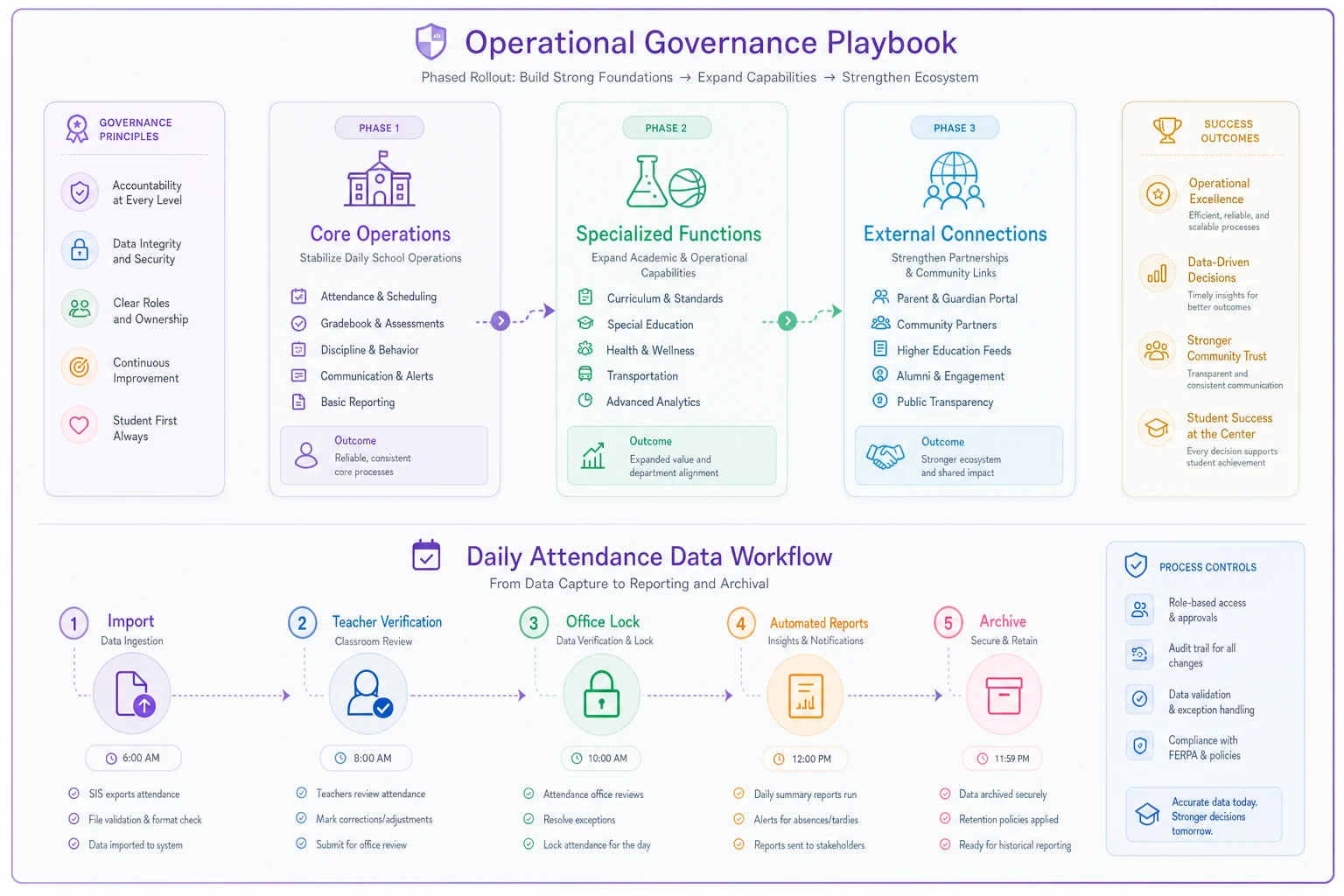
This simple diagram shows phase progression and the daily attendance checkpoints.
These workflows become training materials, audit evidence, and troubleshooting guides. When someone asks "how do we handle attendance data?" you have a concrete answer, not a policy reference.
The challenge most districts face isn't creating these workflows — it's maintaining them as staff changes and systems evolve. Regular workflow reviews ensure your operational procedures stay aligned with actual practice.
When AI-Powered Systems Make Sense
Modern operational software can transform how schools handle data governance, but only when implemented thoughtfully. AI automation helps with pattern recognition — identifying unusual access patterns, flagging potential consent violations, detecting retention deadline approaches. But it can't replace human judgment about context and exceptions.
AI-powered operational platforms excel at:
Automated Monitoring and Alerting
-
Unusual data access patterns (teacher accessing former students)
-
Approaching retention deadlines
-
Consent expiration notifications
-
Permission inconsistencies
-
Backup verification
-
Shadow IT detection
Workflow Automation
-
New staff permission templates
-
Consent renewal reminders
-
Retention schedule execution
-
Access review assignments
-
Incident report routing
-
Audit trail compilation
Decision Support (Not Decision Making)
-
Flag potential issues for review
-
Suggest permission templates based on role
-
Recommend retention periods
-
Identify consent gaps
-
Highlight access anomalies
A Midwest district implemented an AI-enhanced governance platform that reduced their incident response time from days to hours. The system detected when a retired teacher's account was accessing current student records, immediately alerting IT staff who discovered the account had been compromised. Without automated monitoring, this breach could have continued for months.
But automation fails when schools try to remove human oversight entirely. An elementary school in Georgia learned this when their automated retention system deleted five years of special education records that were under litigation hold. The system followed the retention matrix perfectly but couldn't understand the context of an ongoing legal case.
Making Data Protection Part of Daily Operations
Real student data governance in K-12 isn't about perfect policies or comprehensive frameworks. It's about building operational systems that work with how schools actually function, not how we wish they functioned.
The schools succeeding at data protection share common traits. They've stopped pretending teachers won't use personal devices. They've accepted that parents want immediate communication. They've acknowledged that perfect security makes education impossible. Instead, they build practical systems that balance protection with operational reality.
Your next steps aren't complicated but they require consistency. Start with one workflow — pick your messiest, most problematic data flow. Map how it actually works today, not how policy says it should work. Build simple controls that make compliant behavior easier than workarounds. Document what you do, not what you wish you did. Train people on operations, not policies.
Student data governance succeeds when it becomes invisible infrastructure, not visible burden. When teachers protect data because the system makes it natural, not because policy demands it. When administrators can answer audit questions with operational evidence, not scrambled justification.
The gap between policy and practice in schools won't close through more comprehensive frameworks or stricter controls. It closes when we build operational systems that match how schools actually work, supported by technology that enhances rather than replaces human judgment.
Student data governance succeeds when it becomes invisible infrastructure, not visible burden. When teachers protect data because the system makes it natural, not because policy demands it. When administrators can answer audit questions with operational evidence, not scrambled justification.
The gap between policy and practice in schools won't close through more comprehensive frameworks or stricter controls. It closes when we build operational systems that match how schools actually work, supported by technology that enhances rather than replaces human judgment.
Ready to optimize your school operations?
Join hundreds of schools using GoSkoly to save time, improve collaboration, and enhance student outcomes.