

A single mid-year schedule change looks harmless on paper. A counselor moves one section of Algebra I from period 3 to period 5 to fix a teacher's prep conflict. Done in ten minutes. Then attendance starts throwing errors for kids who "aren't enrolled" in a class they've been sitting in for four months, a co-taught special ed section loses its second teacher because nobody checked the paraprofessional's assignment, and a parent calls asking why their kid's lunch period changed without warning.
The edit wasn't the problem. The lack of change control was.
Most schools treat the master schedule as frozen after the first two weeks of the year, then handle every mid-year edit as a one-off favor. No version history, no way to see downstream damage before you commit, no consistent way to tell affected people what changed. That's how a fifteen-minute fix turns into three days of cleanup.
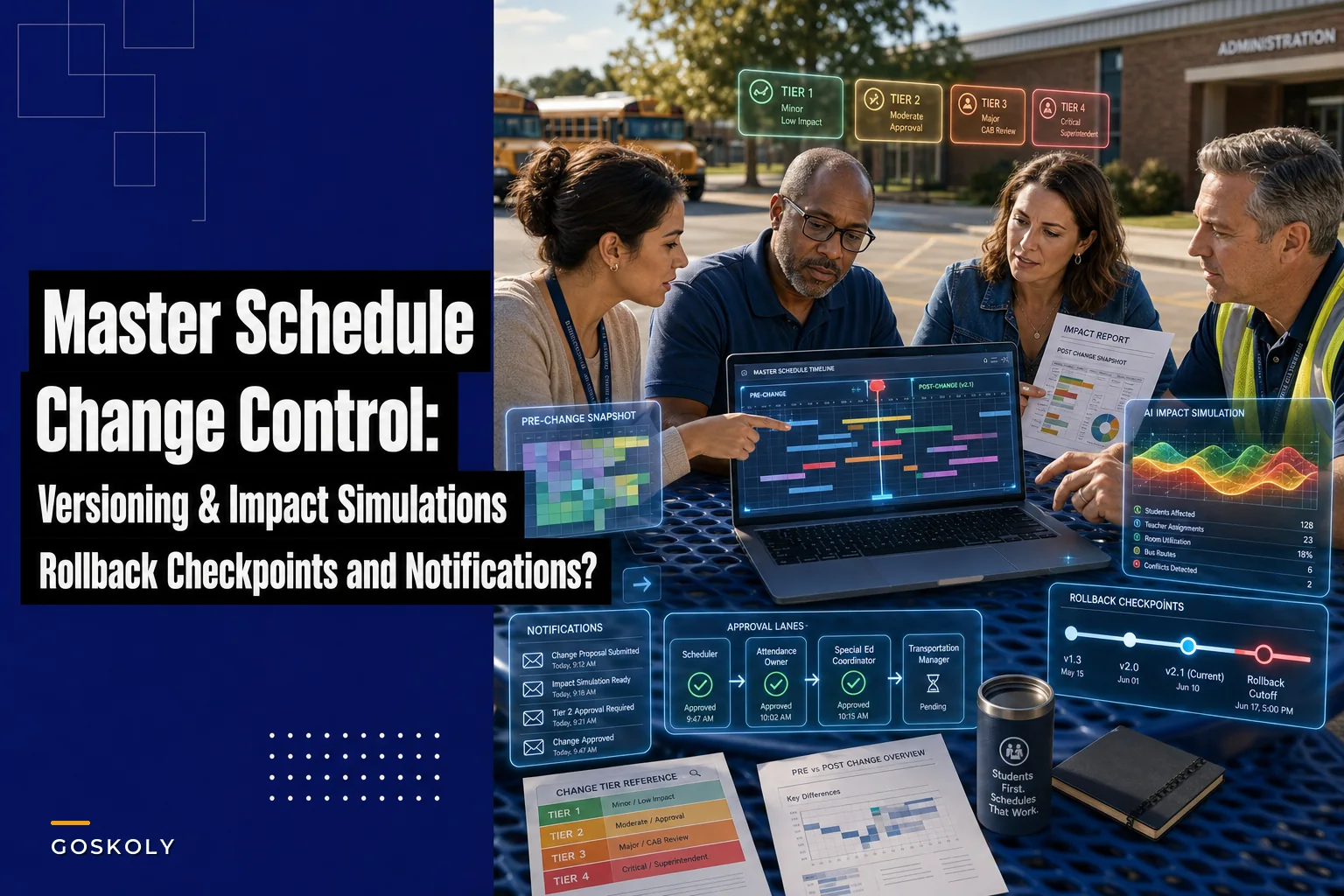
This post is about building a lightweight change-control process for mid-year edits — versioning, simulated impact reports, change tiers, rollback checkpoints, and notification templates — without turning your scheduling office into a software engineering team.
Why mid-year edits go sideways
The master schedule isn't a document. It's the spine that a dozen other systems hang off of: attendance rosters, gradebooks, IEP service minutes, bus routes, food service counts, room assignments, teacher contracts, and state reporting. Edit the spine, and everything attached moves whether you meant it to or not.
The pattern that keeps showing up in scheduling offices:
-
The edit is made directly in the live SIS, no copy, no draft
-
Only the immediate problem gets checked ("does this fix the teacher conflict?")
-
Downstream effects are discovered after they break something
-
Nobody can say exactly what the schedule looked like before the change
That last point is the quiet killer. When something breaks two weeks later, you can't compare against the previous state because there is no previous state. You're reverse-engineering what changed from memory and from angry emails.
There's also a coordination gap. In a lot of districts, the person making schedule edits isn't the person who owns attendance data, who isn't the person who owns transportation, who isn't the person who owns special ed compliance. Without a defined handoff, edits happen in a silo. If you haven't mapped who owns what across systems, this is worth reading first: the District Systems Operating Model covers owner-mapped responsibilities across systems, which is the foundation everything below sits on.
Change tiers: not every edit deserves the same process
The single biggest mistake is treating all schedule changes the same. Force a full review on every edit and staff will route around the process. Review nothing and you get chaos. Tiering fixes this.
Eliminate administrative overload.
GoSkoly helps you manage schedules, attendance, and communications seamlessly.
- Unified student and staff management
- Automated attendance tracking
- Integrated communication tools
No credit card required
Sort edits by blast radius — how many students, systems, and compliance obligations they touch.
| Tier | Example edit | Who touches it | Downstream systems affected | Review required |
|---|---|---|---|---|
| Tier 1 – Cosmetic | Rename a section, fix a typo in course title, correct a room number that was already physically correct | Scheduler only | None or display-only | Log it, no review |
| Tier 2 – Contained | Swap two sections' rooms, move one teacher's prep period | Scheduler + affected teacher | Room booking, teacher schedule | Same-day peer check |
| Tier 3 – Roster-affecting | Move a section to a different period, split or merge sections | Scheduler + attendance owner | Attendance, gradebook, student schedules | Impact report + sign-off |
| Tier 4 – Compliance / structural | Change co-taught section staffing, alter a section serving IEP minutes, shift lunch/passing periods | Scheduler + SpEd + transportation + food service | Nearly everything | Impact report + multi-owner sign-off + rollback checkpoint |
The point isn't the exact wording of each tier — your district will draw the lines differently. The point is that a scheduler can look at an edit request and immediately know how much process it demands. Tier 1 and 2 stay fast. Tier 3 and 4 slow down on purpose, because those are the ones that generate the three-day cleanups.
One rule that tends to hold up well: any edit that changes which students are in which room at which time is automatically Tier 3 or higher. That single test catches most of the edits that cause real damage.
Lightweight versioning without engineering overhead
You don't need Git. You need a way to answer three questions:
-
What did the schedule look like before this edit?
-
What exactly changed?
-
Who made the change and when?
The lightest version that actually works: before any Tier 3+ edit, export the affected sections to a dated snapshot — something like MasterSchedule2025-01-14pre-AlgebraMove.csv. Make the edit. Export again as the "post" state. Store both in a change-control folder with a one-line note about what changed and why.
That's it. Boring, and boring is the point. The value shows up three weeks later when attendance breaks and you can diff the two files in ninety seconds instead of guessing.
A few things that make this actually stick in a real office:
-
One folder, one naming convention. Snapshots scattered across five people's Downloads folders means you have nothing.
-
Snapshot the affected slice, not the whole schedule. Diffing a 4,000-row full export is miserable. Export just the sections you're touching plus their student rosters.
-
Version the reason, not just the data. "Moved Alg I sec 4 from P3 to P5 to resolve Ms. Herrera prep conflict" tells the next person why. "Updated schedule" tells them nothing.
For schools already running structured export processes, this folds neatly into existing export discipline. Where scheduling gets genuinely complex — multiple campuses, shared rooms, traveling teachers — versioning matters even more, and the mechanics of conflict-free scheduling are covered in detail over at Multi-Campus Timetable Optimization.
Simulated impact reports: check the damage before you commit
This is the step almost everyone skips, and it's the one that prevents the most pain.
A simulated impact report answers: if I make this edit, what breaks? You run it before committing the change, not after. The idea is to trace the edit through every attached system — on paper, or in a copy of the data — before it touches the live environment.
For a Tier 3 section move, a decent impact simulation checks:
-
Student conflicts — does moving the section create a double-booking for any enrolled student? A period-5 move sounds clean until you find six kids who now have two classes in period 5.
-
Attendance continuity — will historical attendance records still map correctly, or will the move orphan four months of records?
-
Teacher load — does the receiving teacher now exceed contract limits or lose a duty-free prep?
-
Room capacity — does the new room actually fit the roster? Moving 31 kids into a 24-seat lab is a real, recurring mistake.
-
Special ed service minutes — does the change reduce or reschedule any minutes written into an IEP? This one has legal teeth.
-
Transportation and food service — does a lunch or dismissal shift change bus timing or meal counts?
Here's a realistic example of what a simulation catches. A middle school wanted to move one ELA section from period 2 to period 6 mid-year to balance class sizes. Looks trivial. The simulation flagged that 9 of the 28 students had a scheduled reading intervention in period 6, and 3 had IEP service minutes locked to that block. Committing the edit would have created double-bookings for a third of the class and quietly violated three IEPs. The move got redesigned before anyone was harmed. Without the simulation, that gets discovered in February by a parent, a case manager, or a state auditor — pick your nightmare.
The manual version of this is a checklist a human runs against a copy of the data. Slow, but it works. This is also exactly the kind of cross-system trace where operational software earns its keep: a scheduling platform that already knows the relationships between sections, rosters, rooms, and IEP flags can run the conflict check automatically and surface a report in minutes rather than an afternoon. The real value isn't automation for its own sake — it's that the simulation actually gets run every time instead of getting skipped when the office is busy, which is precisely when the risky edits happen.
Rollback checkpoints: how to undo cleanly
Every Tier 3+ edit needs a defined way back. A rollback checkpoint is your pre-edit snapshot plus a written procedure for restoring it, tested enough that you actually trust it.
The mistake schools make is assuming rollback means "just undo it." By the time you notice a bad edit, other changes have layered on top. Kids have been marked present in the new configuration. Grades have been entered. You can't simply reverse the button-press.
A workable rollback checkpoint includes:
-
The pre-edit snapshot (from your versioning step)
-
A cutoff rule — how many days after an edit rollback is still clean versus requiring manual reconciliation. A common line is 5 school days; after that, attendance and grade data have accumulated enough that you reconcile forward instead of rolling back.
-
A named owner for executing the rollback, so it's not "someone should fix this"
-
A communication step because rolling back is itself a change that affected people need to hear about
Honest take: rollback is a fallback, not a plan. If you're rolling back Tier 4 edits regularly, your impact simulation isn't doing enough. Rollback exists for the edge cases the simulation missed, and it should feel rare.
Stakeholder notification: templates that actually get read
A schedule change nobody hears about generates confusion. Over-notify and people tune you out. Match the notification to the tier and keep it short enough to read on a phone.
Here's a notification template set you can adapt.
For teachers (Tier 2–4): > Schedule change effective [date]: Your [course/section] is moving from [old period/room] to [new period/room]. Reason: [one line]. Your rosters will update automatically in [system] by [date]. Questions: [name].
For families (Tier 3–4 only, when a student's day changes): > [Student name]'s schedule update: Starting [date], [class] will meet during [new time]. Nothing else about their day changes. If you have questions, contact [name] at [contact]. No action needed on your part.
For internal owners (Tier 4): > Change control notice — [tier]: Edit: [what changed]. Systems affected: [attendance / SpEd / transportation / food service]. Impact report attached. Please confirm your area by [date/time]. Rollback checkpoint: [snapshot name].
Two things make these work. First, families only hear about changes that affect their kid's actual day — not internal room swaps, not cosmetic edits. Nothing erodes trust faster than a stream of confusing notices about things that don't affect them. Second, internal notices always name the systems affected, so the transportation owner isn't reading a wall of text to figure out whether it concerns them.
If your school has multilingual families, the family template needs to ship in the appropriate languages by default. A schedule notice that only half your parents can read isn't a notification — it's a liability.
A workable end-to-end process
Putting it together, here's the flow for a Tier 3+ mid-year edit:
Visual flow for the process below.
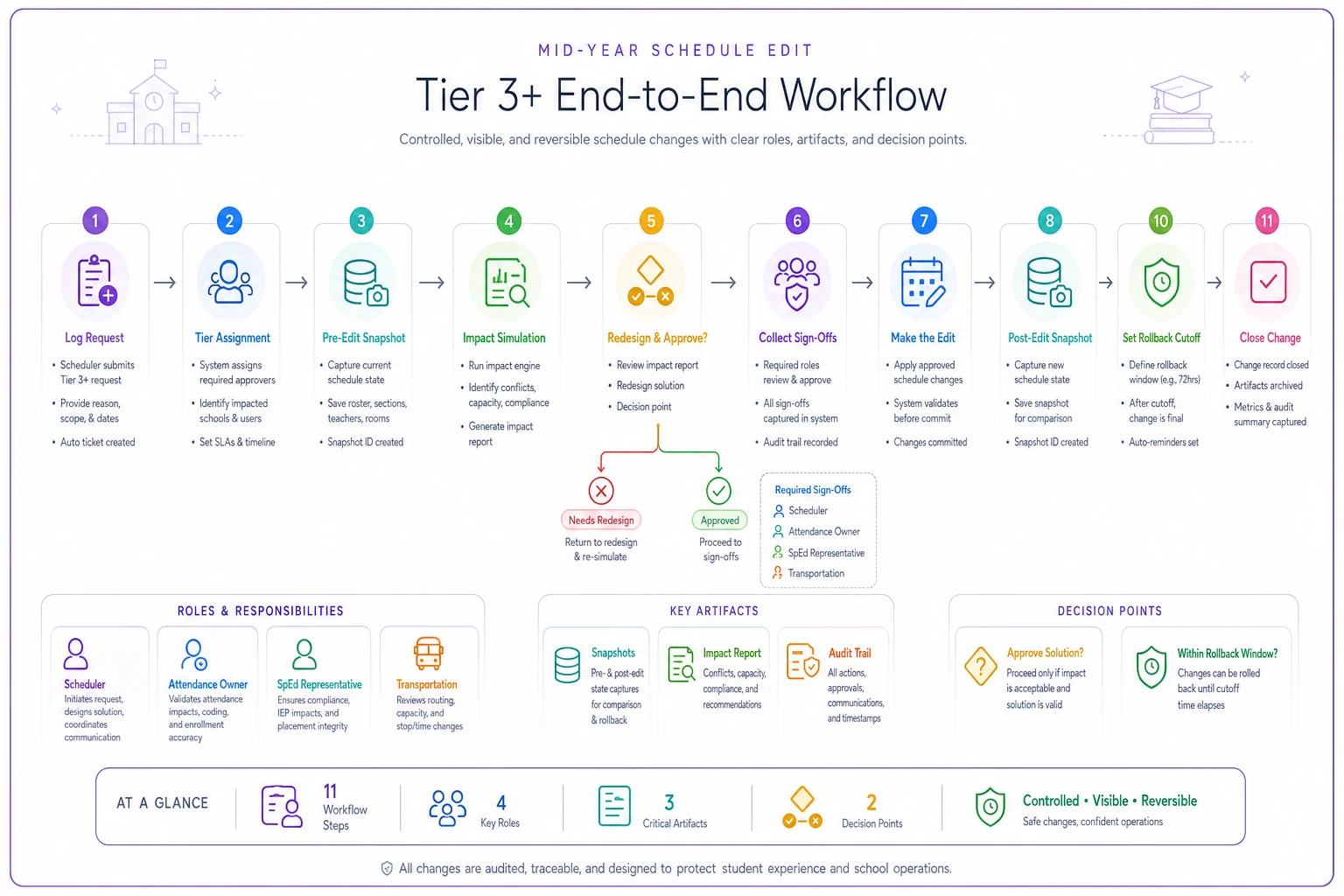
Steps 3 through 7 are where the discipline lives. Skip them and you're back to the ten-minute edit that costs three days. The sequence also makes it easier to hand off mid-process if a second staff member needs to take over — which happens more than people plan for.
-
Log the request with the reason and the requesting person.
-
Assign a tier using the blast-radius test.
-
Take a pre-edit snapshot of the affected sections and rosters.
-
Run the impact simulation against a copy — flag every conflict, capacity issue, and IEP touch.
-
Redesign or approve based on what the simulation found.
-
Collect sign-offs from every named owner for the affected systems.
-
Make the edit, then take a post-edit snapshot.
-
Send tier-matched notifications to teachers, families, and internal owners.
-
Set the rollback cutoff and file the checkpoint.
-
Close the change in your log with the final state noted.
Steps 3 through 7 are where the discipline lives. Skip them and you're back to the ten-minute edit that costs three days. The sequence also makes it easier to hand off mid-process if a second staff member needs to take over — which happens more than people plan for.
When this full process makes sense — and when it's overkill
Do the full process when: the edit touches rosters, IEP minutes, room capacity, or anything that flows into state reporting. Tier 3 and 4, always.
Skip most of it when: you're renaming a section, fixing a display typo, or correcting a field that no downstream system reads. Forcing full change control on cosmetic edits trains staff to hate the process and route around it.
This becomes a problem if you build it so heavy that a legitimate urgent edit — a teacher on sudden medical leave, for instance — gets stuck in a two-day sign-off queue. Change control should have a documented fast path for emergencies: make the edit, snapshot after, backfill the review within 24 hours. The goal is safety, not bureaucracy.
Who should skip the heaviest version: very small schools making a handful of mid-year edits a year. For them, a shared snapshot folder and a basic conflict-check habit covers most of the risk without the full tiering apparatus. Scale the process to your actual edit volume.
A short real scenario
A K–8 with around 640 students was making mid-year edits directly in the live SIS — no snapshots, no impact checks. Over a single fall semester they made roughly a dozen "quick" schedule edits. Four caused downstream breakage: orphaned attendance records, a room double-booking that put two classes in one space for about a week, and one IEP section change that got flagged in a compliance review and required a documented correction.
Cleanup on those four edits ate an estimated 20-plus staff hours across the scheduling office, attendance clerk, and special ed coordinator — plus the harder-to-measure cost of parent complaints and a compliance note that had to be explained.
The following semester they added exactly two things: dated pre/post snapshots for any roster-affecting edit, and a one-page impact checklist run before committing Tier 3+ changes. Edit volume stayed about the same. Downstream breakage dropped to one minor issue caught and fixed same-day. Nobody added headcount. They just stopped treating live-system edits as disposable.
The takeaway
Mid-year schedule changes will always happen — that's just the reality of running a real school. The difference between a smooth edit and a three-day mess isn't the skill of the person clicking the button. It's whether there's a snapshot to compare against, a simulation that flagged the conflicts first, a defined way back, and notifications that reached the right people without spamming everyone else.
Start small. Add tiering so fast edits stay fast. Snapshot anything that moves a roster. Run the impact check before you commit, not after. Those few habits catch the vast majority of the damage, and they cost far less than the cleanup they prevent.
Mid-year schedule changes will always happen — that's just the reality of running a real school. The difference between a smooth edit and a three-day mess isn't the skill of the person clicking the button. It's whether there's a snapshot to compare against, a simulation that flagged the conflicts first, a defined way back, and notifications that reached the right people without spamming everyone else.
Ready to optimize your school operations?
Join hundreds of schools using GoSkoly to save time, improve collaboration, and enhance student outcomes.