

Every August, school districts are processing thousands of immunization records while state health departments are quietly updating requirements, nurses are manually cross-referencing paper forms against digital systems, and registrars are chasing missing documentation through phone calls that go nowhere. The immunization intake workflow for K-12 has become an operational mess that most districts ignore until audit season forces the issue.
The real problem isn't tracking who's vaccinated. It's managing the constant flow of partial records, exemptions, provisional enrollments, and state-specific compliance variations while keeping audit-ready documentation current for multiple oversight bodies at the same time.
What actually breaks in immunization workflows
School districts typically manage immunization data across three to five disconnected systems. The student information system holds enrollment data, the health module tracks medical records, state reporting portals demand specific formats, and parent communication platforms handle notifications. Each one runs on different update schedules with different validation rules and different export capabilities.
A mid-sized district with around 8,000 students processes somewhere in the range of 2,400 new immunization records each enrollment season. That includes kindergarten entries, transfer students, and grade-level requirement changes. Each record requires verification against state requirements, entry into multiple systems, parent notification for missing items, and follow-up tracking through provisional enrollment periods.
The breakdown happens in a pretty predictable way. Health staff receive immunization cards in all kinds of formats — some handwritten by doctors, others printed from different EMR systems, many partially illegible or using non-standard abbreviations. Someone manually interprets each document, figures out which vaccines count toward requirements, calculates intervals between doses, and identifies what's missing.
State requirements add another layer on top of all that. Texas requires different vaccines than California. Illinois has specific exemption procedures. New York's requirements shift based on grade level. A student transferring mid-year brings records that may not align with local requirements, creating provisional enrollment situations that need tracking for 30, 60, or 90-day compliance windows. There's no clean universal process — every scenario has its own wrinkle.
The compliance risks schools tend to ignore
Most districts discover their immunization tracking problems during state audits. An auditor requests vaccination rates for specific cohorts, exemption documentation for religious waivers, or proof of provisional enrollment follow-ups. Then the scramble begins — pulling reports from multiple systems, manually reconciling discrepancies, and assembling evidence packets that should have been ready months earlier.
Eliminate administrative overload.
GoSkoly helps you manage schedules, attendance, and communications seamlessly.
- Unified student and staff management
- Automated attendance tracking
- Integrated communication tools
No credit card required
Missing documentation creates immediate legal exposure. A student attends school for three months without completed immunization records because their provisional enrollment expired without triggering an alert. The district faces potential state penalties, liability concerns if an outbreak occurs, and the kind of community trust damage that takes years to rebuild.
The financial impact compounds quickly. State funding formulas often tie to enrollment numbers, and students out of compliance can't be counted. A district with 40 non-compliant students might lose somewhere around $280,000 in annual funding depending on per-student aid rates. Add staff overtime during audit prep, potential penalties, and legal costs, and this stops being just a health office problem.
Manual tracking also creates inconsistent enforcement. One school aggressively follows up on missing immunizations while another lets provisional enrollments slide past deadlines. Parents notice the inconsistency. That leads to equity complaints and policy challenges that consume administrative time and erode community trust over time.
Building owner-assigned intake processes
The immunization intake workflow for K-12 needs clear ownership at every step — not vague mandates, actual names attached to actual responsibilities. Start by mapping who handles each document type and decision point. School nurses own medical verification. Registrars manage enrollment holds. Health coordinators track provisional timelines. IT maintains system integrations.
Create intake assignments based on school, grade level, or alphabet splits — whatever actually makes sense for your district's structure. Some districts assign immunization tracking by last name. This creates accountability and prevents records from falling into the "someone will handle it" void.
Document handoff points explicitly. When a parent submits immunization records at the main office, who receives them? How quickly must they reach the health office? Who enters data into the system? Who verifies accuracy? Who triggers parent notifications for missing items? Each transition point needs an owner, a timeline, and an escalation path.
The intake checklist should reflect common scenarios, not just the ideal ones. Include processes for:
-
Partial immunization records missing specific vaccines
-
Out-of-state transfers with different requirements
-
International students with foreign vaccination documents
-
Religious or medical exemption applications
-
Provisional enrollment extensions
-
Foster children with incomplete histories
-
Homeless students under McKinney-Vento protections
Track completion rates by owner, not just by student. If one nurse processes 95% of records within 48 hours but another averages five days, you've identified either a training need or a workload imbalance. That data drives real improvements rather than assumptions about who's doing their job.
Track completion rates by owner, not just by student.
That data drives real improvements rather than assumptions about who's doing their job.
Automated rules that catch missing requirements
Manual compliance checking fails because humans can't consistently apply complex conditional logic across thousands of records. A kindergarten student needs DTaP, polio, MMR, hepatitis B, and varicella vaccines with specific dose counts and timing intervals. A seventh-grader needs additional Tdap and meningococcal vaccines. A transfer student from another state might have different requirements that are grandfathered in.
Automated validation rules that check each record against grade-specific requirements change this significantly. The system flags missing vaccines, incorrect intervals between doses, expired exemptions, and approaching provisional deadlines. These aren't simple database queries — they're conditional business rules that account for state regulations, medical exceptions, and administrative policies.
The MMR vaccine is a good example. It requires two doses, but timing matters. The first dose must occur after 12 months of age. The second needs at least 28 days separation from the first. If a student received their first dose at 11 months, it doesn't count toward the requirement. Manual reviewers miss these details regularly. Automated rules catch them every time.
Provisional enrollment creates another automation opportunity. When a student enrolls with incomplete immunizations, start a countdown. Send notifications at strategic intervals rather than a single email that gets ignored:
| Day | Action |
|---|---|
| Day 1 | Welcome email with specific requirements |
| Day 15 | Friendly reminder with vaccine list |
| Day 25 | Urgent notice with clinic resources |
| Day 28 | Compliance warning |
| Day 30 | Enrollment hold triggered |
Each message should be personalized with exactly which vaccines are missing and where to get them — not a generic "please update your records" notice.
Exemptions need intelligent handling too. Religious exemptions might require annual renewal. Medical exemptions need physician documentation. Some states allow philosophical exemptions while others don't. Tracking exemption types, expiration dates, and renewal requirements manually is precisely where things fall apart.
RAG dashboards for real-time compliance visibility
Red-Amber-Green dashboards transform immunization compliance from a black box into something people can act on. Most schools implement them wrong — colorful displays that show data without driving action.
The dashboard needs different views for different stakeholders. School nurses see individual student compliance with drill-down to specific missing vaccines. Principals see school-level percentages with trend lines. District administrators see comparative data across schools. Health departments see aggregate reporting metrics. Each view should surface actionable information for that specific role, not a one-size-fits-all summary that's only useful to nobody in particular.
Red status should trigger immediate action. These are students attending school out of compliance, expired provisional enrollments, or missing critical vaccines during disease outbreaks. Include student names, contact information, specific deficiencies, and recommended next steps. Flagging a problem without a path forward isn't useful — it just creates anxiety without resolution.
Amber status indicates approaching deadlines or partial compliance. A student with 25 days left on provisional enrollment appears amber. So does someone missing a single vaccine in a series. These warnings exist to prevent last-minute scrambles, which means someone needs to actually be responsible for clearing them.
Green means fully compliant, but it's worth breaking this into subcategories. Distinguish between complete immunization, valid exemptions, and provisional compliance. That granularity matters during outbreak management when you need to quickly identify truly protected versus legally compliant populations. Those are different things.
The dashboard should update in real-time as records change. When a nurse enters new immunization data, compliance percentages adjust immediately. When a provisional enrollment expires, the status shifts automatically. This keeps everyone aligned without manual report generation cycles that are already outdated by the time someone reads them.
Predictive analytics add another layer. Based on historical patterns, projected compliance rates for upcoming deadlines help administrators allocate resources before things become urgent rather than after.
Pre-built export templates for health audits
State health audits arrive with specific data requests that don't match your standard reports. They want immunization rates by vaccine type, exemption percentages by category, provisional enrollment resolution times, and demographic breakdowns you've never calculated before. Most districts spend weeks pulling this together manually — sometimes because the data genuinely isn't in one place, but often just because nobody built the templates in advance.
Build audit export templates before audits begin. Common requests include:
-
Vaccination coverage rates by antigen and grade level
-
Exemption analysis by type, school, and demographic group
-
Provisional enrollment tracking with resolution outcomes
-
Multi-year trend analysis for specific vaccines
-
Outbreak readiness assessments by disease type
-
Documentation packets for non-compliant cases
Each template needs consistent formatting, clear labeling, and audit trail documentation. Include metadata showing extraction date, data sources, filtering criteria, and any calculations applied. Auditors want to verify your numbers, not just receive them.
The export process should be repeatable and documented. Step-by-step runbooks that any staff member can follow — which systems to access, what parameters to set, how to validate completeness, where to save outputs — prevent knowledge loss when key staff leave and ensure consistency across audit cycles. Institutional knowledge shouldn't live entirely inside one person's head.
Build validation checks into your exports too. Cross-reference enrollment counts between systems. Verify that exemption numbers match between summary and detail reports. Flag students appearing in multiple categories. These quality controls catch discrepancies before an auditor does.
Your export templates should also connect to evidence documentation. When reporting 15 medical exemptions, link to the actual physician letters. When showing provisional enrollment resolutions, include the completion documentation. That integration between data and evidence is what actually accelerates audit response times.
Immunization intake workflow — the operational flow
A well-structured immunization intake workflow follows a consistent path from document submission through compliance resolution. The sequence below reflects how it works in practice:
Parent/Guardian Submits Immunization Records ↓ Initial Receipt and Logging (School Office or Health Clerk) ↓ Document Scanning / OCR Extraction (AI-assisted data capture) ↓ Nurse or Health Staff Verification and Data Entry ↓ Automated Compliance Check (grade-specific rules engine) ↓ [Compliant?] / \ Yes No ↓ ↓ Mark Green Flag Missing Items Status ↓ Automated Parent Notification ↓ Provisional Enrollment Timer Starts ↓ Follow-Up Notifications (Day 15, 25, 28) ↓ [Resolved?] / \ Yes No ↓ ↓ Mark Green Enrollment Hold + Escalation Status to Health Coordinator ↓ Audit-Ready Documentation Stored ↓ Dashboard Updated in Real-Time
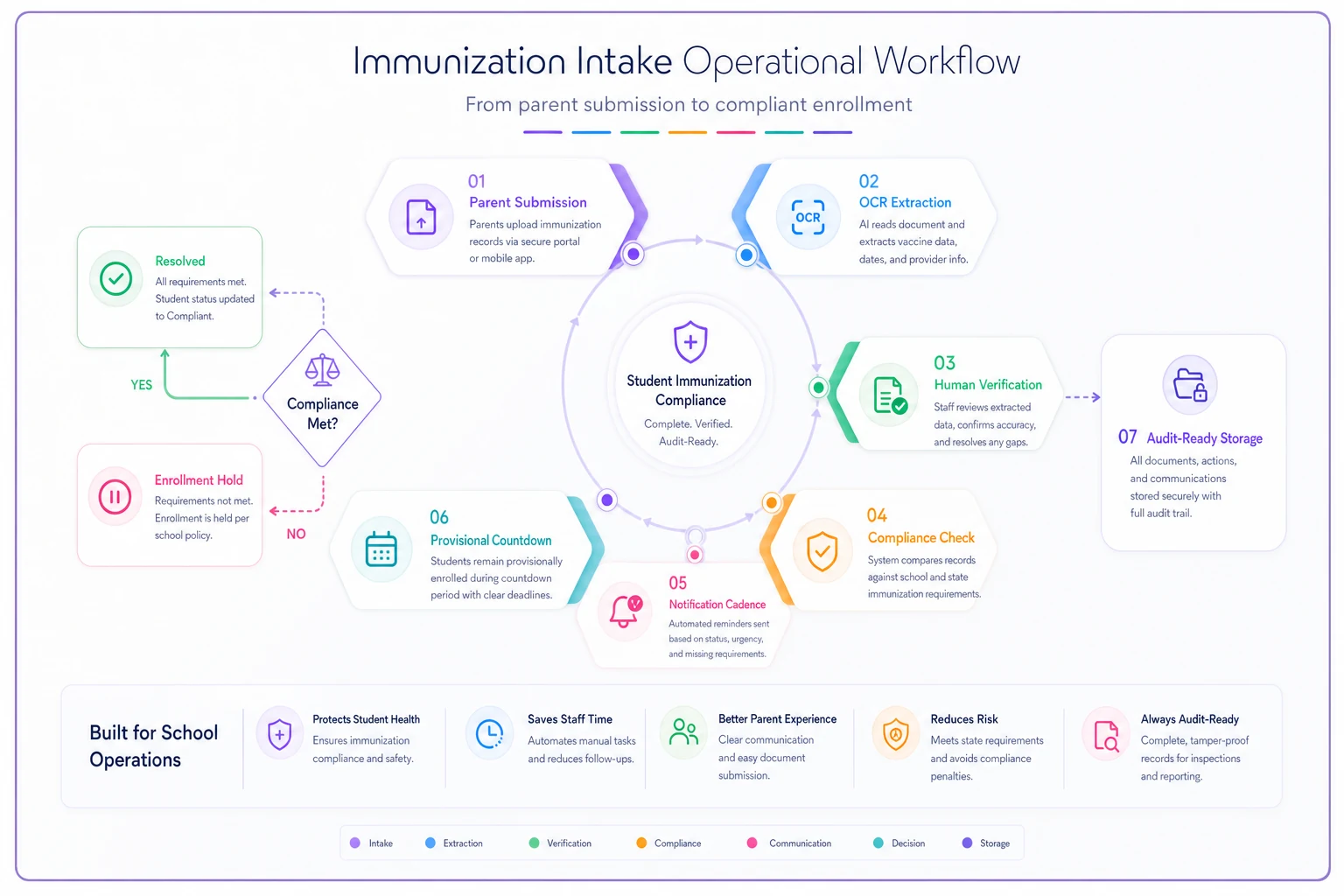
This diagram shows the operational flow from submission to audit-ready documentation.
Every handoff in this sequence needs an owner. The automation handles flags, notifications, and status updates — the humans handle verification, judgment calls, and escalation decisions.
Operational patterns from successful implementations
Mountain View Unified reduced their immunization compliance processing time from about six days down to 14 hours by restructuring their intake workflow. Instead of routing everything through a central health office, they deployed trained health clerks at each school for initial verification. Only exception cases escalated to nurses. This distributed model processed around 3,200 records in the first two weeks of school without overtime costs.
The district also implemented a visual tracking board showing each school's compliance percentage updated daily. Principals could see their standing relative to other schools, which created some healthy competition. Schools reaching 95% compliance by September 15th earned additional health supply budgets. On-time compliance went from 67% to 89% year-over-year.
Automated parent notifications made the biggest operational difference. The district sent over 8,000 customized messages throughout enrollment season — something impossible to do manually at any realistic scale. Parents received specific vaccine requirements for their child, maps to local clinics, and available appointment slots through email, text, and automated phone calls for critical deadlines.
Prairie Heights Schools focused on a different problem: provisional enrollment management. They found that 78% of provisional enrollments resolved in the final five days before expiration, creating massive last-minute workloads. They restructured timelines to create earlier soft deadlines with incentives for early completion — students finishing requirements within 15 days got priority course selection for the following semester. Resolution patterns shifted earlier and workload smoothed out considerably.
Their audit preparation system integrated directly with immunization tracking. Monthly mini-audits tested export templates and evidence assembly, identifying gaps before external auditors showed up. When the state audit happened, they produced all requested documentation within four hours instead of the typical two-week scramble.
Technology considerations for K-12 constraints
School districts face constraints that generic health systems don't account for. Budget limitations mean solutions need to integrate with existing student information systems rather than requiring wholesale replacements. Staff technical skills vary widely, so interfaces need to be usable without extensive training. Privacy regulations add complexity that consumer health apps simply ignore.
The immunization intake workflow for K-12 also has to accommodate paper-based processes that aren't going away anytime soon. Many parents still submit handwritten immunization cards. Rural clinics fax records. International documents arrive in various languages. Any solution needs to bridge digital and analog workflows rather than pretending everything is already digital.
AI-powered operational software handles a lot of this complexity without requiring massive infrastructure changes. Optical character recognition extracts data from uploaded immunization cards. Natural language processing interprets various vaccine abbreviations and naming conventions. Automated translation handles international documents. These capabilities work within existing systems rather than replacing them.
When a nurse uploads an immunization card photo, the system extracts vaccine names, dates, and provider information automatically. The nurse verifies and corrects rather than typing everything from scratch. In practice, this cuts entry time significantly while maintaining accuracy through human verification — the automation handles the tedious part, not the judgment calls.
Integration capabilities matter more than features when evaluating solutions. Your immunization tracking system needs to exchange data with student information systems, state reporting portals, parent communication platforms, and health information exchanges. Pre-built connectors to common K-12 systems are worth far more than custom integration projects that take months and cost more than expected.
Common mistakes that derail implementations
Districts often treat immunization tracking as purely a health office function. This siloed approach fails because compliance impacts enrollment, attendance, funding, and legal obligations. Successful implementations involve registrars, attendance clerks, school secretaries, IT staff, and administrators from the beginning — each group needs to understand their role in the broader workflow, not just their piece of it.
Installing new software while maintaining old manual workflows just digitizes inefficiency. One district spent a substantial amount on an immunization tracking system but continued printing reports for manual review because they didn't trust automated compliance checking. They essentially paid for an expensive digital filing cabinet.
Poor data governance undermines even well-designed systems. Without clear data quality standards and ownership, immunization records become unreliable. Duplicate entries accumulate. Vaccination dates contain typos. Exemption documentation gets misfiled. The system shows 94% compliance, but reality is closer to 85%. These discrepancies surface during audits and create credibility problems that take time to dig out of.
Training also tends to focus on system features rather than operational workflows. Staff learn which buttons to click but not when or why. They can enter immunization data but don't understand provisional enrollment regulations. They generate compliance reports but can't interpret what they're seeing. Surface-level knowledge breaks down fast when handling exception cases or responding to audit requests.
Making the transition manageable
Start with a single school or grade level rather than district-wide deployment. Choose a location with engaged staff and relatively straightforward demographics. Work through the full workflow from intake through audit reporting. Document the friction points, refine processes, build confidence — then expand.
Run parallel operations during transition periods. Keep existing manual processes running while the new system establishes itself. This redundancy feels wasteful but prevents failures if problems emerge. After two successful enrollment cycles, scale back the legacy processes.
Phase the rollout by functionality rather than trying to activate everything at once. Start with basic immunization record entry and compliance checking. Add automated notifications after the core system stabilizes. Integrate audit reporting once data quality improves. This staged approach reduces risk and creates incremental wins that build momentum.
Measure success through operational metrics, not just compliance rates. Track processing time per record, parent notification response rates, provisional enrollment resolution patterns, and audit preparation hours. These measurements show whether the system actually improves operations or just moves work around.
The immunization intake workflow for K-12 will never be simple. State requirements keep changing, parents submit incomplete records, and students transfer constantly. But structured processes, clear ownership, and thoughtful automation can turn this into manageable operations. The districts doing it well aren't the ones with perfect systems — they're the ones with practical approaches that acknowledge real constraints while systematically improving.
Build your immunization workflow assuming things will go wrong. Plan for missing documents, system outages, staff turnover, and regulation changes. Create contingencies for common failures and escalation paths for unusual situations. It might seem pessimistic, but it's what keeps things running when August enrollment chaos hits.
The goal isn't a perfect system. It's predictable, auditable, and sustainable operations that protect student health without consuming excessive administrative resources. Focus on incremental improvements, measured outcomes, and realistic timelines. Your immunization tracking might never be elegant, but it can be effective.
Ready to optimize your school operations?
Join hundreds of schools using GoSkoly to save time, improve collaboration, and enhance student outcomes.