

Most districts treat identity like a one-time setup problem. You provision accounts in August, deactivate some in June, and assume the directory does its job the rest of the year. Then a service account password shows up in a phishing dump, a terminated aide still has gradebook access in October, or a parent reports that someone logged into their student's portal from another state. Suddenly the question isn't "who has access" — it's "what happened, when, who touched it, and can we prove any of it."
That proof gap is where identity incident response K-12 usually falls apart. Detection might be fine. Containment might even be quick. But six weeks later, when the state, your insurer, or a parent's attorney asks for a timeline, nobody can put one together that holds up. The logs rolled over. The forensic export was ad hoc. The notification went out before anyone confirmed scope, so now you've either under-stated or over-stated the breach.
This article is about the linkage — connecting your identity policy to the operational steps that actually run when something goes wrong. Not the policy document sitting in a shared drive. The actual detection signals, export templates, containment runbooks, and evidence packaging that turn a scramble into something repeatable.
Why identity incidents break differently in schools than in companies
A corporate security team deals with a reasonably bounded identity population: employees, some contractors, a handful of service accounts. Schools deal with something messier.
You have staff, substitutes, long-term subs, student teachers, volunteers, contractors, vendors with system access, and then the largest group of all — students, whose accounts are provisioned and deprovisioned on an academic calendar that doesn't match anything else. Add parents and guardians with portal access, custody situations that change mid-year, and the fact that a single person can be a parent, an employee, and a vendor at the same district.
When an identity incident lands, the first operational failure is almost always scoping. This usually happens because the account in question has tangled, overlapping roles that nobody mapped. A paraprofessional who also coaches, who also has a child enrolled, who also volunteers for the booster club — which of those access paths got abused? If you can't answer that in the first hour, your notification and remediation decisions are already built on guesses.
The second difference is custody of evidence. In a company, IT owns the logs and the response. In a district, the data lives across a SIS, an LMS, Google or Microsoft tenants, a transportation system, a nutrition vendor, a dozen EdTech tools that SSO into your identity provider — and none of those teams report to the same person. Getting a clean forensic picture means pulling from systems owned by people with different priorities and different retention settings.
This is the same ownership problem that shows up in the District Systems Operating Model — when responsibility is spread across systems with no cross-system accountability matrix, an incident just exposes the gaps that were already there.
Prioritized detection signals (not every alert is worth waking up for)
Districts that buy a SIEM or turn on their identity provider's security dashboard usually make the same mistake: they treat every anomaly as equally urgent. Within two weeks the alerts get muted, and the one that actually mattered gets buried under hundreds of impossible-travel flags caused by a VPN.
Eliminate administrative overload.
GoSkoly helps you manage schedules, attendance, and communications seamlessly.
- Unified student and staff management
- Automated attendance tracking
- Integrated communication tools
No credit card required
The fix is tiering your signals by what they imply about student data exposure and account takeover — not by how alarming the vendor's dashboard makes them look.
| Signal | Why it matters in a school context | Response tier |
|---|---|---|
| Staff account mass-accessing student records outside role pattern | Classic sign of a compromised or misused account pulling PII at scale | Immediate — contain first, ask questions after |
| MFA disabled or reset on a privileged account | Attacker establishing persistence; also common insider move | Immediate |
| Login to a terminated employee's account | Deprovisioning failure plus active use — real exposure | Immediate |
| Service account authenticating from a new IP range | EdTech integrations breaking vs. credential theft — needs triage | High |
| Parent/guardian portal access from new geography | Could be legitimate travel or a custody-related access concern | Medium — verify before acting |
| Bulk password resets initiated by a help-desk account | Social engineering of the help desk is one of the most common K-12 vectors | High |
| Impossible travel on a student account | Usually noise (shared devices, proxies), occasionally real | Low — correlate, don't page |
The insight most teams miss: the help desk is your highest-value identity target, and almost nobody monitors it as one. Attackers don't break your MFA — they call the help desk pretending to be a staff member who's locked out, and a well-meaning tech resets it. If you've only built detection around end-user accounts, you've left the front door open.
Treat help-desk resets and help-desk-initiated password changes as high-priority signals and monitor them separately from normal end-user alerts.
One more thing worth naming. Detection signals decay in value fast. A flag that fires 30 seconds after a suspicious login is worth acting on; the same flag surfaced in a weekly report is just a historical footnote. Prioritization isn't only about which signals — it's about which ones you've wired to actually interrupt someone.
The minimal forensic export — capture less, but capture it the same way every time
When an incident hits, the instinct is to grab everything. That's a mistake. Dumping gigabytes of raw logs you'll never parse wastes the narrow window where useful records still exist, and it creates a discovery liability later.
What you actually need is a minimal, consistent export template that captures the same fields every time, from every system involved. The goal is a reconstructible timeline — not an archive.
-
Authentication events for the account — timestamp, source IP, user agent, MFA status, success/failure — covering at least the 30 days before detection.
-
Authorization/role state at the time of incident — what groups and permissions the account held, and the last change to those permissions with who made it.
-
Data access records — which records or resources the account touched during the suspect window, pulled from SIS/LMS audit logs.
-
Account lifecycle events — created, modified, password reset, MFA changes, and by which administrator.
-
Related session artifacts — active sessions and tokens at the moment of containment (because revoking them is step one of containment, and you want the record of what existed).
The operational discipline that matters more than the fields themselves: export the same way every time, timestamp in UTC, and record who pulled the export and when. A forensic timeline assembled from exports in three different time zones and three different formats is worthless in an audit. One district spent nearly three weeks reconciling a 90-minute incident because the SIS logged in local time, the identity provider logged in UTC, and the LMS logged in whatever the admin's browser decided — and nobody documented which was which.
This connects directly to your broader student data governance practices. If your retention settings roll logs off at 30 days and your insurer wants 90, you don't have a response problem — you have a governance problem that only looks like a response problem during an incident.
Containment and remediation runbooks
Containment is where speed and evidence fight each other. Revoke too fast and you destroy the forensic state. Move too slow and the attacker keeps pulling data or spreads laterally. The resolution is a runbook that sequences these steps on purpose instead of leaving it to whoever happens to be on the ticket.
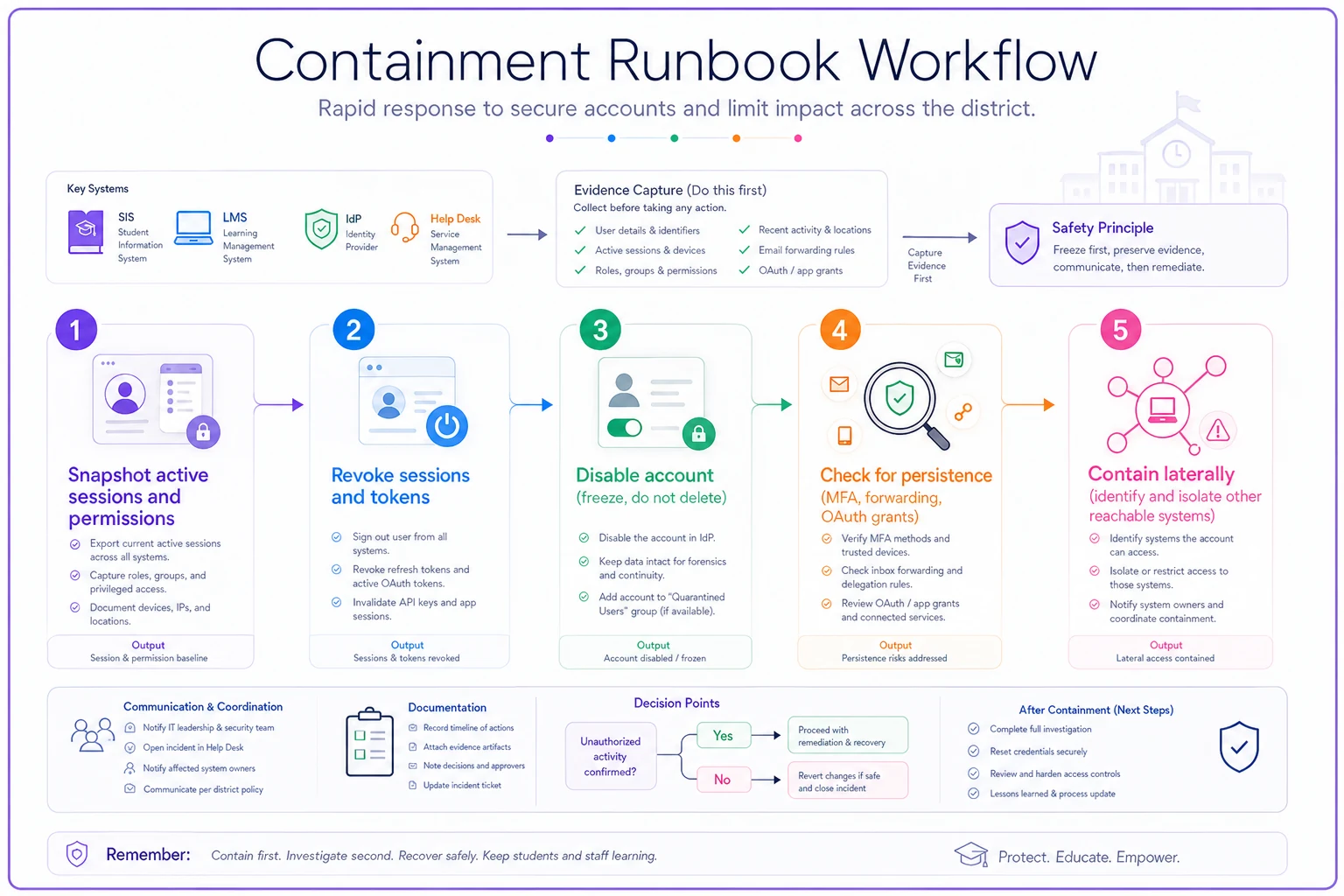
A containment sequence that preserves evidence
Step 1 — Snapshot before you touch. Capture the active session and permission state before you kill anything. This is thirty seconds of work that saves weeks later.
Step 2 — Revoke sessions and tokens, not just the password. Resetting a password does nothing if the attacker holds a live session token. Kill active sessions across the identity provider and any SSO-connected tools.
Step 3 — Freeze, don't delete. Disable the account. Never delete it during an active incident — deletion erases the evidence trail and, in a district, often cascades into connected systems in ways you can't predict.
Step 4 — Check for persistence. Look for forwarding rules, added MFA methods, new OAuth app grants, and delegated access. In takeover cases, the password reset you're proud of is meaningless if the attacker added their own authenticator in week one.
Step 5 — Contain laterally. Identify what else the account could reach. A compromised staff account that's a member of a broad security group may have opened a path to systems you weren't thinking about.
Quick workflow diagram:
Remediation is a separate phase — treat it that way
Containment stops the bleeding. Remediation fixes why it happened. The common failure is declaring victory at containment and never closing the loop, so the same deprovisioning gap or help-desk weakness causes the next incident two months later.
Remediation should produce a short written record answering:
-
What was the root cause (not the symptom)?
-
What permission, process, or control allowed it?
-
What changed so this specific path can't be reused?
-
Who verified the fix, and when?
Most repeat identity incidents in schools trace back to the same handful of root causes. Stale accounts that never got deprovisioned, over-broad security groups, help-desk social engineering, shared service-account credentials, and MFA exceptions that were supposed to be temporary. If your remediation records keep pointing at the same things, you have a systemic fix to prioritize — not an endless stream of unique emergencies.
Notification without over- or under-stating
Notification is where districts get into real trouble, because the timing pressure is enormous and the facts are still soft. Send too early and you announce a breach you later can't substantiate — or you misstate the scope and have to walk it back publicly. Send too late and you've violated a statutory window and lost community trust.
The principle: notification content should be driven by confirmed scope from your forensic export, not by the initial panic. You separate "we detected suspicious activity" (internal) from "student data was accessed" (external, legal) from "specific records of specific students were exposed" (individual notification). Those are three different thresholds, and conflating them is how a contained incident turns into a reputational one.
A minimal notification template set that most districts need:
-
Internal escalation notice — to leadership and legal, factual, no speculation, states what's confirmed and what's still under investigation.
-
Regulatory/state notification — scoped to your state's student privacy statute and timeline, triggered only when the data-access threshold is confirmed.
-
Affected-individual notice — to parents/guardians of specifically identified students, with what happened, what data, what you've done, and what they can do.
-
Staff advisory — when the vector was staff-facing (help-desk social engineering, phishing), so the workforce knows the specific lure to watch for.
Keep these drafted and legally pre-reviewed before you need them. Writing notification language during an active incident, under pressure, with lawyers reviewing every sentence in real time, is how the 72-hour clock runs out while you argue about a comma.
Audit-ready remediation evidence
Six months after the incident closes, someone will ask you to prove it was handled. An auditor, an insurer renewing your cyber policy, a state review, or litigation. If your evidence lives in a Slack thread, a few emails, and one admin's memory, you effectively have nothing.
Audit-ready evidence means a single assembled package that tells the whole story in order:
-
Detection record — what signal fired, when, who received it.
-
Forensic exports — the minimal, consistently-formatted exports with their own pull-timestamps and chain of custody.
-
Containment log — each step, timestamped, with the admin who performed it.
-
Scope determination — how you concluded what data was and wasn't accessed.
-
Notifications sent — copies, recipients, timestamps, and the threshold that triggered each.
-
Remediation record — root cause, fix, and verification.
-
Closure sign-off — who declared the incident resolved and on what basis.
The checklist to run before you call an incident closed:
-
[ ] Every timestamp in the package is in one consistent time zone (UTC is the safe default)
-
[ ] Every export notes who pulled it and when
-
[ ] Containment steps each have a named performer
-
[ ] Scope determination is documented with reasoning, not just a conclusion
-
[ ] Notification thresholds are explicitly tied to confirmed facts
-
[ ] Root cause is a cause, not a symptom
-
[ ] The fix is verified by someone other than whoever implemented it
-
[ ] The package is stored somewhere with longer retention than your raw logs
That last point catches people constantly. Raw logs might roll off in 30 days, but your assembled evidence package should survive for years. The package is what proves due diligence long after the underlying logs are gone.
A real scenario
A mid-sized district — roughly 6,000 students across about a dozen schools — had a long-term substitute whose account was never deprovisioned when the assignment ended in February. In late March, that account was used to access and export attendance and contact records for several hundred students over about a week before anyone noticed. It only got flagged when a data-access report caught the volume as abnormal.
The first time through, with no runbook, the response was rough. It took close to three weeks to assemble a timeline because logs lived in three systems with mismatched time formats, and the deprovisioning gap wasn't even identified as the root cause until week two. The notification to families went out later than the district was comfortable with, and the cyber insurer asked for evidence the district struggled to produce cleanly.
After rebuilding their process — tiered detection wired to actually alert, a fixed minimal export template, a containment sequence that snapshots before revoking, and pre-drafted notification language — they ran a tabletop against the same scenario. Time to a defensible timeline dropped to under a day. More importantly, the root-cause review surfaced that over forty stale accounts were still active from prior terms. Fixing the deprovisioning process closed the whole category, not just the one account.
That's the real payoff. The point isn't handling one incident faster. A disciplined response reveals the systemic gaps feeding the next one.
When this level of rigor makes sense — and when it's overkill
When it's worth building fully: any district holding student PII at scale with staff turnover, substitutes, and a web of SSO-connected EdTech — which is nearly all of them. The moment you have more than a handful of integrated systems and an identity population that changes every term, informal response stops being viable.
When a lighter version is fine: a very small single-school operation with a small, stable staff and almost no third-party integrations can run a stripped-down version — a one-page runbook and a shared export template — without the full tiered detection stack. The principles hold; the tooling scales down.
Who should NOT try to do this all at once: districts that don't yet have basic deprovisioning and ownership mapping sorted out. If you can't reliably answer "who has access to what, and who removes it when someone leaves," building an elaborate forensic process on top of that is building on sand. Fix the lifecycle basics first — that alone eliminates a large share of the incidents you'd otherwise be forensically chasing.
Where automation genuinely helps
There's a narrow set of places where tooling earns its keep in identity response, and it's mostly the tedious, error-prone, consistency-dependent parts. Automatically normalizing timestamps and formats across exports so your timeline assembles cleanly. Watching for stale-account and over-broad-group patterns continuously instead of discovering them during an incident. Packaging the detection record, containment log, and notifications into one audit-ready bundle without someone hand-collecting it from five places under pressure.
Operational platforms that connect identity events to your response steps — and keep the evidence trail intact automatically — remove exactly the manual work that causes three-week timelines and mismatched logs. But the tool is downstream of the thinking. A platform can assemble evidence cleanly; it can't decide your notification threshold or map your custody-tangled roles for you. Get the runbook and the ownership right first, then let automation handle the parts humans do inconsistently under stress.
Closing thought
Identity incidents in schools aren't primarily a technology problem — they're a linkage problem. The policy says one thing, the systems are owned by different people, the logs are formatted three ways, and the response depends on whoever happens to be on call. The districts that handle these well aren't the ones with the fanciest security stack. They're the ones who decided, before anything went wrong, exactly which signals matter, how they'll export, how they'll contain, who they'll notify at which threshold, and how they'll prove all of it later.
Build that linkage once, test it against a realistic scenario, and the next incident stops being a crisis and becomes a procedure. That shift — from scramble to runbook — is the whole game.
Ready to optimize your school operations?
Join hundreds of schools using GoSkoly to save time, improve collaboration, and enhance student outcomes.