

Most reporting failures in schools aren't dramatic. Nobody deletes a database. What tends to happen is quieter and more embarrassing: a job that was supposed to run at 5:30 AM didn't, nobody noticed, and the attendance summary the superintendent pulled up in Tuesday's board meeting was showing Friday's numbers. Or a nightly extract ran fine — technically — but pulled from a table that stopped updating three days ago, so everything looked current and was completely wrong.
The tricky part with an automated reporting cadence in K-12 isn't building the reports. Districts figure that out. The hard part is knowing, reliably, when something didn't run, ran late, or ran on stale data — and having a clear plan for who does what when that alert fires at 6 AM.
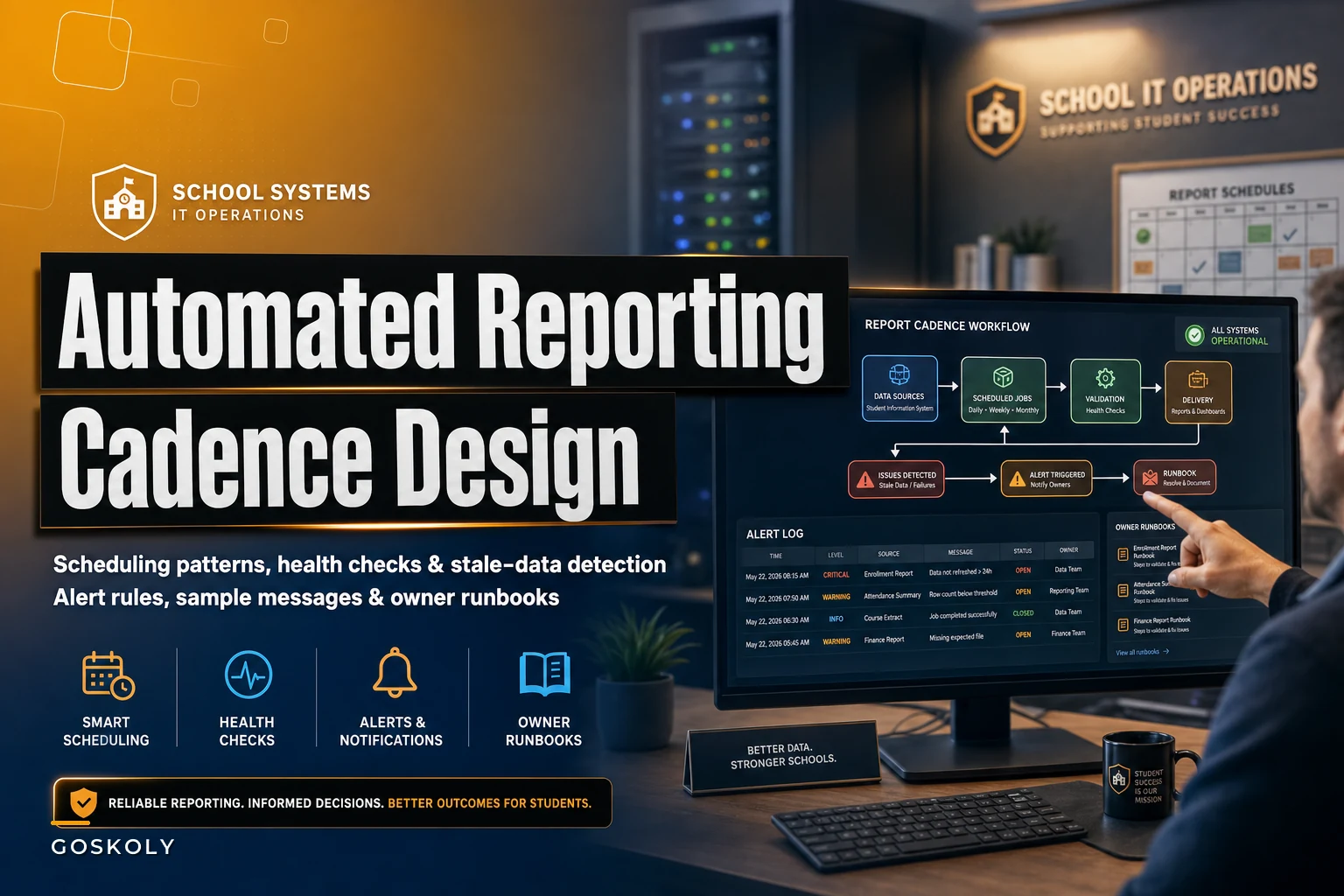
This post is about the boring plumbing that makes reporting trustworthy: how to schedule jobs sensibly, what health checks actually catch problems, how to write alerts that don't get ignored, and what an owner runbook for a failed report should look like.
Start with the failure modes, not the schedule
Most people design cadences backwards. They ask "when should this run?" before asking "what are the ways this can silently break?" Get the second question right and the schedule mostly designs itself.
| Failure mode | What it looks like | Why it's dangerous |
|---|---|---|
| Failed run | Job errors out, no output produced | Usually caught — but only if someone's watching the log |
| Silent skip | Scheduler didn't trigger at all | No error, no output, no alarm. The worst kind. |
| Stale upstream data | Report runs fine but source stopped refreshing | Output looks perfectly normal and is wrong |
| Partial data | Report ran mid-load, half the schools are missing | Totals look plausible, so nobody double-checks |
| Late run | Ran, but after the report was already needed | Right data, wrong time, decision already made |
| Wrong-cutoff run | Ran against yesterday's snapshot instead of today's | Off-by-one-day errors, especially near month boundaries |
The pattern worth burning into memory: the failures that produce an error message are the safe ones. Your monitoring should obsess over the failures that produce no signal — the silent skip and the stale data. Those are the ones that end up in front of a board.
Scheduling patterns that hold up
A schedule isn't just a cron time. A schedule that survives contact with a real school year has three things baked in: dependencies, buffer, and a defined data cutoff.
Eliminate administrative overload.
GoSkoly helps you manage schedules, attendance, and communications seamlessly.
- Unified student and staff management
- Automated attendance tracking
- Integrated communication tools
No credit card required
Chain to the upstream load, don't guess at timing. A common setup is "SIS sync runs at 2 AM, so we'll build the attendance report at 4 AM to be safe." Then one night the sync takes until 4:20 because of an enrollment spike, and the report builds against half-loaded data. The fix is dependency-based scheduling: the report doesn't fire on a clock, it fires when the upstream load reports success. If the load never signals done, the report never runs — and that non-run itself becomes an alert.
Build in a buffer before the human deadline. If the assistant superintendent needs the daily enrollment count by 7:30 AM, don't schedule the job for 7:15. Schedule it for 5:30 and give yourself a two-hour window to catch and re-run a failure before anyone needs it. A report with zero recovery time between run and deadline will eventually be wrong at exactly the wrong moment.
Pin the data cutoff explicitly. State submissions and month-end reports live and die on "as of what date." A monthly membership report should not run against "whatever's in the table right now." It should run against a defined snapshot — "as of the last calendar day of the reporting month, end of day." When the cutoff is implicit, you get the classic off-by-one where a report run at 12:05 AM on the 1st grabs data that's already rolled into the new month. Keeping clean canonical pipelines for anything headed to the state matters a lot here, which we get into in our piece on K-12 data interoperability for state reporting.
A reasonable cadence layout for a mid-sized district might look like:
-
2
00 AM
— SIS nightly sync begins -
On sync success — canonical data validation runs (row counts, key checks)
-
On validation pass — daily reports build (attendance, enrollment, discipline)
-
5
30 AM
— health check sweep confirms all expected outputs exist and are fresh -
6
00 AM
— if anything failed or is missing, alert fires to the owner -
7
30 AM
— reports needed by staff are already sitting in place, with a two-hour recovery buffer already spent (or not needed)
Steps 4 and 5 are the whole point. The reports building is table stakes. The sweep that confirms they actually built with fresh data is what separates a district that trusts its numbers from one that finds out in the meeting.
Pro-tip: Trigger reports on upstream success rather than fixed times to avoid mid-load runs.
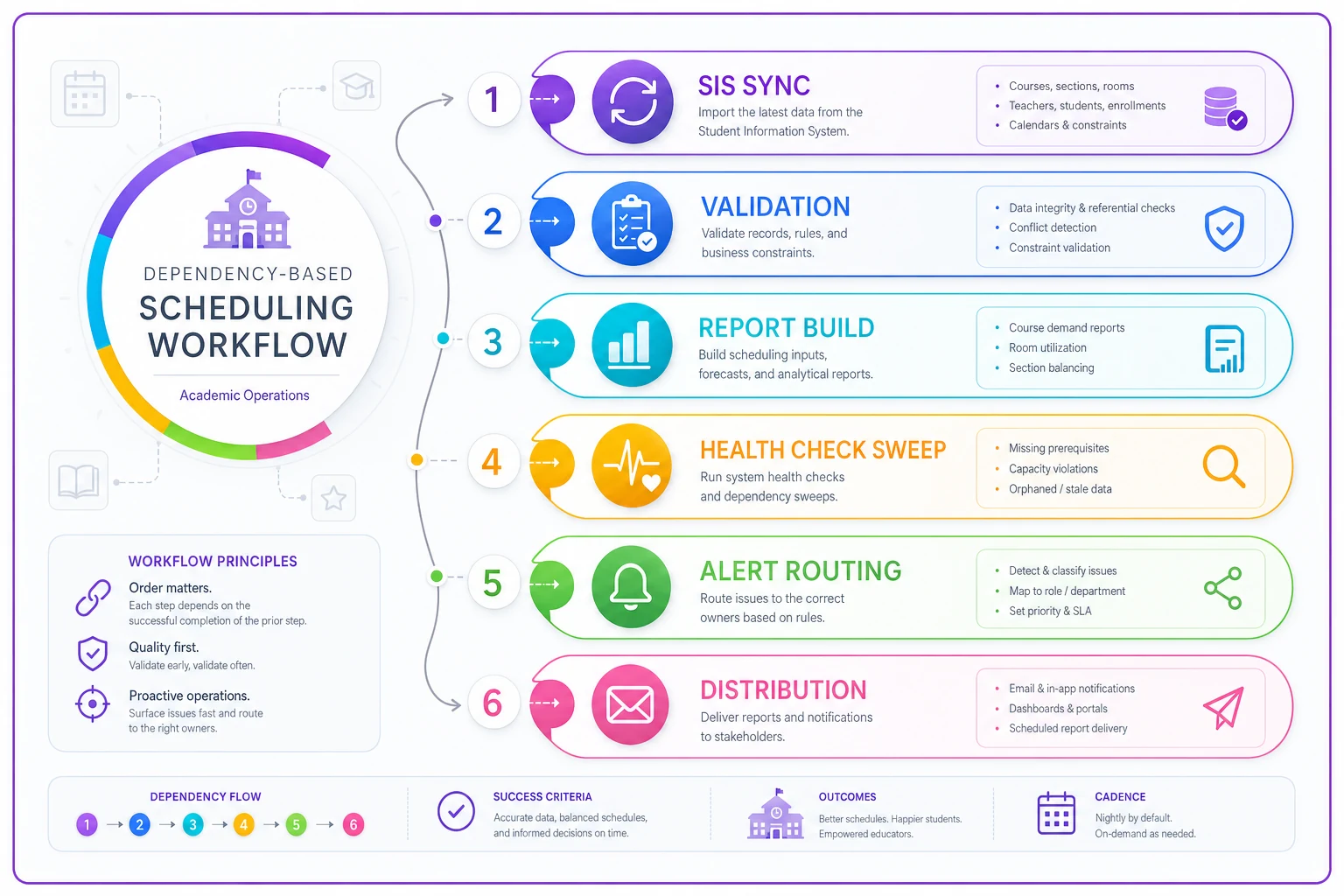
This diagram shows the end-to-end flow from upstream sync to distribution.
Health checks that catch the silent failures
A report producing a file is not proof the report is correct. Three categories of check earn their keep.
Freshness checks. For every report, define a maximum acceptable age of the underlying data. Attendance built off data older than 26 hours is stale. A freshness check compares the max timestamp in the source against the run time and fails loudly if the gap is too wide. This is the single most valuable check most districts don't have — it's what catches the "everything ran fine but the source stopped updating" trap.
Volume and row-count checks. Compare today's row count to a rolling expectation. If yesterday's attendance file had roughly 14,000 records and today's has 6,200, something is wrong even though a file exists. A simple rule — flag anything more than 20–30% off the trailing average — catches partial loads before they reach anyone.
Structural and key checks. Did every campus report in? A district with 11 schools expecting 11 school-level rows should hard-fail on 9. Are the primary keys unique? Are the required columns non-null? These are cheap to run and catch the partial-data failure that totals alone hide.
A short checklist you can adapt per report:
-
Does an output actually exist for today's run?
-
Is the source data fresher than the defined threshold?
-
Is the row count within expected range of the trailing average?
-
Did every expected campus / grade / entity appear?
-
Are required fields populated and keys unique?
-
Does the run's data cutoff match the intended reporting period?
Getting these checks right also quietly prevents a lot of the downstream KPI confusion covered in our post on reporting and KPI pitfalls — most of those "the numbers don't match" fire drills trace back to a stale or partial run nobody flagged.
Writing alerts people actually act on
An alert that says JOB_4471 FAILED: exit code 1 gets ignored, then eventually filtered into a folder nobody opens. Alert fatigue is real, and in schools it's usually caused by two things: alerts with no context, and alerts that fire for things nobody needs to act on.
A useful alert answers four questions in the first two lines: what broke, how bad, who owns it, and what to do next.
> 🔴 FAILED — Daily Attendance Report did not produce output. > Ran 5:32 AM, errored during build step (source join). > Impact: Attendance summary due to Dr. Reyes by 7:30 AM will be missing. > Owner: Data Team (Marcus). Runbook: [link]. > Recovery window: ~2 hrs before deadline.
> 🟠 STALE DATA — Enrollment Report built successfully but source is 51 hours old (threshold: 26). > Likely cause: SIS sync did not complete Tue night. > Output exists but should NOT be trusted or distributed. > Owner: Data Team. Runbook: [link].
> 🔴 MISSING RUN — Discipline Report expected by 5:30 AM, no run detected. > Scheduler did not trigger. Upstream sync status: unknown. > Owner: Data Team (on-call). Runbook: [link].
Three things make these work. They lead with impact in plain English, not error codes. They tell the reader whether the output is safe to use — the stale-data one explicitly says do not distribute, which is the whole reason the alert exists. And they name one owner, not a distribution list where everyone assumes someone else has it.
One more pattern worth adopting: severity tiers. Not everything deserves a 6 AM page. A late-but-recovered run can be a daily digest ("3 jobs ran late overnight, all recovered"). A stale state-submission feed the day before a deadline is a phone call. Match the loudness of the alert to the actual consequence, or people stop reading all of them.
The owner runbook: what happens after the alert
An alert without a runbook just moves panic from the software to a person. The runbook is the difference between a five-minute fix and a forty-minute Slack thread of "who knows how this report works?"
A good runbook for a failed report is short, specific, and assumes the reader is stressed. Structure each one like this:
-
What this report is and who needs it. One sentence. "Daily attendance summary, needed by the assistant superintendent by 7:30 AM for the morning ops call."
-
The most likely causes, in order. For attendance
sync didn't finish → source stale → campus didn't submit → build error. List them by frequency, because the majority of failures are the same two causes.
-
The exact first check. "Open the sync log. If last success is before 3 AM, the problem is upstream — stop here and go to the sync runbook."
-
The re-run procedure. The literal steps and command or button. Not "re-run the job" — which job, from where, and how to confirm it worked.
-
The safe-to-distribute rule. How the owner confirms the fixed output is actually correct before anyone sees it. Re-run the health checks. Don't eyeball it.
-
The escalation path and the fallback. If it can't be fixed before the deadline: who to tell, and what to send instead ("provide yesterday's figures, clearly labeled, note the delay").
That last point is where most runbooks fall short. They tell you how to fix the report but not what to do when you can't fix it in time. A district needs a defined answer to "the report can't be ready by 7:30, now what?" — and that answer should be a decision, not an improvised apology.
A real scenario
A district of about 12,000 students ran roughly a dozen scheduled reports overnight — attendance, enrollment, a few compliance extracts. Their setup was time-based: sync at 2, reports at 4, done. No freshness checks, no run-detection.
They had two incidents in a single month. First, a Monday-holiday schedule change meant the sync didn't kick off, but the reports still tried to build off Friday's data — the enrollment count in the Tuesday leadership meeting was three days stale and nobody caught it until a principal questioned her own number. Second, a mid-load run produced an attendance file missing two of their eleven campuses. Totals looked low but plausible, and the file went out before anyone noticed.
Neither failure threw an error. Both produced a file. That's the exact profile of the failures that hurt.
The fix wasn't glamorous. They switched daily reports to trigger on sync success instead of a clock, added a freshness threshold (nothing older than roughly 26 hours passes), and added a campus-count check that hard-failed when fewer than eleven schools reported. They wrote a one-page runbook per report and named a single owner for the morning window. Alerts got rewritten to lead with impact and a distribute/don't-distribute flag.
The measurable change was less about catching more errors and more about when they caught them. Over the next couple of months, the handful of overnight failures that did happen got flagged in the 5:30 sweep and fixed inside the recovery buffer — before anyone downstream ever saw a wrong number. The Tuesday-meeting surprises stopped. Not zero failures, but zero failures that reached a decision-maker.
When this level of rigor makes sense — and when it's overkill
Not every report needs dependency chains and three-layer health checks. Building all of this for a report two people glance at monthly is wasted effort, and over-alerting on low-stakes jobs is how you train everyone to ignore alerts.
Worth the full treatment: anything feeding state submissions, board meetings, funding calculations, or daily operational decisions. Anything where a wrong number has a deadline and an audience.
Freshness + existence checks are enough: internal working reports where a human reviews the output anyway before acting on it.
Skip the machinery: ad-hoc pulls, one-off exports, reports where staleness is obvious to anyone reading and the stakes are low.
The honest failure mode on the other side is a district that alerts on everything, so the on-call person's phone buzzes six times a night for jobs that recovered on their own. Reserve the loud alerts for the reports where being wrong actually costs something.
Where tooling quietly helps
None of this requires a fancy platform — plenty of districts run it on scripts and a scheduler. But operational software earns its place here through consistency. Dependency-based triggering, freshness thresholds, run-detection, and severity-tiered alerts are exactly the kind of repetitive checks that get skipped when a person is doing them by hand at 5 AM. A workflow platform that runs the health-check sweep automatically, routes each alert to its named owner with the runbook attached, and confirms the fixed output passed its checks before flagging it safe — that's what keeps the discipline from eroding the third busy week in a row.
The tool matters less than the design, though. A well-designed cadence with health checks and clear runbooks, run manually, beats a great platform with no thought behind what it's actually checking.
The point
A trustworthy automated reporting cadence in K-12 isn't measured by how many reports run on time. It's measured by whether a broken report ever reaches someone who'll make a decision on it.
That comes down to three unglamorous habits: schedule on dependencies with a real recovery buffer, check for the silent failures that don't throw errors, and give every report one owner with a one-page runbook that tells them what to do — including what to do when they can't fix it in time.
Build for the failure that produces no error message. That's the one that shows up in the board meeting.
Build for the failure that produces no error message. That's the one that shows up in the board meeting.
Ready to optimize your school operations?
Join hundreds of schools using GoSkoly to save time, improve collaboration, and enhance student outcomes.