

A section change in October is nothing like a section change in June. In June, nobody's riding a bus to the room you just deleted. By October, a "small" edit to a master schedule can quietly break an IEP service minute count, orphan a student off a bus manifest, and leave a teacher of record attached to a period that no longer exists. Nobody notices until attendance won't post, or a parent calls asking why their kid's speech session disappeared.
That's the real problem with mid-year edits in K-12: the edit itself is usually fine. The downstream collisions are what hurt you. And because scheduling, attendance, SpEd, and transportation each live in different systems with different owners, no single person sees the full blast radius before someone clicks save.
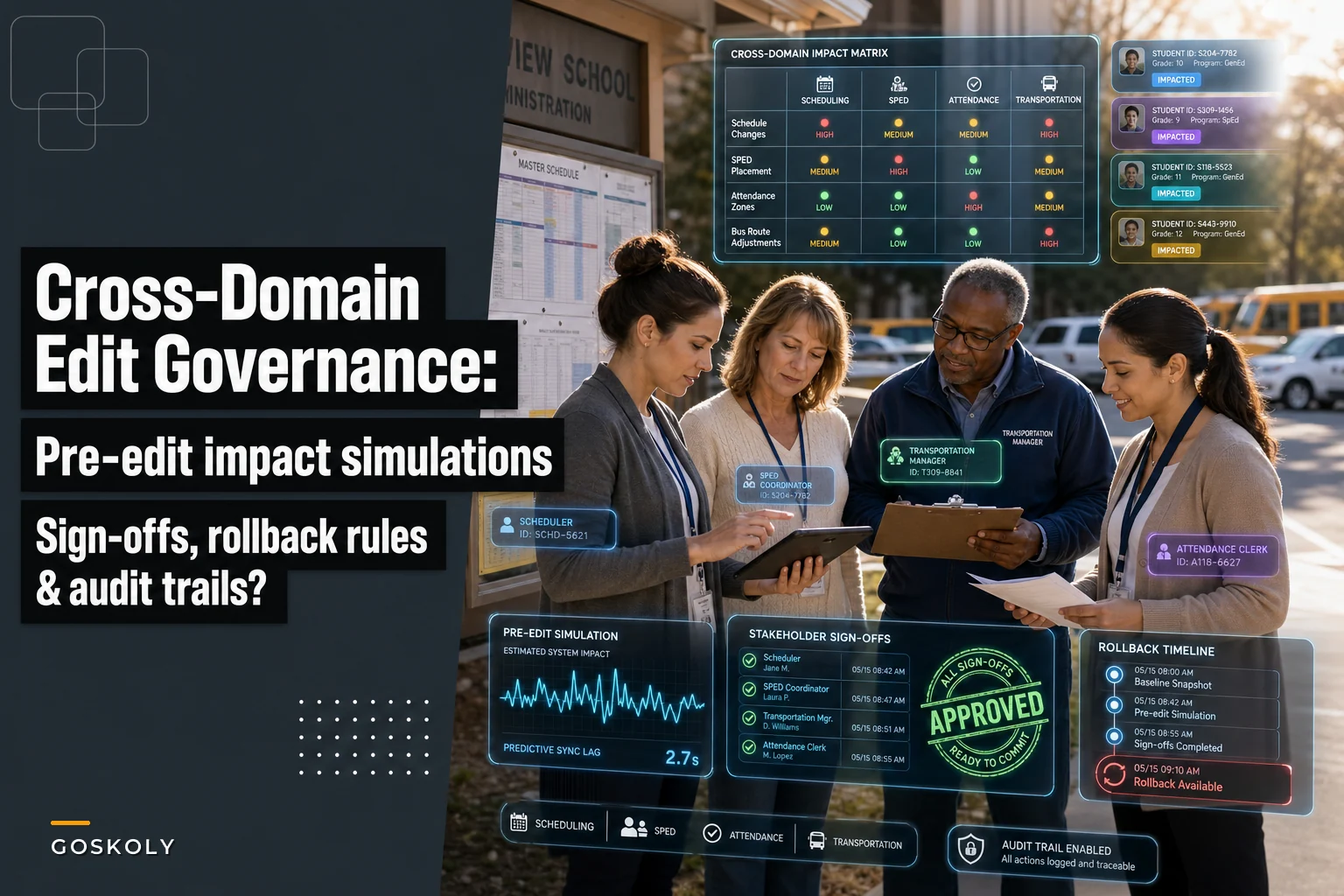
This piece is about putting real cross-domain change control K-12 structure around those edits — a cross-system impact matrix, a pre-edit simulation checklist, sign-off templates, and clear rollback criteria — so a mid-year change is something you can defend in an audit and undo if it goes sideways.
Why a single edit becomes a four-domain incident
A student record isn't one object. It's the same ID referenced across a handful of systems that sync on different schedules, and each sync assumes the others are stable. That's the mechanical reason this keeps happening.
Take a routine request: a counselor moves 14 students out of an overloaded 3rd-period Algebra section into a new section that opens 5th period. In the scheduling system, that's a clean move. But watch what trails behind it:
-
Attendance now expects period-based rosters that won't match until the nightly sync runs — so 3rd-period attendance shows ghost students and 5th shows "unknown" entries for a full day.
-
SpEd had three of those 14 students receiving co-taught support in that specific 3rd-period section. Their service delivery location just changed without anyone updating the IEP, which is a compliance problem the moment it happens, not when it's eventually discovered.
-
Transportation doesn't care about periods — but two of those students were in an after-school tutoring block tied to the old section, which fed a late-bus manifest. Move the section, and the late-bus eligibility list silently drifts.
None of those three teams got told. The counselor did exactly what they were asked. The edit was correct inside its own domain and wrong everywhere else.
The damage scales with how far into the year you are, not with how big the edit looks. A ten-student move in week two is noise. The same move in week twelve touches funding claims, service compliance, and bus contracts.
The cross-system impact matrix (build this first)
Before you touch any change-control workflow, you need one artifact that doesn't exist in most districts: a matrix that maps each edit type to which domains get hit and who owns the cleanup.
Eliminate administrative overload.
GoSkoly helps you manage schedules, attendance, and communications seamlessly.
- Unified student and staff management
- Automated attendance tracking
- Integrated communication tools
No credit card required
| Edit type | Scheduling | Attendance | SpEd | Transportation | Primary owner | Secondary sign-off |
|---|---|---|---|---|---|---|
| Section move / merge | Direct | High (roster resync) | High if service-linked | Low–Med (late bus) | Scheduling lead | SpEd coordinator |
| Teacher-of-record change | Direct | Med (posting rights) | Med (service provider) | None | Scheduling lead | Attendance admin |
| New section open mid-term | Direct | High | Med | Low | Scheduling lead | Attendance admin |
| Bell schedule / period time change | High | High | High (service minutes) | High (route timing) | Operations director | All four owners |
| Program/placement change | Med | Med | Direct | High (route/stop) | SpEd coordinator | Transportation lead |
| Address / residency correction | Low | Low | Low | Direct (stop/route) | Registrar | Transportation lead |
The point of the matrix isn't completeness — it's that the person making the edit can see in ten seconds whether their change is a one-domain thing or a four-domain thing. The most common mistake is treating every edit as local. The second most common is treating every edit as a full fire drill. The matrix tells you which one you're actually dealing with.
On building it: don't start from an idealized list. Pull your last 30–40 mid-year change requests and categorize them. You'll find that most fall into five or six edit types, and those are the only rows worth maintaining carefully.
The pre-edit simulation checklist
Once you know an edit crosses domains, the question becomes: what breaks if I do this, before I do it?
Most districts are flying blind here. They make the change in production and find out through complaints. A simulation step — even a manual one — changes the whole posture. If you've already worked through impact simulations for master schedule changes, you'll recognize the logic; here we're extending it across the other three domains instead of keeping it inside scheduling.
Run this before any edit the matrix flags as Medium or higher in two or more domains:
-
Snapshot current state. Export the affected rosters, service schedules, and bus manifests as they exist right now, with a timestamp. This is your rollback baseline and your audit evidence in one move.
-
List affected student IDs explicitly. Not "3rd period Algebra" — the actual IDs. Cross-domain collisions hide at the student level.
-
Check SpEd linkage for every ID. Does any affected student have a service, minute count, or provider tied to the thing you're editing? If yes, the SpEd coordinator signs before you proceed, full stop.
-
Check transportation linkage. Any affected student on a route, stop, or special-needs transport that references the section, program, or time you're changing?
-
Check attendance posting dependencies. Will period rosters, teacher posting rights, or funding-linked attendance blocks (think after-school, which ties back to funding claims) shift?
-
Predict the sync lag. Note exactly when each downstream system refreshes. Most "the system is broken" panic is just a nightly sync that hasn't run yet. Tell people the lag in advance and the panic mostly disappears.
-
Write the expected end state. One or two sentences
"After this edit and the next sync, these 14 students appear in 5th period, three IEP locations updated manually, late-bus list unchanged."
Quick visual: the checklist steps flow like this.
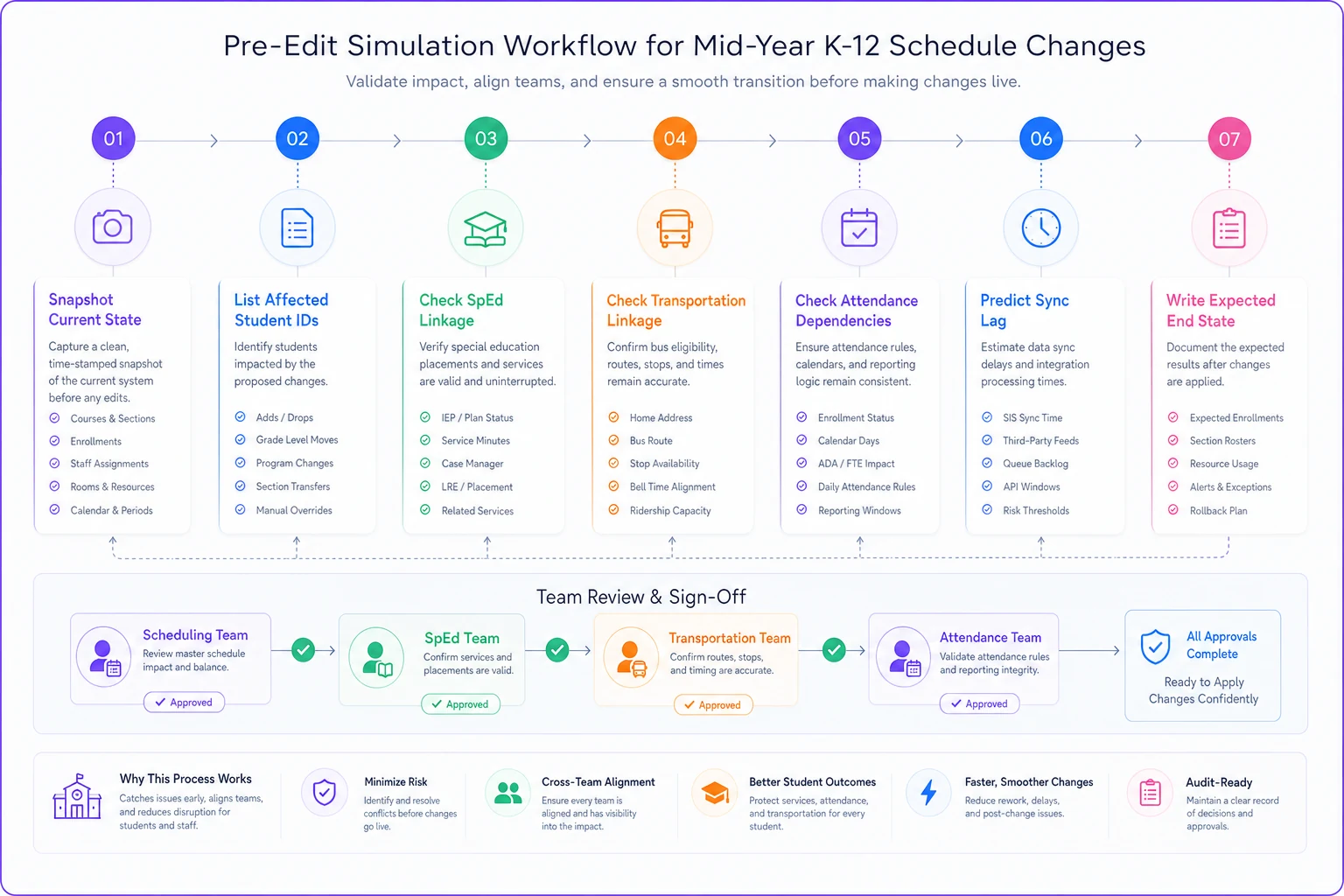
That last step is deceptively useful. If you can't clearly write what the correct end state looks like, you're not ready to make the edit — and you definitely can't tell later whether it worked.
Stakeholder sign-off that isn't just a signature
Sign-off templates fail when they're a formality. The fix is making the sign-off carry information the signer is actually responsible for. A SpEd coordinator shouldn't sign "approved." They should sign "I confirmed these 3 students' service minutes and locations are accounted for."
A workable sign-off block for a cross-domain edit:
-
Requested edit plain-language description + matrix edit type
-
Affected IDs attached list
-
Scheduling owner confirms section logic and teacher-of-record integrity
-
Attendance admin confirms posting rights and roster resync timing
-
SpEd coordinator confirms service minutes, locations, providers — or explicitly marks "no SpEd impact"
-
Transportation lead confirms route/stop/manifest impact — or "no transport impact"
-
Effective date + sync window when it goes live, when downstream catches up
-
Rollback owner the named person who executes the undo if criteria are hit
Force each owner to explicitly mark "no impact" to avoid silent cross-domain failures.
The "no impact" option matters more than it looks. Forcing each owner to explicitly clear their domain turns a silent cross-domain failure into a documented decision. When an auditor later asks "who verified transportation wasn't affected?", you have a name and a timestamp instead of a shrug.
One pattern worth copying: route sign-offs by what the matrix flags, not by habit. If an edit is scheduling-only, don't drag the transportation lead into it — you'll train everyone to rubber-stamp. Reserve full four-domain sign-off for edits that genuinely earn it, like bell schedule changes.
Rollback criteria: decide the undo before you need it
The hardest moment in change control is 2 p.m. on go-live day when something's clearly wrong and nobody knows whether to fix forward or roll back. People freeze because the decision feels huge and nobody wants to own it.
The fix is defining rollback triggers in advance, in the sign-off itself, so the decision is already made. Concrete and measurable, not judgment calls:
-
Attendance cannot post for any affected student for more than one full business day after the expected sync.
-
Any student loses a documented IEP service and it can't be restored within the same school day.
-
A student is dropped from a bus manifest with no alternate transport confirmed.
-
More than a defined share of affected students (10% is a reasonable starting point) show up in the wrong roster after the sync completes.
If any trigger fires, the named rollback owner restores the snapshot from step 1 of the simulation checklist. No meeting, no debate. The whole reason you took the timestamped snapshot is so "undo" is a real option and not a theoretical one.
When rollback is the wrong call: if the only problem is sync lag you already predicted, or the fix-forward is trivial and the snapshot is stale because other edits piled on top. Rolling back on top of five newer changes creates a worse mess than the original problem. That's exactly why the snapshot timestamp and a brief "no other edits until this stabilizes" freeze both matter.
A real scenario
A mid-sized district — around 11,000 students, four high schools — kept running into the same October pattern. Counselors made somewhere between 60 and 90 schedule edits in the first six weeks, and a handful each year quietly broke SpEd service delivery or dropped kids off late-bus manifests. Nothing catastrophic, but each incident ate most of a day across three offices to untangle, and twice it surfaced in a compliance review with no clear record of who had approved what.
They didn't buy anything new at first. They built the impact matrix from their own previous year's change log, added the two-sentence "expected end state" requirement to every cross-domain edit, and made SpEd and transportation sign-offs mandatory for the flagged edit types.
The real change was behavioral. Counselors started routing the risky edits instead of just making them. Over the following semester, recurring cross-domain surprises dropped to near zero, and the two edits that did go wrong were caught at the simulation step — before production — instead of by a parent phone call. The compliance reviewer the following spring specifically noted the sign-off trail.
No dramatic transformation. Just fewer bad surprises and documentation that actually held up.
Where tooling helps (and where it doesn't)
You can run all of this on a spreadsheet and shared forms, and plenty of districts do. The friction shows up at scale: keeping the matrix current, pulling clean snapshots quickly, and knowing which systems have actually synced.
This is where AI-assisted operational platforms earn their keep — not by making decisions, but by tracking the cross-domain linkages you can't hold in your head. A workflow system that can flag "this section has three service-linked IEPs and two late-bus riders attached" at the moment of the edit turns the manual simulation checklist into something that runs automatically. Sign-off routing, snapshot capture, sync-timing warnings — those are coordination tasks that automation handles well and humans forget under pressure.
The judgment stays with your people, though. The tool surfaces the blast radius and holds the audit trail. Deciding whether to proceed, who signs, and when to roll back is still an operational call, and it should be.
The one thing to take away
Mid-year edits aren't dangerous because they're hard. They're dangerous because each domain assumes its own view is the whole picture. The matrix, the pre-edit simulation, information-carrying sign-offs, and pre-defined rollback triggers all do the same job from different angles: they make the invisible cross-domain consequences visible before someone clicks save — and they leave a trail you can defend afterward.
Start with the matrix. Build it from your own last-year change log, not from a template. Everything else hangs off knowing, in ten seconds, whether the edit in front of you is a one-domain thing or a four-domain thing.
Ready to optimize your school operations?
Join hundreds of schools using GoSkoly to save time, improve collaboration, and enhance student outcomes.