

Every spring, some poor building tech ends up standing in a storage closet with a clipboard, a stack of charging bricks, and a spreadsheet that says 512 devices went out and 487 came back. Nobody knows where the other 25 are. Some got transferred when a kid moved schools. Some are in a backpack in a house across town. Two are broken and sitting in a teacher's desk drawer because nobody wanted to file the paperwork.
That gap between "what we handed out" and "what we can actually account for" is where the whole device loan workflow K-12 falls apart. Not at checkout. Not during the term. At the end, when reconciliation forces every loose thread to show up at once.
This post is narrow on purpose. It covers the loan lifecycle for student and classroom devices — the checkout moment, the condition record, the reminder cadence, and the end-of-term reconciliation and export that IT and ops owners actually get judged on. Not asset management broadly. Just the loan loop, done in a way that survives an audit.
The checkout moment is where most of the damage is baked in
People obsess over end-of-year collection and treat checkout like a formality. It's completely backwards. A sloppy checkout guarantees a painful reconciliation four months later.
Watch what happens during a typical device rollout week. A teacher gets handed a cart of 34 Chromebooks and a class roster. They call names, hand out devices, and jot the asset tag next to each kid's name — if they have time. Half the time the tag number gets transposed. Sometimes a kid swaps with a friend after class. The condition of the device? Nobody wrote anything down, so on day one every device is silently assumed to be perfect.
That last part is the killer. If you don't capture condition at checkout, you have no baseline. When a device comes back with a cracked corner, you can't prove it wasn't already cracked. You can't bill the family. You can't even have a fair conversation about it. The absence of a condition record turns every damage claim into an argument you're going to lose.
-
Scan the device barcode (asset tag).
-
Scan or select the student.
-
Tap a condition state
New / Good / Minor wear / Pre-existing damage.
-
If "minor wear" or "pre-existing damage," snap a photo and add a one-line note.
-
Student or guardian sign-off — a signature line, a PIN, or a checkbox with a timestamped name.
Keep the checkout interaction under 20 seconds per device to ensure teachers actually complete the condition tap.
The signature step matters more than people think. It's not about legal muscle. It's that a signature at checkout changes behavior — kids and parents treat a signed device differently than one that was tossed at them. And when you do need to bill for damage, "signed acknowledgment of condition on 8/28" ends the debate pretty fast.
Why condition sign-offs get skipped — and what it costs
The reason condition capture gets skipped is friction. If the process requires a teacher to fill out a paper form with six fields per device across 30 kids, it won't happen by October. People optimize for getting through the day.
Eliminate administrative overload.
GoSkoly helps you manage schedules, attendance, and communications seamlessly.
- Unified student and staff management
- Automated attendance tracking
- Integrated communication tools
No credit card required
So the condition field quietly dies. Schools that skip condition capture at checkout end up writing off far more damage than schools that spend the extra ten seconds — not because their kids are rougher, but because they can't defend a single claim.
Run the rough math. Say a middle school loans out around 600 devices. If even 4% come back with billable damage and the average repair or replacement recovery lands somewhere in the $60–$140 range, that's roughly $1,500–$3,300 you either recover or eat, per building, per year. Multiply that across a district and the "we'll just skip the condition step" decision becomes a five-figure line item nobody budgeted for.
There's a softer cost too. When families dispute charges and the school has nothing but a name on a spreadsheet, those disputes eat administrator time and burn goodwill. A clean condition record with a photo and a timestamp collapses a 20-minute phone argument into a 30-second email.
The reminder cadence problem nobody plans for
Devices don't come back on their own. The single biggest driver of a messy reconciliation is that reminders happen too late and too rarely — usually one blast email in the final week of school when everyone is mentally checked out and half the recipients aren't reading district email anyway.
A working cadence isn't complicated, but it has to be scheduled and it has to escalate:
-
T-minus 3 weeks First notice to guardians. Friendly, informational. "Devices are due back by June 6. Here's how and where."
-
T-minus 1 week Second notice. Add the specific device (asset tag) and where to return it.
-
Due date Reminder to anyone with an outstanding loan.
-
Due date +3 days Escalation. Copy the teacher or advisor. Note any replacement cost policy.
-
Due date +10 days Final notice with the dollar figure and next steps.
The mistake is treating this as one message repeated. Each stage has a different audience and a different tone, and the escalation only goes to people who still owe something. Blasting the full population at every stage just trains everyone to ignore you.
This is exactly the kind of repetitive, date-driven work that's worth automating. An operational platform that tracks each open loan and sends the right message at each stage — only to families who still have a device out — removes the "did anyone send the June 1 reminder?" scramble entirely. The staff time saved during closeout week alone usually justifies it, and return rates before the deadline climb noticeably when reminders are consistent rather than last-minute.
End-of-term reconciliation: the report that actually matters
Reconciliation is just answering one question cleanly: for every device we own, what state is it in right now, and who's accountable for the gaps?
The problem is most schools try to answer this from a checkout list that was never designed to be reconciled against. They have "who got what" but no live status, no return timestamps, and no clean bucket for exceptions.
| Status | What it means | Owner / next action |
|---|---|---|
| Returned – Good | Back, condition matches or better | Closed, restock |
| Returned – Damaged | Back, condition worse than checkout | IT triage + billing decision |
| Outstanding – In cadence | Not returned, reminders active | Automated follow-up |
| Outstanding – Escalated | Past final notice | Advisor/admin manual contact |
| Transferred / Withdrawn | Student left; device followed or was collected | Verify with receiving school or clear |
| Lost / Unrecoverable | Written off after process exhausted | Document, remove from active inventory |
The value isn't the categories themselves — it's that every device lands in exactly one bucket, and every non-closed bucket has a named owner. When you can't produce this table, you don't have a reconciliation problem, you have an ownership problem. That same owner-mapping logic shows up across nearly every school process; the modular operations playbook for school administrative systems covers how to assign clear owners across systems so nothing lands in "everyone's responsibility, therefore no one's."
[Checkout Record + Condition Sign-Off] ↓ [Live Loan Status Tracking During Term] ↓ [Automated Reminder Cadence by Stage] ↓ [Return Scan + Condition Comparison] ↓ [Reconciliation Bucket Assignment] ↓ [Audit-Ready Export]
This workflow maps the reconciliation sequence visually.
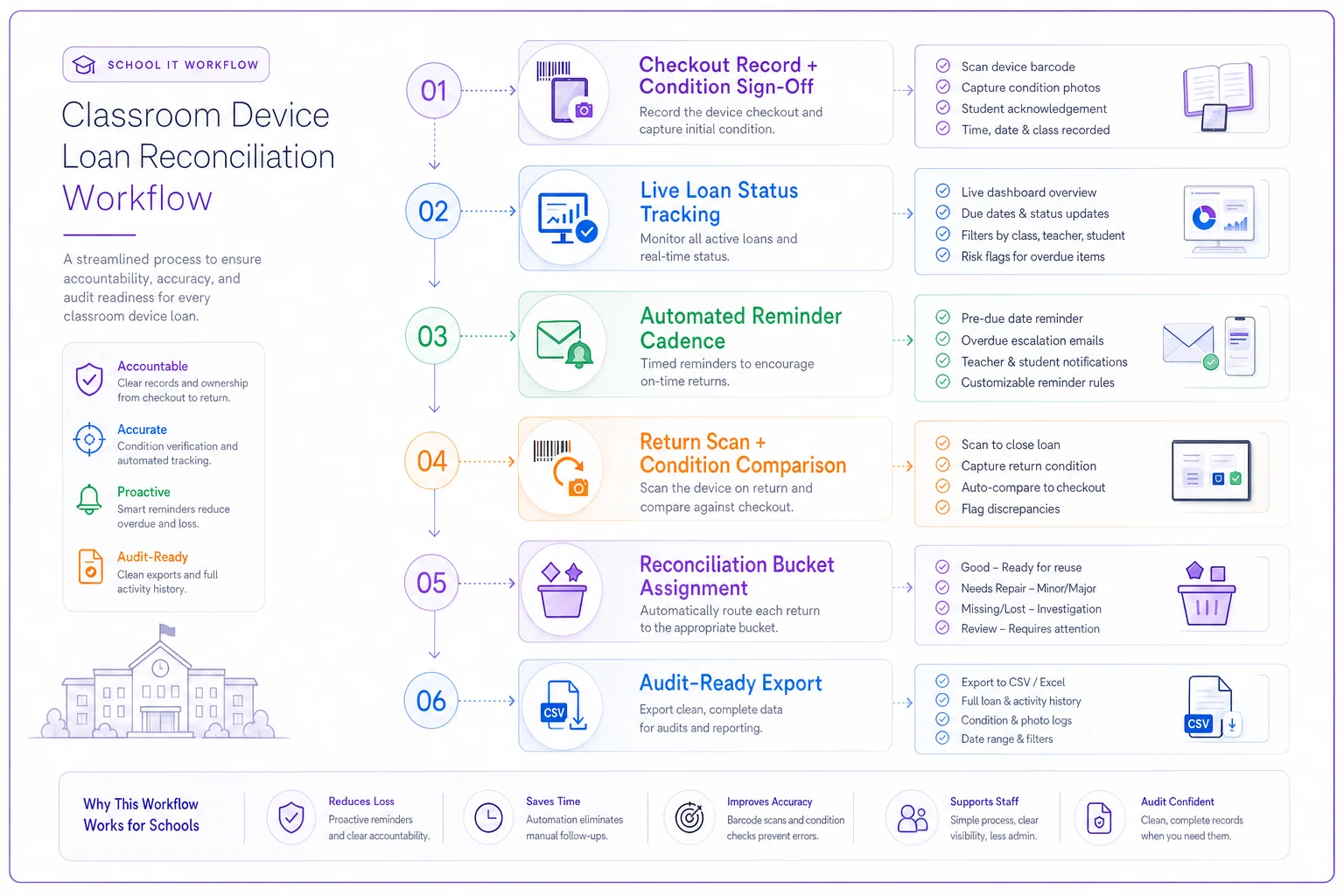
Each stage feeds the next. When any link in that chain is missing — usually the condition sign-off at the start or the return scan at the end — the whole thing gets rebuilt by hand under deadline pressure.
A real scenario: the closeout that stopped bleeding hours
Consider a K–8 with about 480 student devices spread across roughly a dozen homerooms. Their old process: teachers tracked checkouts on paper, condition was never recorded, and reminders were one email in the last week of school.
Their first reconciliation under that system took the building tech and an office aide the better part of two weeks — chasing devices, calling families, arguing about damage they couldn't prove, and manually cross-referencing a paper list against physical shelves. They wrote off around 20 devices as lost and ate close to $1,900 in damage they couldn't bill.
They didn't overhaul everything. Three things changed: a barcode-scan checkout with a required condition tap and guardian sign-off, a scheduled four-stage reminder cadence, and a single live reconciliation view.
The next end-of-term looked completely different. Closeout took a few days instead of two weeks. Devices returned before the deadline came in as a steady flow across the last three weeks rather than a rushed final-week pile. Unrecoverable devices dropped into the single digits. And billable damage — because they finally had baseline condition records — was actually collectible, recovering somewhere in the $1,200–$1,600 range they'd previously written off.
Nothing dramatic. Just a process that stopped leaking.
Audit-ready exports for IT and ops owners
The last mile is the export, and it's where good internal tracking still fails an outside review. Auditors and district finance don't want your dashboard. They want a defensible file that ties devices to people, dates, and evidence.
A clean loan export should carry, per device:
-
Asset tag / serial
-
Assigned student and guardian
-
Checkout date, checkout condition, and sign-off record
-
Return date and return condition (or current status)
-
Any damage note, photo reference, and billing status
-
Owner responsible for the current status
Keep it as a flat, sortable file — CSV or a well-structured sheet — with a data dictionary so nobody has to guess what "status = 4" means. If you're preparing for a formal review, the practices in school audit preparation: owner-mapped exports and automated evidence assembly apply almost directly here: the export should pull from the same records staff already touched during checkout and return, not get rebuilt by hand the night before.
That's the quiet payoff of capturing condition and sign-off at the moment of checkout. The audit export isn't a separate project. It's just the loan records, filtered and formatted. If you have to create evidence for the audit, you've already lost the argument.
When a lightweight loan workflow makes sense — and when it doesn't
This whole approach earns its keep when:
-
You're loaning hundreds of devices with real end-of-term collection.
-
Families are billed for loss or damage and disputes actually happen.
-
Devices move between students, buildings, or school years.
-
You get audited on asset accountability.
It's overkill when you're loaning a handful of devices from a single classroom that never leave the room and get collected daily by one teacher who knows every kid. In that case a simple sign-out sheet is genuinely fine — don't build infrastructure for a problem you don't have.
Worth saying plainly: the teams who should not adopt this are the ones hoping software alone fixes accountability. If nobody owns the escalated-outstanding bucket, no checkout template will save you. The tooling removes friction and enforces consistency. It doesn't decide who calls the family that's had a Chromebook since September.
The one thing to fix first
If you take nothing else from this: fix checkout condition capture before you touch anything else. Every downstream problem — unwinnable damage disputes, painful audits, unbilled repairs — traces back to the missing baseline on day one.
Reminders and reconciliation are what make closeout survivable. But the condition sign-off at checkout is what makes the whole loan loop defensible. Get that twenty-second habit in place, keep the records in a system that assembles them into an export automatically, and the two-week spring scramble quietly turns into a few clean afternoons.
Reminders and reconciliation are what make closeout survivable. But the condition sign-off at checkout is what makes the whole loan loop defensible. Get that twenty-second habit in place, keep the records in a system that assembles them into an export automatically, and the two-week spring scramble quietly turns into a few clean afternoons.
Ready to optimize your school operations?
Join hundreds of schools using GoSkoly to save time, improve collaboration, and enhance student outcomes.