

The hardest part of assistive technology work isn't choosing the device. It's the six weeks between an IEP team saying "student needs a dedicated AAC device" and that device being configured, deployed, logged against inventory, and reconciled against the purchase order or loan agreement that paid for it.
That gap is where things fall apart. A device gets trialed but nobody records the trial outcome. A loaner from the regional lending library sits in a specialist's car for a month past its return date. A $4,800 speech-generating device shows up in procurement records but can't be matched to a specific student, so when the auditor asks "which IEP authorized this purchase?" nobody can answer without two days of digging.
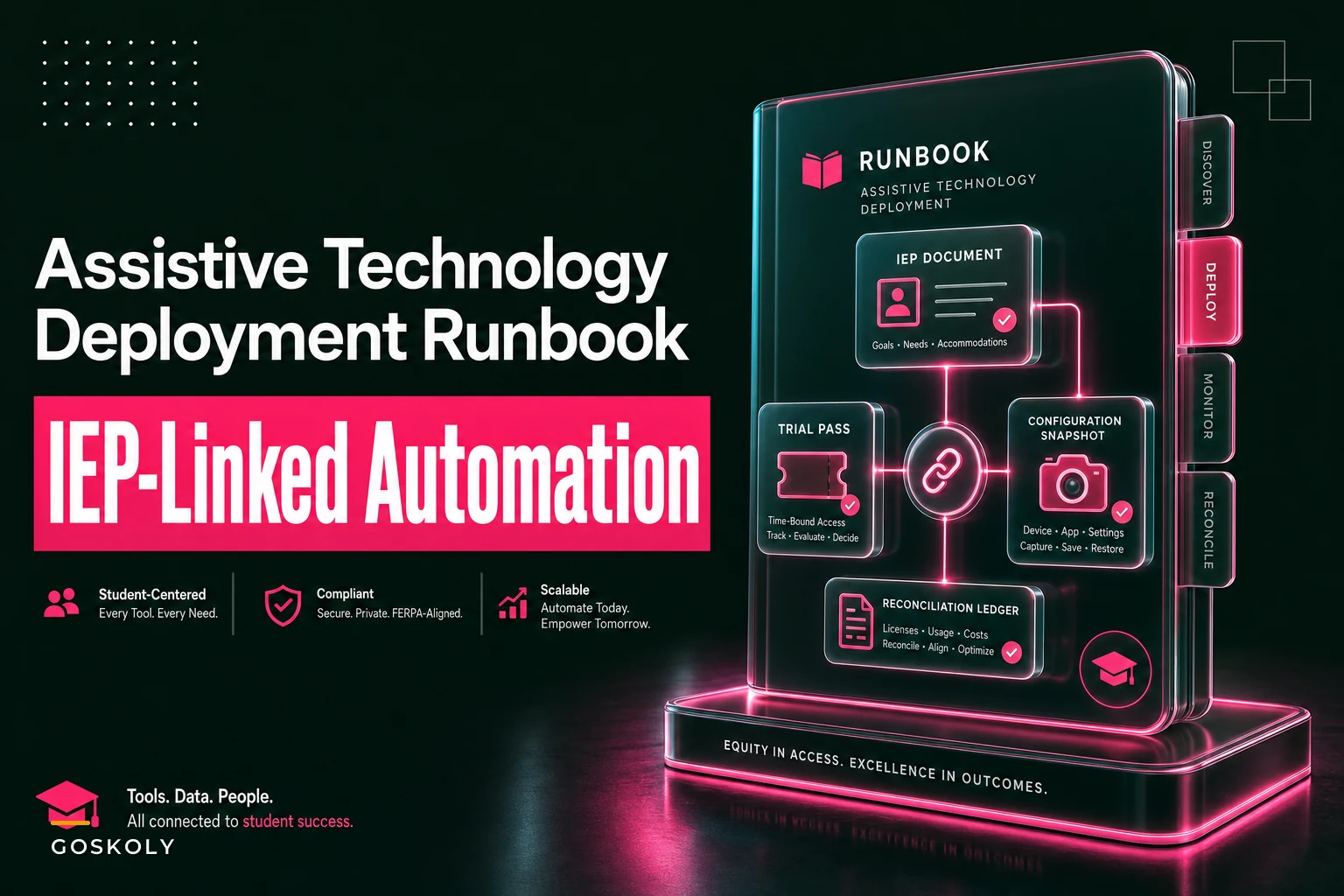
This runbook walks the full chain — owner-mapped intake, trial, configuration snapshot, deployment checklist, and loan/procurement reconciliation — with the evidence exports that tie everything back to the IEP and your device inventory. One workflow, end to end.
Why AT deployment breaks where it breaks
AT isn't like ordering 300 identical Chromebooks for a grade level. Every deployment is a one-off. The device is tied to a specific student, a specific IEP requirement, a specific funding source, and often a specific configuration that took a specialist hours to build.
The breakage points cluster in predictable places:
-
The handoff between the AT specialist and the student's building. The specialist knows the device. The building staff who see the student daily often don't know it arrived, what it's for, or who configured it.
-
Trials that never close out. A student trials three communication apps over four weeks. Nobody formally records which one won, so the "decision" lives in someone's memory until the next IEP meeting.
-
Loaner devices with no return clock. Regional and state lending libraries loan equipment for evaluation. Those loans have terms. When the return date slips, you're either paying late fees or holding equipment another district needs.
-
Procurement records that don't reference the student. Finance buys the device against a budget code. The IEP authorizes the need. If those two records never get linked, reconciliation becomes archaeology.
The device itself is rarely the problem. The problem is that four or five different people each hold one piece of the record, and nobody holds the whole chain.
The owner-mapped intake: start by naming who holds each piece
Before any device moves, map every stage to a named owner. Not a role — a person. "The AT team" is not an owner. "Marcus, AT specialist, Tuesdays and Thursdays" is an owner.
Eliminate administrative overload.
GoSkoly helps you manage schedules, attendance, and communications seamlessly.
- Unified student and staff management
- Automated attendance tracking
- Integrated communication tools
No credit card required
| Stage | Owner | What they produce | Evidence artifact |
|---|---|---|---|
| Intake / referral | Case manager | Device requirement tied to IEP goal | IEP excerpt + referral form |
| Trial authorization | AT specialist | Trial plan, devices to test, timeline | Trial plan doc |
| Trial execution | Classroom teacher + specialist | Daily/weekly usage notes | Trial log |
| Trial decision | IEP team | Chosen device + rationale | Signed decision record |
| Procurement / loan | Finance or AT coordinator | PO or loan agreement | PO number / loan ID |
| Configuration | AT specialist | Device setup snapshot | Config snapshot |
| Deployment | Building staff | Device in student's hands | Deployment checklist, signed |
| Reconciliation | AT coordinator | Device matched to IEP + funding | Reconciliation record |
The single most common failure is a blank in the "owner" column at the trial-decision stage. Everybody assumes the IEP team "just decides," but nobody owns writing down what was decided and why. That blank is where device selections get re-litigated three months later.
Step 1: Intake that captures the requirement, not just the request
Intake starts the moment an IEP identifies an AT need. The requirement needs to carry three things forward or the whole chain gets fuzzy:
-
The specific IEP goal the device supports. Not "communication" — "student will initiate requests using a symbol-based system across three settings." The goal drives the device spec.
-
The constraint set. Portability requirements, durability (does this student throw things?), language needs, switch access, mounting for a wheelchair. These constraints eliminate half the catalog before you trial anything.
-
The funding path. Is this coming out of the building budget, a special education set-aside, Medicaid reimbursement, or a loaner first while you decide? The funding path determines the paperwork, and knowing it at intake saves a two-week scramble later.
A practical pattern: tie the intake record directly to the IEP documentation so the device requirement and the goal never drift apart. If your IEP documentation workflow already prevents missed requirements and duplicate records, the AT intake should hang off that same structure rather than living in a separate spreadsheet that nobody updates.
The mistake is treating intake as a request form — "please provide an iPad." A request gives you a device. A requirement gives you a decision you can defend.
Step 2: Run the trial as a closed loop, not an open experiment
Trials go wrong because they never formally end. A student tries a device, it seems fine, and six weeks later the trial has quietly become the permanent deployment — except nothing was procured, nothing was configured for the long term, and no decision was recorded.
Run the trial as a bounded process:
-
Define the window. Two to four weeks is typical. Put an end date on it before the device leaves the office.
-
Name what "success" looks like before the trial starts, tied back to the IEP goal. If you don't define success in advance, every trial ends with "seems to work, I guess."
-
Collect usage notes on a cadence. Doesn't have to be elaborate — a few lines twice a week from the teacher and specialist. "Used device for 4 of 6 request opportunities Tuesday. Frustrated by menu depth."
-
Hold a decision point at the end. The IEP team (or a designated subset) looks at the trial log and makes a call. That call gets written down with a rationale.
A typical example: a district trials two AAC apps on a loaned tablet over three weeks. App A is slicker but the student keeps getting lost in the navigation. App B is simpler and the student independently makes requests by week two. The decision record reads: "App B selected — student achieved independent request initiation in 3+ settings during trial; App A navigation depth exceeded current motor/cognitive access." That one paragraph saves an hour of argument at the annual review and gives procurement a clear thing to buy.
The trial has to close. That's the whole point.
Below is a rough map of how the full AT deployment sequence flows from IEP identification through to reconciliation. Each stage feeds the next, and the evidence artifacts produced along the way are what make the final reconciliation and any audit response manageable.
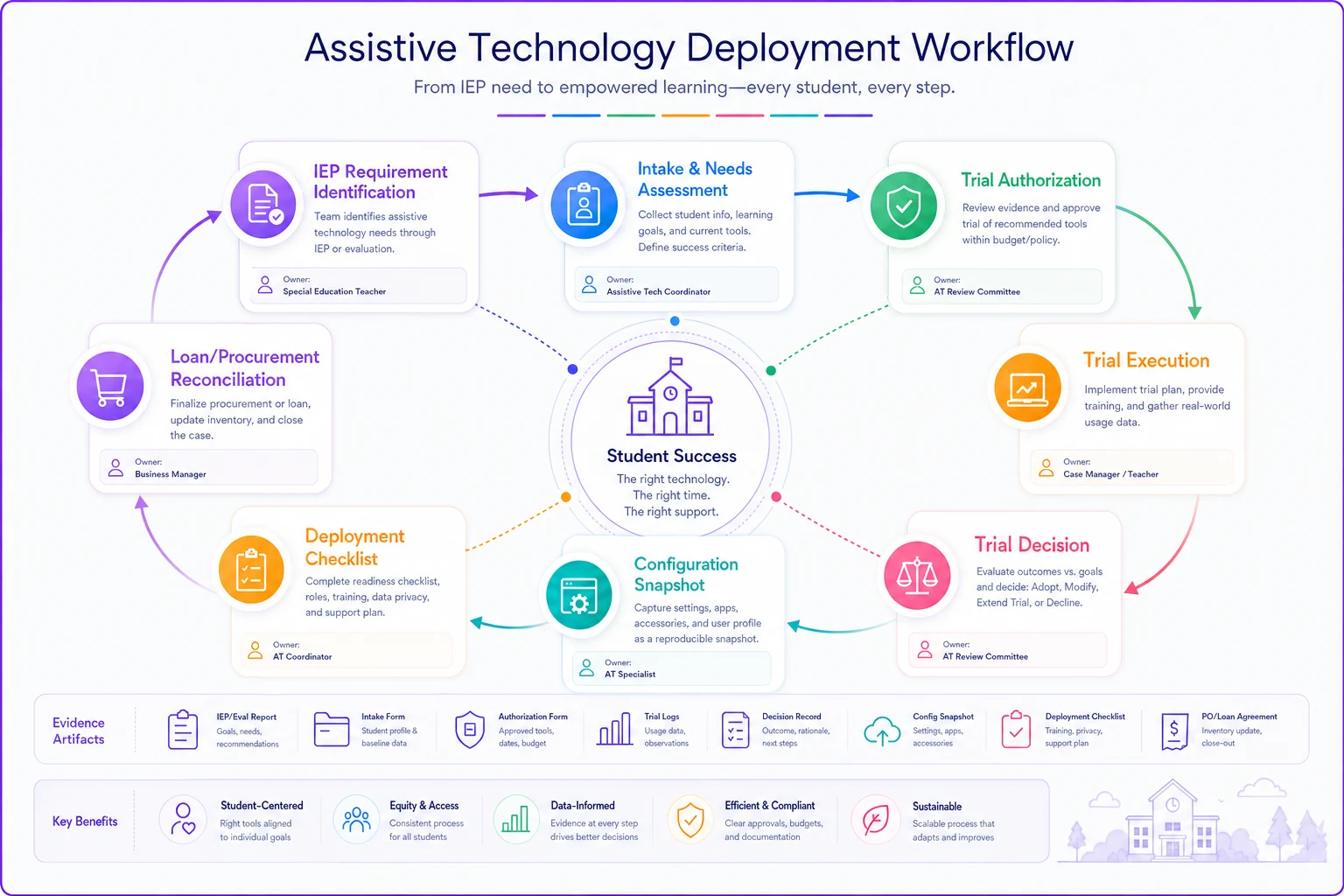
Getting this sequence right is largely an ownership problem, not a complexity problem. Each box has a person attached to it. Each person produces a record. The records connect.
Step 3: The configuration snapshot — capture the setup before it leaves your hands
This is the step almost everyone skips, and it causes the most downstream pain. An AT specialist spends three hours configuring a device — the vocabulary set, the switch sensitivity, the accessibility settings, the mounting, the backup/sync account. Then the device goes to the building and nobody can reproduce that setup.
A month later the device gets wiped during a routine IT re-image, or the student drops it and the screen cracks, and the replacement comes back blank. Three hours of specialist time, gone, plus however many days the student goes without a working system.
-
Device make, model, serial number, asset tag
-
OS version and app versions
-
Full accessibility and access configuration (switch settings, dwell times, voice, language)
-
Vocabulary/symbol set or profile used
-
Backup/restore account and location
-
Mounting or hardware notes
-
Who configured it and when
Store the snapshot against both the device inventory record and the student's IEP record. When something breaks, restoration is a checklist, not a re-invention. One district cut their average "device down" time from roughly a week to under two days simply because the snapshot meant any specialist — not just the one who originally configured it — could rebuild the setup.
Step 4: Deployment checklist — confirm the device actually landed and the staff can use it
A device in a closet isn't deployed. Deployment means it's in the student's hands, the people around the student know what it is, and first-line troubleshooting is covered.
-
[ ] Device received, serial/asset tag confirmed against the order
-
[ ] Configuration verified against the snapshot
-
[ ] Charger, case, mount, and accessories present and logged
-
[ ] Classroom staff briefed on purpose and basic operation
-
[ ] First-line troubleshooting contact identified (who to call when it stops working)
-
[ ] Charging and overnight storage routine established
-
[ ] Deployment date recorded against IEP and inventory
-
[ ] Loan terms acknowledged (if device is on loan)
The item people underweight is the troubleshooting contact. When an AAC device stops talking at 9:15 on a Monday, the classroom aide needs to know who to call that same morning — not file a general IT ticket that gets triaged behind the printer that's out of toner. AT devices need their own first-line path.
Put a named first-line troubleshooting contact (with phone/email) directly on the deployment checklist so classroom staff can act immediately.
The deployment logic mirrors what works for general device checkout — the same discipline around condition sign-offs and confirmed handoffs you'd use in a classroom device loan workflow applies here, just with higher stakes because the device is tied to a legal requirement in an IEP.
Step 5: Loan and procurement reconciliation — close the financial loop
This is where audits get uncomfortable. Every AT device has a funding story, and that story has to reconcile against both the IEP that authorized it and the inventory that tracks it.
Two tracks to reconcile:
Loaned devices (from a lending library, vendor eval loan, or regional co-op):
-
Loan ID, source, start date, and return date
-
Current holder and location
-
Return condition expectations
-
A standing alert as the return date approaches
The quiet money-loser is the forgotten loaner. A regional library loans an eval device for 30 days. The trial ends, the decision is made to purchase, but the loaner never goes back because everyone moved on to procurement. Now you're holding equipment past term, blocking the next district's eval, and in some arrangements racking up fees. Set a return clock at the moment of loan, not at the moment someone remembers.
Purchased devices:
-
PO number and budget/funding code
-
The IEP that authorized the need (the link auditors always ask for)
-
Vendor, cost, warranty terms
-
Asset tag matched into inventory on receipt
The reconciliation that matters most: every purchased AT device should trace to an IEP requirement, and every IEP AT requirement should trace to either a deployed device or a documented reason it isn't deployed yet. Run that two-way match on a cadence — monthly during the school year — and you'll catch the orphans early: devices bought but never deployed, and requirements authorized but never fulfilled.
A mid-size district carrying around 120 active AT devices ran their first full reconciliation and found roughly a dozen devices with no clear student match and three loaners weeks past their return window. The unmatched devices represented somewhere around $15k–$20k of equipment nobody could account for. None of it was lost — it was just untracked. After the first cleanup, a standing monthly match kept the orphan count near zero.
This kind of financial tightness matters more than people realize until the first time a grant auditor asks for documentation. Having the two-way match built into normal operations means the answer is a report pull, not a two-day reconstruction project.
Evidence exports: build them once, not during the audit
When a due-process complaint, a state monitoring visit, or an internal audit lands, the question is always some version of: show me the chain for this student's AT.
If your records are owner-mapped and linked across the stages above, the export is a pull, not a project. For any given student you should be able to produce, on short notice:
-
The IEP excerpt stating the AT requirement
-
The trial plan, trial log, and signed decision record
-
The configuration snapshot
-
The signed deployment checklist
-
The PO or loan agreement with funding code
-
The current inventory record and location
The districts that handle monitoring visits calmly are the ones that treated evidence as a byproduct of the workflow — each stage produced its artifact as it happened. The ones that panic are reconstructing the story after the request arrives, calling staff to ask what they remember from October.
Where lightweight software earns its place
You can run all of this on spreadsheets and shared drives, and small programs do. It works until the device count or the staff count crosses a threshold and the manual linking between IEP, trial, config, deployment, and procurement starts dropping records.
The value of a workflow platform here isn't flashy — it's that the links hold automatically. The device record carries its student, its IEP requirement, its funding code, and its config snapshot together, so reconciliation is a report instead of a reconstruction. Return-date reminders on loaners fire without someone remembering to check a calendar. The evidence export for a given student assembles from records that were already connected, rather than from a frantic search across five systems.
AI-assisted operational platforms add another layer here — not by reinventing the process, but by flagging the gaps before they compound. A device approaching its loan return date without a confirmed return log, or an IEP AT requirement with no matching deployed device after 60 days, can surface automatically rather than waiting for someone to notice during a quarterly review. That kind of passive monitoring is where the tooling genuinely reduces the human overhead of keeping the chain intact.
The point isn't the software. The point is that the chain from IEP to device to funding stays intact without a human holding all the pieces in their head.
When this full runbook makes sense — and when it's overkill
Run the full chain when: you're managing dozens of AT devices across multiple buildings, you have loaner relationships with time-bound terms, or you've been through a monitoring visit and felt the pain of missing records. At that scale, the reconciliation discipline pays for itself the first time it catches an orphaned device or a late loaner.
Keep it lighter when: you're a single small school with a handful of AT devices and one specialist who knows every device personally. You still need intake tied to the IEP and a config snapshot — losing a three-hour configuration hurts at any scale — but the monthly two-way reconciliation can be a quarterly glance instead.
Who should not shortcut this: any program relying on Medicaid reimbursement or grant funding for AT purchases. The funding-to-IEP link isn't optional there; it's the thing that survives an audit. Skipping the reconciliation step to save time is exactly how reimbursement gets clawed back.
Bringing it together
AT deployment lives or dies in the connections — IEP requirement to trial to decision to configuration to deployment to funding record. No single stage is particularly hard. The failures come from the gaps between stages, where one owner's record never meets the next owner's record.
Name the owner for every stage. Close every trial with a written decision. Snapshot every configuration before the device leaves your hands. Put a return clock on every loaner the day it arrives. Run the two-way match between devices and IEP requirements often enough that orphans never accumulate.
Do that consistently, and the evidence export stops being a fire drill — because the record was always there, assembled as the work happened.
AT deployment lives or dies in the connections — IEP requirement to trial to decision to configuration to deployment to funding record. No single stage is particularly hard. The failures come from the gaps between stages, where one owner's record never meets the next owner's record.
Name the owner for every stage. Close every trial with a written decision. Snapshot every configuration before the device leaves your hands. Put a return clock on every loaner the day it arrives. Run the two-way match between devices and IEP requirements often enough that orphans never accumulate.
Do that consistently, and the evidence export stops being a fire drill — because the record was always there, assembled as the work happened.
Ready to optimize your school operations?
Join hundreds of schools using GoSkoly to save time, improve collaboration, and enhance student outcomes.