


Walk into any special education department during IEP season and you'll find the same scene: three people working on different versions of the same document, someone frantically searching for last year's goals, and at least one person realizing they've been updating the wrong student file for the past hour.
The average special education team manages 40-60 active IEPs at any given time. Each IEP involves roughly 12 different documents, 8-10 team members contributing sections, and strict federal timelines that can trigger compliance violations if missed. That's potentially 720 documents floating around with multiple versions, conflicting edits, and zero systematic way to track who changed what and when.
IEP documentation errors are particularly brutal. Unlike regular academic records where mistakes might mean a parent phone call, these errors can trigger state audits, legal challenges, and loss of federal funding. One medium-sized district in Ohio recently faced a $340,000 settlement because their documentation couldn't prove they'd provided services listed in student IEPs.
The Version Control Nightmare Nobody Talks About
Most schools handle IEP documentation through a combination of shared drives, email attachments, and whatever system the state mandates for final submission. This creates a documentation workflow that would make any operations person break out in hives.
Take Lincoln Middle School's recent audit preparation. Their special education coordinator discovered they had fourteen different versions of one student's behavior intervention plan spread across the school psychologist's desktop, two different folders in Google Drive, multiple email chains between teachers, the district's IEP system (outdated version), and printed copies with handwritten notes in filing cabinets.
When the state auditor asked for documentation showing parental consent for a service change, they couldn't definitively prove which version the parent had actually signed. The handoff between the IEP meeting and implementation was completely undocumented.
This happens because IEP documentation involves multiple parallel workflows: teachers drafting academic goals, specialists writing service recommendations, administrators reviewing for compliance, parents providing input and revisions, and support staff tracking implementation.
Without explicit handoff checkpoints, these parallel tracks create duplicate work, conflicting information, and massive gaps in the audit trail.
Template Standardization: Your First Line of Defense
Schools that handle IEP documentation effectively don't rely on individual expertise—they build their compliance into the workflow itself. Start with template-driven processes that force consistency across all documentation.
Eliminate administrative overload.
GoSkoly helps you manage schedules, attendance, and communications seamlessly.
- Unified student and staff management
- Automated attendance tracking
- Integrated communication tools
No credit card required
Create templates for goal development worksheets, service recommendation forms, meeting preparation checklists, progress monitoring logs, and parent communication records.
Most schools mess up by creating templates then letting everyone modify them freely. Your templates need version control just like your IEPs. Lock down the master templates and create a formal update process.
One district special education director structured it this way:
Document Creation Flow:
-
Pull current template from protected folder (read-only access)
-
Save with standardized naming
StudentLastNameDocumentTypeDate_Version
-
Complete required fields (system won't let you proceed without them)
-
Submit through review checkpoint
-
Next person receives notification with version history attached
Lock down master templates and require a formal update process to prevent divergent copies.
The standardized naming alone cut their document search time by roughly 70%. Staff could immediately identify the most recent version without opening multiple files.
Building Handoff Checkpoints That Actually Work
Explicit handoff checkpoints transform IEP documentation from a free-for-all into a controlled process. Think of it like a relay race where runners can only pass the baton in designated zones.
For each IEP component, identify who initiates the documentation, what triggers the handoff, who receives it next, what they must verify before accepting, and where the audit trail gets recorded.
graph TD A[Teacher Drafts Goals] --> B{Goals Complete?} B -->|No| A B -->|Yes| C[Special Ed Teacher Review] C --> D{SMART Criteria Met?} D -->|No| A D -->|Yes| E[IEP Coordinator Review] E --> F{Compliance Check?} F -->|No| C F -->|Yes| G[Parent Input Session] G --> H[Final Director Approval] H --> I[Implementation Begins]
The diagram below shows the decision points and handoff owners.
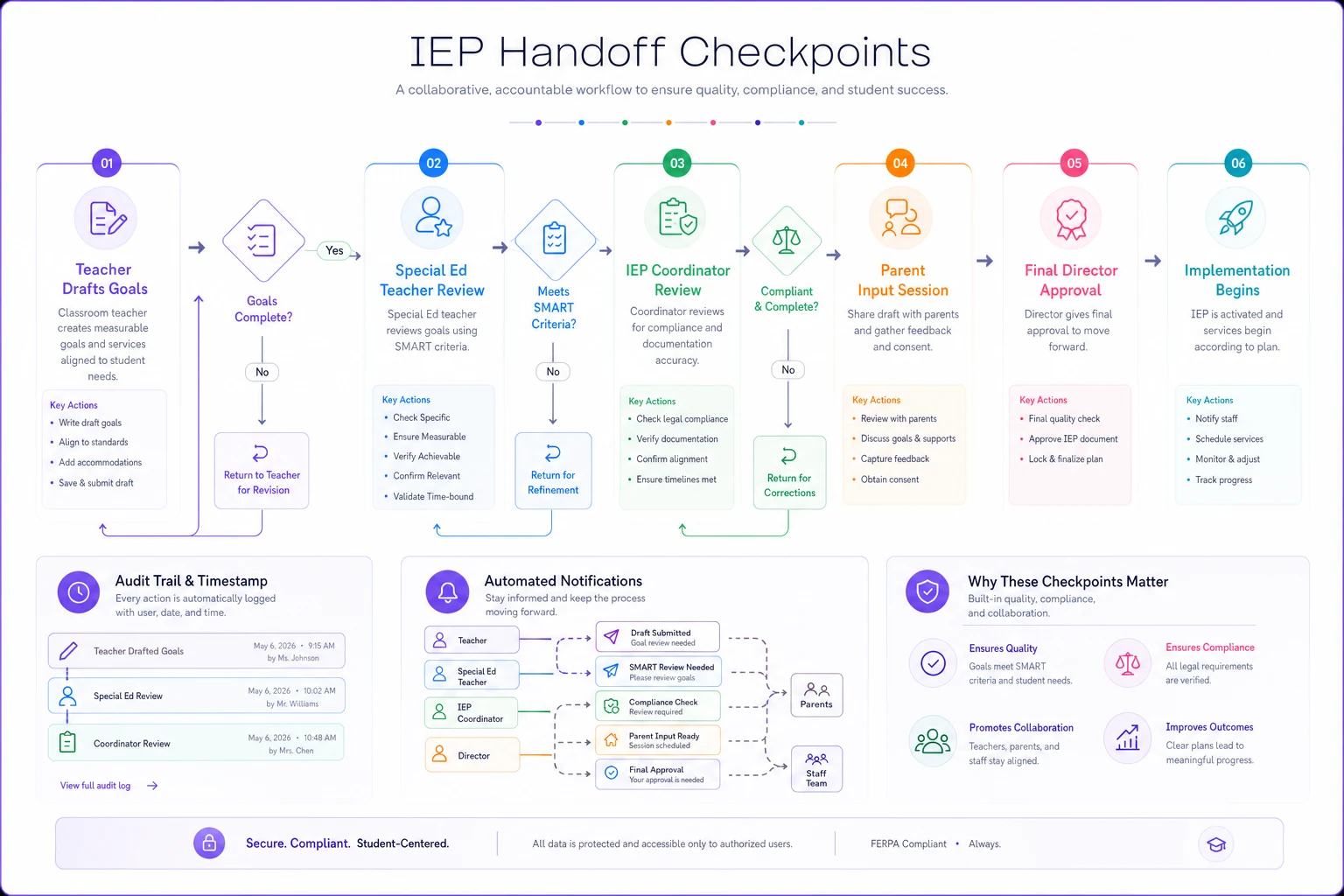
A working handoff checkpoint system might look like:
| Document Stage | Owner | Completion Trigger | Next Owner | Verification Required |
|---|---|---|---|---|
| Draft Goals | Classroom Teacher | All academic areas addressed | Special Ed Teacher | Goals align with evaluation data |
| Review Goals | Special Ed Teacher | SMART criteria met | IEP Coordinator | State standards referenced |
| Parent Input | IEP Coordinator | Meeting scheduled | Parent/Guardian | 10-day notice documented |
| Final Review | IEP Coordinator | All sections complete | Director | Compliance checklist signed |
| Implementation | Special Ed Teacher | IEP finalized | Service Providers | Schedule confirmed |
Each handoff creates a timestamp and ownership record. When someone asks "why wasn't speech therapy implemented until October?" you can show exactly where the process stalled.
Version Control Without Enterprise Software
You don't need expensive document management systems to implement version control for IEPs. Most schools can build an effective system using tools they already have.
The key principle: one source of truth with controlled access.
Folder Architecture:
-
Active IEPs (current year, write access limited) - In Development (working drafts) - Under Review (locked for editing) - Approved (read-only)
-
Archive (previous years, read-only)
-
Templates (admin access only)
-
Supporting Documents (organized by student ID)
Within each student folder you need the current IEP (always clearly marked), version history folder (previous versions, numbered), communication log (every parent contact, team discussion), service documentation (proof of implementation), and amendments (any changes with authorization).
The version numbering matters more than you'd think. Use semantic versioning: 1.0 equals initial IEP for the year, 1.1 equals minor correction (typo, formatting), 1.2 equals service adjustment (no meeting required), and 2.0 equals major revision (required IEP meeting).
This immediately tells anyone reviewing the file whether changes were substantive or administrative.
Audit-Ready Documentation from Day One
Most schools treat audit preparation like cramming for an exam—frantically assembling documentation weeks before the review. But audit-ready documentation is really just good operational practice done consistently.
The three-layer documentation approach prevents most audit issues. Layer 1 covers process documentation: what should happen (policies, procedures), who's responsible (role assignments), and when it happens (timelines, calendars). Layer 2 handles execution documentation: what actually happened (meeting minutes, emails), who did it (signatures, system logs), and when they did it (timestamps, dated forms). Layer 3 captures outcome documentation: services delivered (attendance logs, session notes), progress measured (assessment data, work samples), and changes justified (team decisions, parent input).
For each IEP requirement, you need documentation at all three layers. Missing any layer creates an audit vulnerability.
Consider prior written notice requirements. Layer 1 shows your district's PWN policy. Layer 2 proves you sent the notice (email receipt, signed form). Layer 3 demonstrates what happened after (parent response, meeting held, services started).
Reducing Duplication Through Strategic Centralization
Duplication in IEP documentation isn't just annoying—it creates serious risks. When the speech therapist's goals don't match what's in the official IEP, or when two teachers track contradictory behavior data, you've got a compliance problem waiting to explode.
The fix requires centralizing certain elements while maintaining distributed ownership. Not everything needs to live in one place, but core compliance documents absolutely do.
Centralize These:
-
Current approved IEPs
-
Evaluation reports
-
Parental consent forms
-
Service provider schedules
-
Compliance deadlines
Keep Distributed:
-
Daily implementation notes
-
Informal communication
-
Draft materials
-
Professional observations
-
Working documents
Madison Elementary's resource room teacher kept meticulous daily notes about student accommodations in her personal notebook. The general education teachers tracked different accommodations in their gradebooks. The IEP listed a third set. When a parent filed a complaint, they couldn't prove which accommodations were actually being provided.
The solution wasn't to centralize all note-taking (that would be impossible). Instead, they created a weekly accommodation verification process. Teachers still kept their own notes, but every Friday they updated a central accommodation tracking sheet.
Five minutes per week eliminated the duplication problem. Simple fixes work best.
The Hidden Cost of Missed Requirements
Missing an IEP requirement rarely happens because someone didn't care. It happens because documentation workflows break down at predictable points.
The most commonly missed requirements include progress reporting to parents (root cause: no systematic trigger for reports, fix: automated reminders tied to grading periods), transition planning for ages 14/16 (root cause: age triggers get overlooked, fix: student database flags based on birthdate), annual review timelines (root cause: manual calendar tracking, fix: batch scheduling with 60-day lead alerts), and related service documentation (root cause: providers work in isolation, fix: shared service logs with weekly verification).
Each missed requirement costs roughly $2,000-8,000 in staff time to remediate (documentation, meetings, potential legal consultation). Prevent ten missed requirements per year and you've saved a teacher's worth of salary.
Making Your IEP Workflow Sustainable
The best IEP documentation workflow is one your team will actually follow when things get hectic. Build in forgiveness for human error while maintaining compliance standards.
Weekly Team Checkpoints
Instead of marathon IEP preparation sessions, hold 15-minute weekly reviews covering upcoming deadlines (next 30 days), documentation gaps (what's missing), and handoff confirmations (who needs what).
Quarterly Audits
Don't wait for the state. Run your own mini-audits by pulling 5 random IEPs, checking documentation completeness, verifying service delivery records, and fixing issues immediately.
Annual Template Review
Every summer, before school starts, update templates for new requirements, archive outdated versions, train new staff on current processes, and document any workflow changes.
Perfect documentation is impossible. But consistent, template-driven workflows with clear handoffs and version control make good documentation achievable even during the chaos of the school year.
Sometimes staff resist new processes. That's normal. Start small, show early wins, then expand. Don't try to fix everything at once.
Technology's Role (Without the Hype)
Most schools need better processes, not better technology first. Once your workflows are solid, the right tools can eliminate massive amounts of manual coordination.
AI-enhanced operational platforms can handle the mundane parts: version tracking, deadline monitoring, handoff notifications, and audit trail creation. They can flag when documentation is missing, when timelines are at risk, or when duplicate entries exist. Think of it as having a detail-oriented assistant who never gets tired of checking compliance requirements.
These workflow management systems work because they automate the coordination headaches while keeping the human decision-making intact. Your special education team still writes goals, conducts meetings, and serves students. The software just makes sure nothing falls through the cracks.
Choose tools that support your workflow, not ones that force you to completely redesign how you work. The best platforms let you keep your existing templates and processes while adding automation for the repetitive stuff that burns out your special education team.
Moving Forward
IEP documentation will always be complex—federal law, state requirements, and individual student needs guarantee that. But complex doesn't have to mean chaotic.
Start with one improvement: pick your biggest documentation pain point and apply template-driven structure with clear handoffs. Maybe it's goal development, maybe it's progress monitoring, maybe it's parent communication. Get that working smoothly before tackling the next piece.
Remember that every documentation improvement serves two purposes: it protects your district from compliance issues, and more importantly, it ensures students receive the services they're entitled to. When your IEP documentation workflow runs smoothly, your special education team can focus on what actually matters—helping students succeed.
The path from documentation chaos to audit-ready clarity isn't about perfection. It's about building sustainable systems that work even when your best special education teacher is out sick, when three IEP meetings get scheduled for the same day, or when the state changes requirements mid-year.
With the right workflow structure, those scenarios become manageable bumps instead of compliance catastrophes. Your students deserve services delivered consistently, not lost in documentation confusion.
Ready to optimize your school operations?
Join hundreds of schools using GoSkoly to save time, improve collaboration, and enhance student outcomes.