

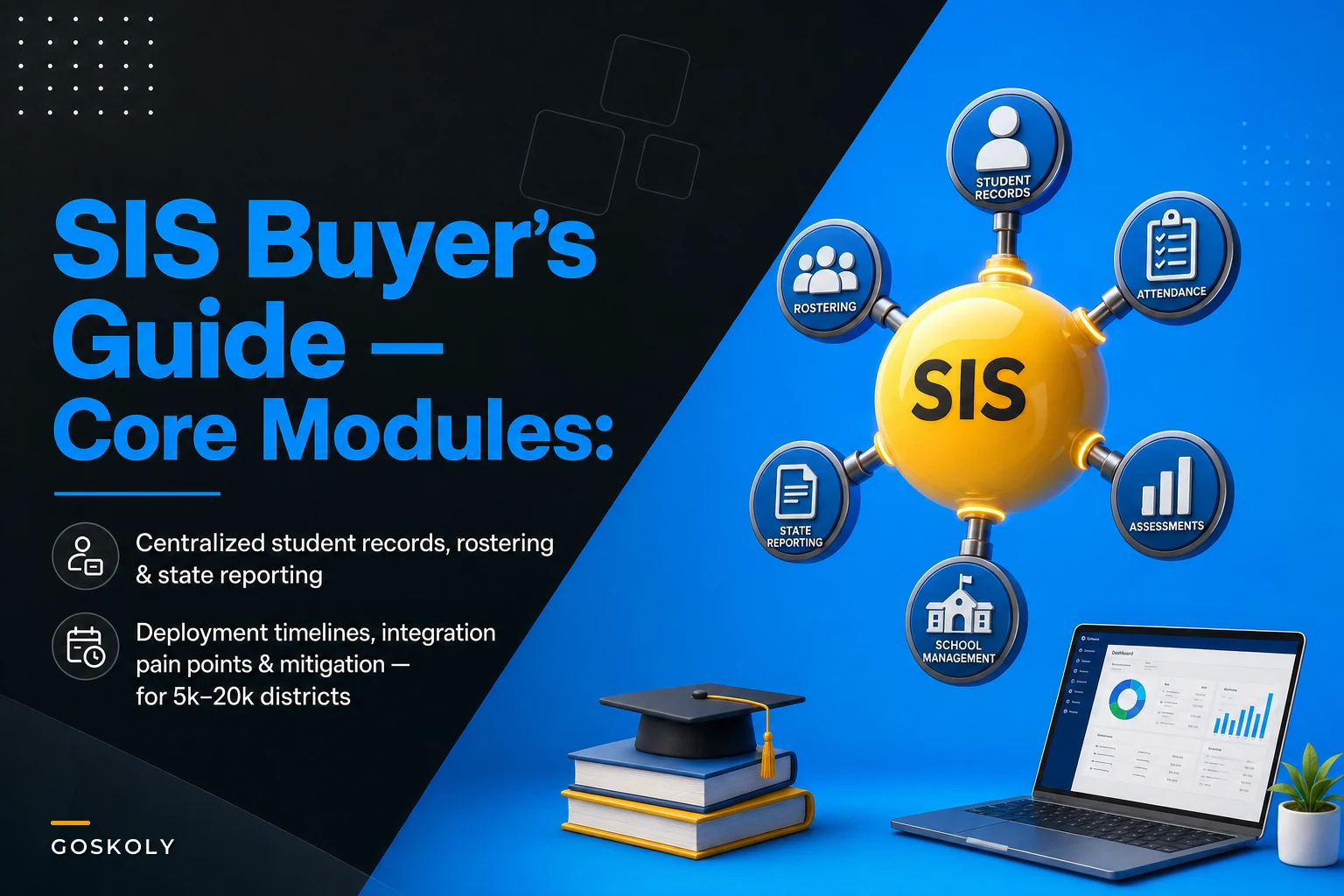

Most SIS procurement decks make it look like you're buying one thing. You're not. You're buying a core records system plus somewhere between four and nine add‑on modules, each with its own data model, its own deployment clock, and its own way of breaking during go‑live. A district of 5,000 students and one of 20,000 can run the exact same SIS and have completely different implementation timelines — because the number of moving integrations scales faster than enrollment does.
This guide is organized the way a real implementation actually unfolds: by product category. For each one you get a realistic calendar estimate for a mid‑sized district, the integration pain points that keep appearing, and the specific mitigations and vendor questions that keep those pain points from becoming summer‑long emergencies.
One thing worth flagging before you get into the catalog: the single biggest driver of total project length in this size band isn't the core SIS. It's state reporting and identity. Districts consistently underestimate both, and both tend to surface their worst problems late — during the first live submission window or the first week school staff try to log in.
Core SIS / Student Records
Typical deployment: 4–7 months for a mid‑sized district doing a full cutover, including a parallel run through at least one grading period.
This is the backbone — demographics, enrollment, program flags, contacts, enrollment history. Everything else maps back to the student and section records that live here.
The pain points are rarely about the software itself. They're about the data you're bringing in. Legacy student IDs that were reused across years. Contact records where the "primary guardian" field was never enforced, so you've got three primaries on one student. Program participation flags (gifted, 504, EL) stored as free text in the old system instead of coded values. A clean‑looking export hides all of this until the new system rejects or silently mangles it.
The organizational pain is sequencing. Registrars want the new system to behave like the old one. Counselors want new fields. IT wants a frozen scope. These three groups rarely sit in the same room until something is already half‑configured.
Mitigations and vendor questions:
-
Lock your student identifier strategy before any data moves. Decide whether the state ID, local ID, or a new system‑generated ID is the master key, and don't let that change mid‑project.
-
Ask the vendor
How do you handle re‑enrollment of a student who was previously withdrawn — same record or new record? The answer determines how your enrollment history will look for years.
-
Run a field‑level mapping document that a registrar signs off on, not just IT. Free‑text‑to‑coded‑value conversions are where quiet data loss happens.
-
Require a full parallel run across one complete grading cycle. A clean data load in July tells you nothing about whether attendance and grades will post correctly in October.
Require a full parallel run across one complete grading cycle. A clean data load in July tells you nothing about whether attendance and grades will post correctly in October.
Rostering and LMS Sync (OneRoster)
Typical deployment: 3–6 weeks per LMS/application once the core SIS is stable — but plan for this to recur every August.
Eliminate administrative overload.
GoSkoly helps you manage schedules, attendance, and communications seamlessly.
- Unified student and staff management
- Automated attendance tracking
- Integrated communication tools
No credit card required
OneRoster is the standard that moves students, teachers, classes, and enrollments into your LMS and dozens of ed‑tech tools. When it works, nobody notices. When it breaks, every teacher in the building files a ticket the same morning.
The recurring failure pattern: a teacher is assigned to a section in the SIS in a way the rostering feed doesn't recognize — a co‑teacher with no primary flag, a section with no meeting pattern, a class renamed after the sync ran. The LMS then shows an empty class or a teacher with no access, and support can't tell whether it's an SIS problem or an LMS problem.
There's also the version trap. OneRoster 1.1 and 1.2 behave differently, and some vendors support CSV bulk but not the live API, or vice versa. "We support OneRoster" is not a complete answer.
Mitigations and vendor questions:
-
Ask each ed‑tech vendor
Which OneRoster version, and do you support the REST API, CSV bulk, or both? Get it in writing per application.
-
Decide your source of truth for teacher‑section assignments and make sure every teacher of record has the required flag before the first sync runs.
-
Test the mid‑year change case deliberately
add a student to a section, move a teacher, drop a class — then watch it propagate. First‑day rostering is the easy part; it's the week‑three changes that expose gaps.
-
Keep a short reconciliation report that compares SIS enrollment counts to LMS enrollment counts by section. A two‑column diff catches most roster complaints before teachers do.
Keep a short reconciliation report that compares SIS enrollment counts to LMS enrollment counts by section. A two‑column diff catches most roster complaints before teachers do.
State Reporting Modules (Ed‑Fi / SIF / Flat‑File Connectors)
Typical deployment: 4–9 months, and this is the category most likely to blow a timeline. The software installs quickly. Getting your data to pass state validations does not.
This is the hardest part of the whole project, and it's hard for a non‑obvious reason: the connector is fine, but your underlying data has to satisfy hundreds of state business rules that your old reporting process quietly worked around. Course codes that don't map to the state crosswalk. Entry/exit dates that overlap. Special program records missing a required service date. The new pipeline surfaces every one of these as a hard rejection.
A realistic pattern in this size band: the first test submission to the state produces several hundred to a few thousand validation errors. That number is normal. It's not a sign the vendor failed — it's a sign your data quality is now being checked at a level it never was before.
Mitigations and vendor questions:
-
Ask
Which state collections do you support out of the box, and when do you certify against the current year's rule changes? State rules change annually; a connector certified for last year is a liability.
-
Get the SLA for reporting exports in writing — specifically, how fast the vendor turns around a connector update when the state publishes a mid‑year rule change. This single SLA is worth more than most feature comparisons.
-
Budget a dedicated validation remediation window of 6–10 weeks, separate from the connector install. Assign owners by error category, not by volume.
-
Start test submissions as early as the state sandbox allows. The worst outcome is discovering a structural mapping problem the week before a funding‑driven deadline.
Start test submissions as early as the state sandbox allows. The worst outcome is discovering a structural mapping problem the week before a funding‑driven deadline.
Scheduling & Course Management
Typical deployment: 6–10 weeks of active configuration, concentrated in a build season.
Course catalogs, section creation, master schedule building, requests and tallies. The software is usually capable; the bottleneck is that scheduling knowledge lives in a few people's heads and isn't documented anywhere.
The common mistake is treating the course catalog as a data migration problem when it's really a cleanup opportunity. Districts carry hundreds of dead course codes — courses not offered in years, duplicates with slightly different names, codes that no longer map to the state crosswalk. Migrating all of it wholesale drags the state‑reporting problem forward into scheduling.
Mitigations and vendor questions:
-
Clean the course catalog before migration. Retire dead codes and fix state‑crosswalk mismatches while the catalog is still manageable, not during August scheduling.
-
Ask
Can scheduling parameters and course catalog be loaded and version‑controlled, or is every change manual? Manual‑only means every annual rebuild is essentially a full rebuild.
-
Validate that section attributes required by state reporting and rostering (course code, teacher of record, meeting pattern) are mandatory fields at section creation, so bad sections can't be saved in the first place.
Validate that section attributes required by state reporting and rostering (course code, teacher of record, meeting pattern) are mandatory fields at section creation, so bad sections can't be saved in the first place.
Attendance & Behavior
Typical deployment: 3–6 weeks for configuration, but attendance code mapping deserves outsized attention relative to that short window.
Attendance drives funding in most states, which means the attendance module is quietly a financial system. Behavior records carry their own compliance weight, especially around suspensions and state discipline reporting.
The pain point is attendance code semantics. Your old system had codes that accumulated meaning over a decade — a code that technically meant "unexcused" but was used for three different situations. If you map those codes one‑to‑one without re‑examining them, you carry a decade of ambiguity into a funding‑critical system.
Mitigations and vendor questions:
-
Build an attendance code crosswalk that documents not just old‑code‑to‑new‑code, but what each code actually means for state reporting and funding.
-
Ask
How does daily and period attendance roll up to the state‑required ADA/membership calculation, and can we audit that rollup? If you can't see the math, you can't defend it in an audit.
-
Confirm how behavior records flag for state discipline collections — and test one of each reportable incident type end to end.
Confirm how behavior records flag for state discipline collections — and test one of each reportable incident type end to end.
Gradebook & Assessment Integrations
Typical deployment: 4–8 weeks, longer if you're integrating multiple third‑party assessment platforms.
Gradebook is where teachers live, and transcript integrity is where the legal risk lives. Assessment integrations pull in benchmark, state, and interim scores that drive intervention decisions.
The recurring failure is grading‑scale mismatch. One high school uses a 4.0 weighted scale, the middle schools use standards‑based marks, and an alternative program uses pass/fail. A district‑wide grade import that ignores these differences produces wrong GPAs and broken transcripts — and transcript errors tend to surface at the worst possible time, during college application season.
Assessment feeds add their own problem: student matching. Scores come back keyed to a testing vendor's ID or a slightly different name spelling, and a few percent of scores land unmatched every cycle.
Mitigations and vendor questions:
-
Map every grading scale in the district explicitly and test transcript generation for each school type before go‑live.
-
Ask assessment vendors
What student identifier do your results use, and do you support our state ID directly? Matching on state ID eliminates most unmatched‑score cleanup.
-
Require a staging step for grade and score imports so nothing posts to a permanent record without a review pass.
Require a staging step for grade and score imports so nothing posts to a permanent record without a review pass.
Special Education / IEP Management
Typical deployment: 4–8 months, often the longest‑tail module after state reporting because of compliance stakes and data sensitivity.
IEP systems are frequently separate products that have to stay in sync with the SIS for enrollment, demographics, and program flags. Any drift between the two creates compliance exposure — a student exited in the SIS but still active in the IEP system, or service minutes that don't match the placement record.
The hard integration problem is bi‑directional sync with a clear system of record. Demographics usually flow from SIS to IEP; special‑education program flags sometimes flow the other way. If ownership of each field isn't explicit, you get records that each system "corrects" in a loop.
Mitigations and vendor questions:
-
Define field‑level ownership between the SIS and IEP system
which system owns demographics, which owns program status, which owns service records. Write it down and enforce it in the integration config.
-
Ask
How does your IEP system reconcile a student whose enrollment or demographics change in the SIS mid‑year? Silent desync is the failure you're guarding against.
-
Require an exception report that flags any student active in one system but not the other. This single report prevents most compliance surprises.
Require an exception report that flags any student active in one system but not the other. This single report prevents most compliance surprises.
Identity & Access (SSO, Provisioning)
Typical deployment: 6–12 weeks, and it belongs near the front of your sequence even though it's often scheduled last.
This is the category that determines whether anyone can actually use everything you just built. SSO federates logins; provisioning creates and deprovisions accounts across the LMS, Google/Microsoft, and ed‑tech tools, usually driven by SIS enrollment and staff data.
The failure mode is predictable: provisioning rules depend on clean SIS data — role, school, grade, status — and if those fields are messy, accounts get created in the wrong org unit, with the wrong access, or not at all. A staff member whose SIS assignment is incomplete can't log into anything on day one, and the help desk absorbs it.
Deprovisioning is the quieter risk. Accounts for withdrawn students and departed staff that never get disabled are both a security and a licensing problem.
Mitigations and vendor questions:
-
Confirm that provisioning keys off a stable, authoritative identifier — not name or email, which change.
-
Ask
What triggers deprovisioning, and how fast does a withdrawal in the SIS disable downstream accounts? Get the lag time in writing.
-
Test the full lifecycle before go‑live
new student, role change, school transfer, withdrawal. Each should propagate to every connected system predictably.
-
Reconcile active accounts against active SIS enrollment at least monthly. The gap between those two numbers is your exposure.
Reconcile active accounts against active SIS enrollment monthly to limit exposure.
Reconcile active accounts against active SIS enrollment at least monthly. The gap between those two numbers is your exposure.
Integration Middleware / iPaaS & ETL
Typical deployment: 2–4 months to stand up, but this is foundational infrastructure, not a module — it carries most of the other integrations.
For a district running a dozen or more connected systems, point‑to‑point integrations become unmanageable quickly. Middleware centralizes the plumbing: one place where mappings, schedules, and error handling live. This is also where AI‑assisted tooling can genuinely help on the operational side — flagging anomalous record counts, surfacing mapping drift, and summarizing why a nightly job failed instead of leaving you to parse raw logs. Used well, that kind of automation cuts the time your team spends diagnosing broken feeds; it doesn't replace the mapping decisions, which still need a human who actually knows the data.
The pain point is error visibility and ownership. A nightly job fails silently at 2 a.m., and nobody knows until a teacher reports missing rosters at 8. Without alerting and clear ownership, middleware becomes a black box that everyone blames and no one controls.
Mitigations and vendor questions:
-
Require monitoring and alerting on every scheduled job, with a named owner per integration.
-
Ask
Do you provide prebuilt connectors for our specific SIS, LMS, and state platform, or are these custom builds? Prebuilt connectors cut both time and ongoing fragility.
-
Insist on a retry and reconciliation mechanism, not just a pass/fail log. Knowing a job failed is useless without knowing which records were affected.
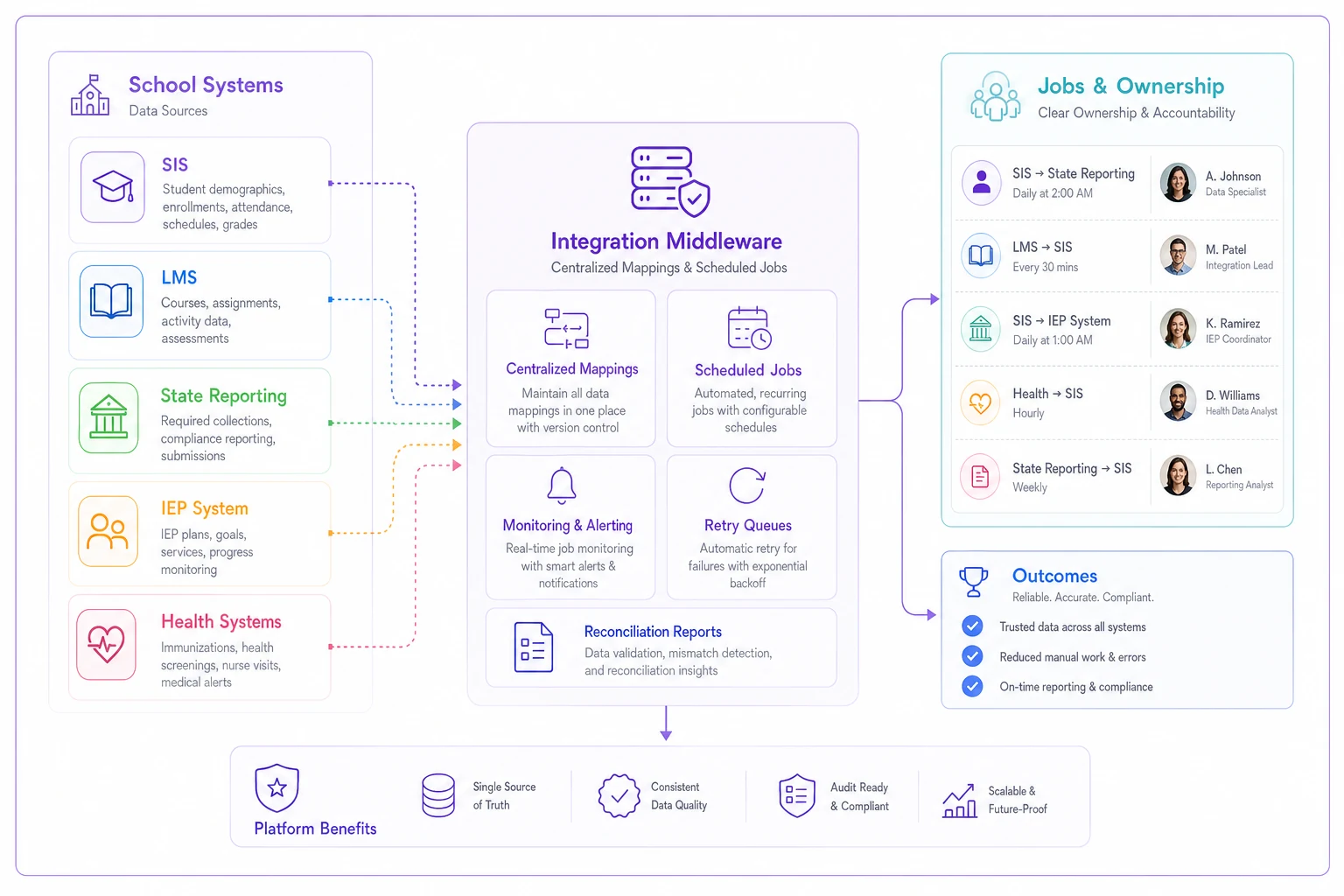
A simple workflow map like this helps teams agree on ownership and alerting thresholds before go‑live.
Insist on a retry and reconciliation mechanism, not just a pass/fail log. Knowing a job failed is useless without knowing which records were affected.
Data Warehouse / Analytics
Typical deployment: 3–6 months to build a trustworthy first version, ongoing after that.
A warehouse pulls history from the SIS and other systems for longitudinal reporting that live systems can't do well. The value is real; the trap is building dashboards on data nobody has validated.
The pattern worth naming: a shiny dashboard gets built, a leader finds one number that's obviously wrong, and the entire warehouse loses credibility for a year. One bad metric poisons trust in all of them.
Mitigations and vendor questions:
-
Validate source‑to‑warehouse counts before publishing anything. If enrollment in the warehouse doesn't match the SIS, fix that before building a single chart.
-
Ask
What's the data latency — real‑time, nightly, weekly? Decisions made on stale data are their own failure mode.
-
Document definitions for every published metric so "enrollment" means the same thing on every dashboard.
Document definitions for every published metric so "enrollment" means the same thing on every dashboard.
Document Management
Typical deployment: 4–8 weeks, straightforward technically but easy to under‑scope on governance.
Cumulative files, enrollment documents, consent forms, health records — attached to student records and governed by retention rules. The build is simple; the policy work is not.
The overlooked issue is retention and access control. Who can see a scanned custody document? How long is it kept? Districts digitize everything and then realize they've created a records‑request and privacy surface they never thought through.
Mitigations and vendor questions:
-
Define document types, retention periods, and access roles before migration, not after.
-
Ask
How are documents linked to the student record, and what happens to them when a student transfers or withdraws?
-
Confirm audit logging on document access for sensitive categories.
Confirm audit logging on document access for sensitive categories.
Health / Immunization
Typical deployment: 4–8 weeks for the module, with a compliance‑reporting tail around immunization status.
Health records, medication logs, and immunization compliance tracking. This module intersects with state immunization reporting and, increasingly, with state immunization registries.
The pain point is immunization status logic: translating raw vaccine records into a compliant/non‑compliant/conditional status against state rules that vary by grade and have their own exemption handling. Migrating records one‑to‑one doesn't produce a status — the rules engine has to do that work.
Mitigations and vendor questions:
-
Confirm the system calculates compliance status against current state requirements, including conditional and exemption cases — not just stores raw records.
-
Ask
Do you integrate with our state immunization registry, and in which direction?
-
Validate status calculations against a sample set of known‑compliant and known‑deficient students before trusting the dashboard.
Validate status calculations against a sample set of known‑compliant and known‑deficient students before trusting the dashboard.
Deployment Time Comparison
These ranges overlap because the work runs in parallel — which is exactly why sequencing matters more than any single estimate.
| Category | Typical deployment (mid‑sized district) | Riskiest dependency |
|---|---|---|
| Core SIS / Student Records | 4–7 months | Legacy data quality & ID strategy |
| Rostering / OneRoster | 3–6 weeks per app | Teacher‑section assignment integrity |
| State Reporting | 4–9 months | Validation remediation tail |
| Scheduling & Course Mgmt | 6–10 weeks | Dirty course catalog |
| Attendance & Behavior | 3–6 weeks | Attendance code semantics / funding |
| Gradebook & Assessment | 4–8 weeks | Grading‑scale mismatch |
| SPED / IEP | 4–8 months | Bi‑directional sync ownership |
| Identity & Access | 6–12 weeks | Provisioning off messy data |
| Middleware / iPaaS | 2–4 months | Error visibility & ownership |
| Data Warehouse | 3–6 months | Unvalidated metrics |
| Document Management | 4–8 weeks | Retention & access policy |
| Health / Immunization | 4–8 weeks | Compliance status logic |
These ranges overlap because the work runs in parallel — which is exactly why sequencing matters more than any single estimate.
A Sample Phased Timeline (5k–20k District)
This assumes a summer‑anchored go‑live, which is the norm. Adjust backward from your first live state‑reporting deadline, not from the start of the school year.
-
Months 0–2 — Foundation. Core SIS data mapping, ID strategy locked, identity/provisioning design started. Course catalog cleanup begins in parallel.
-
Months 2–4 — Core build and first data loads. Scheduling configured, attendance codes crosswalked, SSO and provisioning tested against staging data.
-
Months 3–5 — Integration layer. Middleware stood up, OneRoster feeds configured, IEP and health modules syncing in test.
-
Months 4–7 — State reporting validation. First sandbox submissions, remediation window open with owners assigned by error category. This runs long on purpose.
-
Months 5–7 — Parallel run and go‑live. Full parallel through a grading period, reconciliation reports live, gradebook and assessment verified.
-
Ongoing — Warehouse and sustainment. Analytics built only after source systems are validated.
The common planning error is treating state reporting as a Phase 5 activity. Start it in Phase 3 or 4. The validation tail is what most often runs into a hard deadline.
Integration Readiness Checklist
Before you connect anything, confirm:
-
IDs and keys A single authoritative student identifier chosen and consistent across all systems. Staff identifiers likewise stable.
-
Data quality Duplicate students resolved, primary‑guardian enforced, program flags coded (not free text), entry/exit dates non‑overlapping.
-
Mapping Field‑level mapping documents signed off by the owning department (registrar, counseling, SPED, health) — not just IT.
-
Crosswalks Course codes, attendance codes, and grading scales mapped to state and system values with documented meaning.
-
Testing Staging environment for every integration, mid‑year change cases tested (add, move, drop, withdraw), reconciliation reports comparing counts across systems.
-
Monitoring Alerting on every scheduled job with a named owner and a defined response time.
-
Access Provisioning and deprovisioning triggers tested across the full student and staff lifecycle.
Before you connect anything, confirm:
Recommended Sequencing: What to Implement First
A short decision rule that holds across this size band:
-
Core SIS and identifier strategy first. Nothing downstream is reliable until the master record and keys are stable.
-
Identity/provisioning early, not last. It gates whether anyone can use the system on day one. Design it alongside the core build.
-
Middleware before the long tail of integrations. Stand up the plumbing before you connect a dozen things point‑to‑point.
-
State reporting validation in parallel with everything. It has the longest remediation tail and the hardest deadline.
-
Analytics and warehouse last. Build reporting only on data you've already validated at the source.
The mistake to avoid: sequencing by what's easiest to demo. Document management and dashboards show well in a vendor meeting, which tempts districts to prioritize them early. The things that actually determine go‑live success — identity, state reporting, core data quality — demo poorly and tend to get deferred. That's backwards.
When Add‑On Modules Make Sense — And When They Don't
Buy the integrated module when compliance stakes are high and desync is dangerous. IEP and immunization are good examples: the cost of two systems drifting out of sync is a compliance finding, so tight integration earns its keep.
Be cautious with bundled modules when a best‑of‑breed tool your staff already trusts does the job better. A district forcing everyone onto a weaker bundled gradebook to "keep it all in one system" usually trades teacher goodwill for a tidy architecture diagram.
Who should slow down: Any district still fighting core data quality. Stacking modules on top of a messy student record just multiplies the places where bad data shows up. Fix the foundation first.
It's also worth sanity‑checking budget assumptions before you sign — module licensing, middleware, and integration labor often cost more than the core SIS line item, and external cost pressures on district procurement can shift the math on multi‑year contracts, as covered in the breakdown of how import tariffs could raise school procurement costs.
It's also worth sanity‑checking budget assumptions before you sign — module licensing, middleware, and integration labor often cost more than the core SIS line item, and external cost pressures on district procurement can shift the math on multi‑year contracts, as covered in the breakdown of how import tariffs could raise school procurement costs.
One‑Page Vendor Question Checklist
Bring this to every demo. The answers separate vendors who've done mid‑sized implementations from those who haven't.
APIs and standards
-
Which OneRoster version, and REST API, CSV bulk, or both?
-
What APIs are available for real‑time integration versus batch only?
-
Do you support our state's Ed‑Fi / SIF / flat‑file collection natively?
Prebuilt connectors
-
Which of our existing systems (LMS, IEP, health, assessment, SSO) do you have prebuilt connectors for?
-
Are connectors maintained by you, or does each integration become our maintenance burden?
State reporting
-
When do you certify against each year's state rule changes?
-
What's your SLA for connector updates when the state publishes a mid‑year rule change?
Reliability and exports
-
What's your SLA for reporting exports and scheduled extracts?
-
Do you provide job‑level monitoring and alerting, with per‑record error reporting?
Lifecycle
-
How does a mid‑year enrollment or demographic change propagate to connected systems?
-
What triggers deprovisioning, and how fast does a withdrawal disable downstream accounts?
Data ownership
-
Can we extract our full data set, including history, on exit, and in what format?
Bring this to every demo. The answers separate vendors who've done mid‑sized implementations from those who haven't.
The categories in this guide aren't equally hard, and the schedule that works is the one that respects that imbalance. Core records and identity determine whether the system functions at all. State reporting determines whether you survive your first submission window. Everything else — scheduling, gradebook, document management, health — is real work, but rarely what sinks a project.
If you plan every module to the same timeline and sequence the easy wins first, you'll find out in October or at the first reporting deadline that the hard parts were the ones you deferred. Plan backward from your reporting deadlines, validate your student record before you connect anything to it, and make identity a first‑phase problem instead of a go‑live surprise. That ordering, more than any single vendor feature, is what keeps a mid‑sized SIS implementation on schedule.
Ready to optimize your school operations?
Join hundreds of schools using GoSkoly to save time, improve collaboration, and enhance student outcomes.