

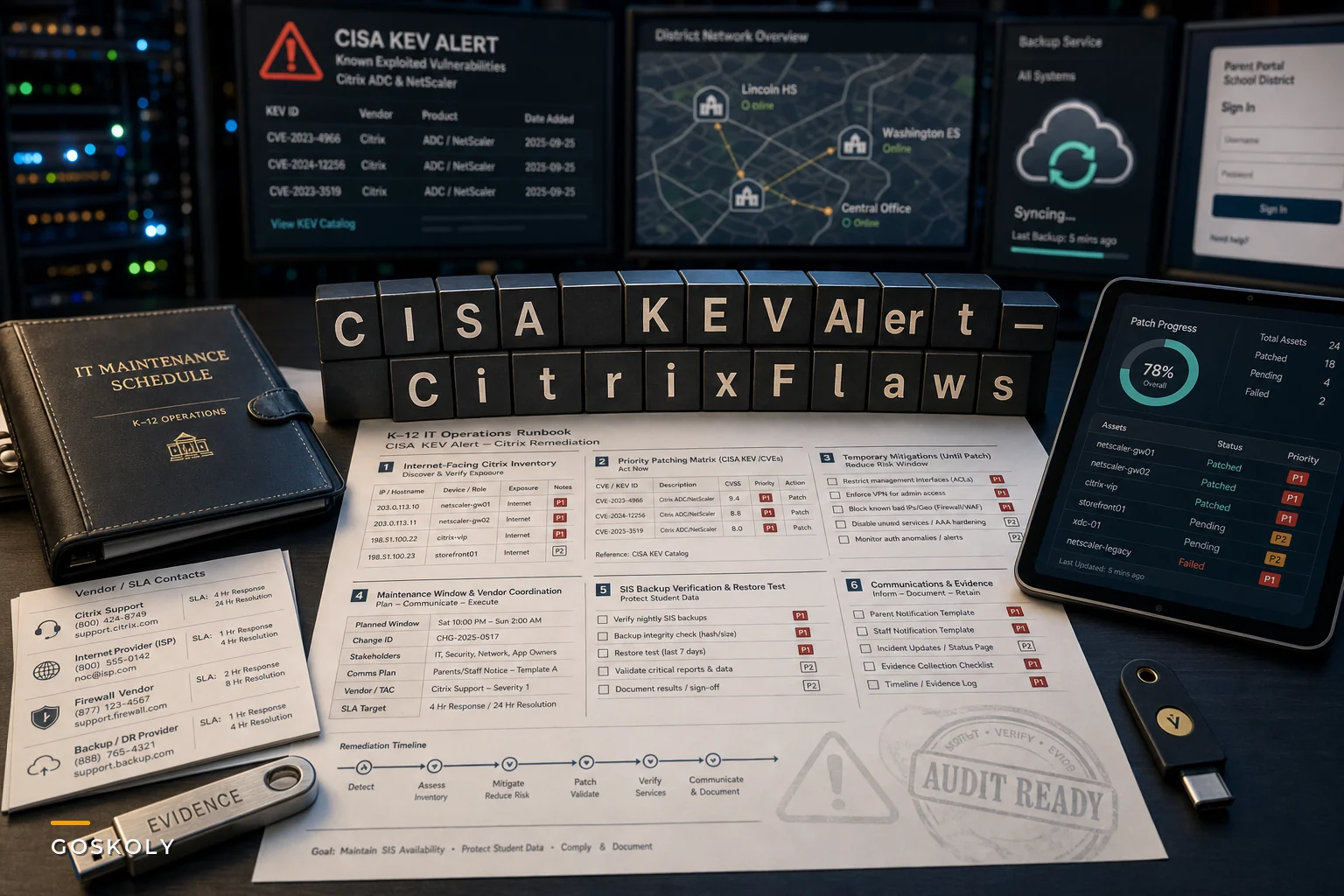

On September 27, 2026, CISA added two Citrix NetScaler vulnerabilities — CVE-2026-88771 and CVE-2026-88772 — to its Known Exploited Vulnerabilities Catalog, citing active exploitation in the wild. For federal agencies, a KEV listing triggers hard remediation deadlines under Binding Operational Directive 22-01. Districts aren't bound by that directive, but anyone who has sat through a cyber-insurance renewal lately knows the KEV catalog has quietly become the baseline that underwriters, state auditors, and incident responders all reference.
If your district runs Citrix NetScaler for remote access — staff VPN, vendor access to your SIS, remote desktop gateways for the business office — this one lands directly on the appliances sitting between the public internet and your student records. That's what makes it different from a routine Patch Tuesday. These aren't workstation patches. They're on the box that, if compromised, hands an attacker a foothold into everything behind it.
Why a KEV listing on an edge appliance is a different kind of problem
Most district patching cadences are built around endpoints and servers. You've got a schedule, a maintenance window, maybe WSUS or an MDM pushing updates overnight. Edge appliances break that model because they're almost always in the critical path for something people need right now — teachers logging grades, the registrar pulling records, a vendor running an overnight SIS sync.
That's the trap with CISA KEV patching schools keep falling into. The vulnerability isn't the hard part. Everyone knows you're supposed to patch. The hard part is that patching a NetScaler gateway often means a maintenance window that takes down remote access to the SIS, and nobody wants to be the person who knocked attendance offline during first period.
So the patch slips. Gets scheduled for the weekend, then the weekend gets busy, and two weeks later the appliance is still exposed on an actively exploited CVE. What tends to happen isn't negligence — it's a coordination failure between the security urgency and the operational cost of the outage.
A useful way to think about the exposure difference:
| Factor | Workstation/server patch | Edge appliance (NetScaler) patch |
|---|---|---|
| Blast radius if exploited | Usually contained to one host | Foothold into everything behind it — SIS, file shares, AD |
| Who notices during patching | Few users | Everyone who remotes in |
| Typical maintenance window | Overnight, automated | Scheduled, often needs vendor coordination |
| Failback complexity | Reboot, done | Config restore, cert validation, HA pair sync |
| Audit/insurer attention | Low | High — these are the systems they ask about |
The right-hand column is why these patches linger. And attackers know it. Internet-facing appliances with known exploited flaws get scanned and hit fast — often within days of a KEV listing going public.
First 48 hours: find out if you're actually exposed
Before anyone argues about maintenance windows, you need to know what you own. This sounds obvious. In practice, the number one reason districts miss an edge-appliance patch is that nobody had a clean inventory of which appliances were internet-facing to begin with.
Eliminate administrative overload.
GoSkoly helps you manage schedules, attendance, and communications seamlessly.
- Unified student and staff management
- Automated attendance tracking
- Integrated communication tools
No credit card required
A realistic scenario: a mid-sized district running two NetScaler appliances in an HA pair, plus a third from a years-old pilot that was never decommissioned and still had a public IP. The two production boxes got patched. The forgotten third one didn't, because it wasn't on anyone's list. That orphaned appliance is exactly the kind of thing that turns a patch cycle into a breach.
Your first pass, in order:
-
Identify every Citrix/NetScaler appliance, including HA pairs, DR units, and anything left over from migrations or pilots.
-
Confirm which are reachable from the internet — don't assume, actually check external scanning results or ask your ISP/edge team.
-
Pin down firmware/build versions against the specific affected builds in Citrix's advisory.
-
Flag vendor-managed gear — if a third party manages your NetScaler, you need their remediation timeline in writing, not a verbal "we're on it."
-
Document who owns each appliance so the remediation task has a named owner, not a team alias.
Label public-facing IPs in your inventory so orphaned appliances are obvious during a KEV review.
That last point matters more than it looks. "The network team will handle it" is how things fall through the cracks. "Maria owns the HA pair, confirms patch by Thursday 6 AM" is how they actually get done.
Patch, mitigate, or segregate — picking the right move
You won't always be able to patch immediately. Sometimes vendor coordination takes a few days, or you're waiting on a validated build. That's fine, as long as you're not just leaving the box exposed while you wait.
When immediate patching makes sense: You have a maintenance window within 24–48 hours, your HA pair lets you patch one node at a time with minimal disruption, and you've got a tested config backup. This is the default. Take it if you can.
When mitigation/compensating controls make sense: You genuinely can't take the outage yet — say, you're mid-enrollment and remote access to the SIS is running hot all day. In that case, restrict source IPs to known vendor and staff ranges, block the vulnerable paths if the advisory provides a workaround, and put the appliance behind tighter firewall rules while you schedule the real patch. Mitigations are a bridge, not a destination.
When segregation makes sense: For that orphaned pilot appliance nobody's using — don't patch it, pull it off the internet or decommission it. The fastest remediation for something you don't need is turning it off.
One thing worth flagging: applying the patch and assuming you're done. On these appliances, if there's any chance the box was already touched before you patched, closing the door doesn't evict anyone already inside. If exploitation may have occurred, you rotate credentials, review active sessions, and check for persistence — not just update firmware and move on.
Protect SIS availability while you remediate
The operational reality that gets lost in the security conversation: your job isn't only to patch the appliance. It's to patch it without taking down the systems families and staff depend on during the school day.
-
Validate backups before you touch anything. Confirm your SIS and attendance backups are current and that you've actually tested a restore recently — not "we have backups" but "we restored one last quarter and it worked."
-
Confirm failover actually fails over. HA pairs that have never been tested have a way of not working when you actually need them. If you're patching one node, verify the other genuinely carries the load before you start.
-
Pick the window around real usage, not the calendar. Attendance submission windows, grade-posting deadlines, and parent-portal peak times should drive your schedule. Early-morning weekend windows are usually safest.
-
Line up vendor SLAs in advance. If your SIS vendor needs to re-establish a connection after the appliance restarts, know that before the window starts — not discovered at 2 AM when something's broken.
A workflow that keeps the day running: announce the window to building admins with a specific fallback ("if the portal is down, use the paper attendance sheet and we'll backfill"), patch the standby node first, validate, fail over, patch the primary, validate again, then confirm the SIS sync and parent portal are both healthy before you call it done. Every step has a check and a fallback so nobody's guessing mid-window.
Here's a quick workflow to follow during the remediation window.
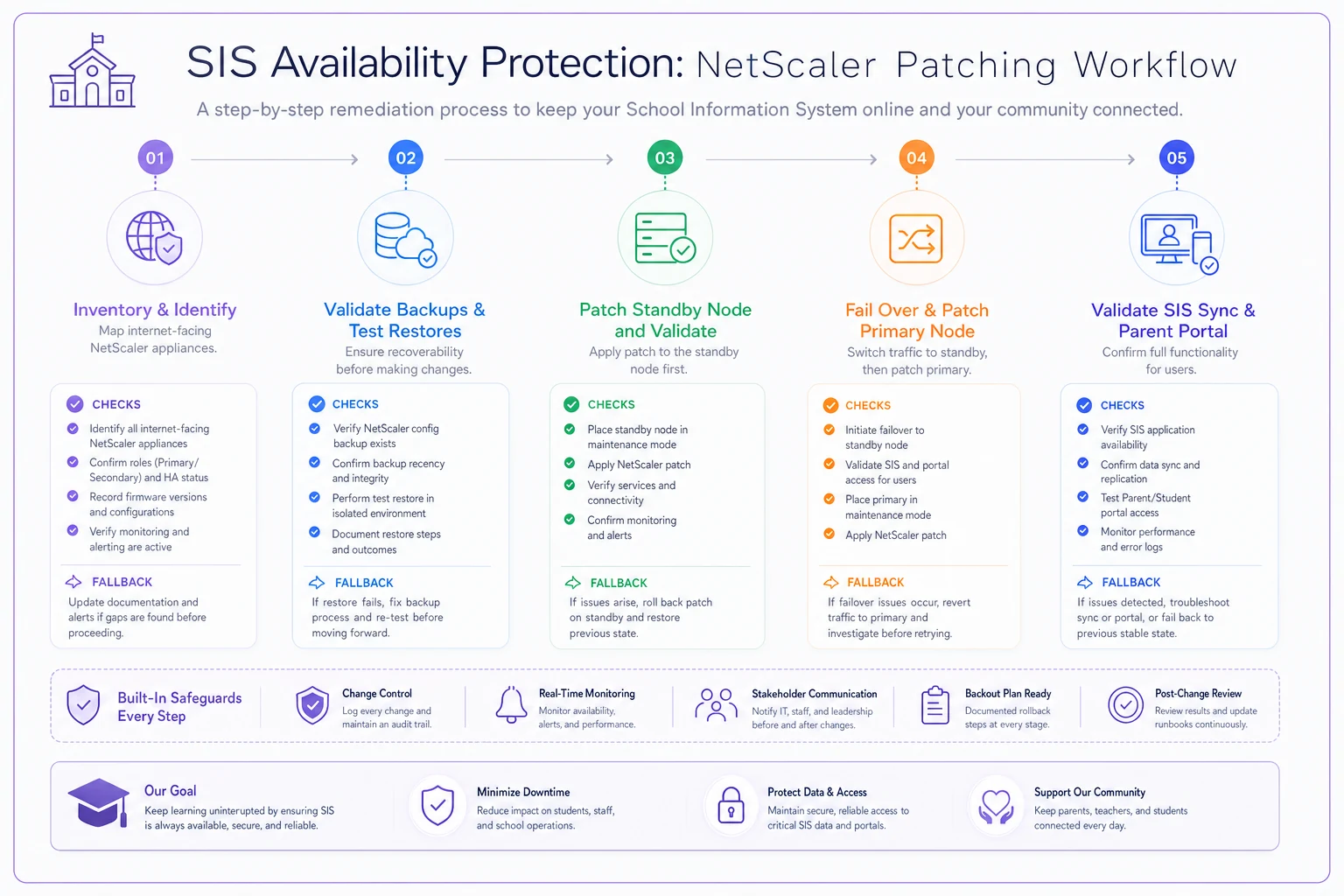
Use this as your quick reference during the maintenance window.
The deeper problem a KEV alert exposes
Every KEV listing that hits a district's edge gear exposes the same underlying gap: there's no standing runbook that ties security urgency to operational continuity. Security says "patch now." Operations says "but attendance is live." Without a pre-agreed process, those two priorities collide in a hallway conversation instead of a plan.
Districts that handle these well have a few things wired up ahead of time. An asset inventory that's actually maintained, not rebuilt in a panic when an alert drops. A named owner per critical appliance. Pre-written maintenance-window communications so building staff aren't blindsided. And an evidence trail — what was found, when it was patched, what the backups showed — because that's exactly what your cyber-insurer and state auditor will ask for.
That evidence piece is underrated. When an appliance on the KEV list sits in your environment, your insurer's post-incident questionnaire will ask when you knew, when you remediated, and what you did in between. "We patched it quickly" isn't an answer. A timestamped remediation log is.
Update your parent and staff notification templates now — not during the incident
The worst time to figure out what you'll tell families is in the middle of an incident. If remediation goes sideways, or worse, if one of these flaws was already exploited before you patched, you'll need to communicate fast and carefully — and the operational discipline for that is nearly identical to breach response.
Worth pulling your incident-response materials off the shelf and making sure they're current. The practical checklist in our incident-response guide for student records and parent communications maps directly onto this situation: who decides what gets said, which notification templates are pre-approved, how you reach families in their home language, and how you document every outbound message for auditors. A KEV alert is the right prompt to dry-run that checklist while nothing's actually on fire.
A short real-world scenario
A regional district — roughly 9,000 students across eleven buildings — ran a NetScaler HA pair for staff remote access and vendor SIS connectivity. When a prior KEV listing hit similar gear, their initial inventory turned up the two production nodes plus one decommissioned-on-paper appliance that was still live with a public IP.
Before they had a runbook, their typical edge-patch cycle ran close to three weeks from alert to patched. Mostly because scheduling the window required back-and-forth between the network lead, the SIS vendor, and building admins, and nobody owned pushing it forward. For an actively exploited flaw, three weeks is a long time to sit exposed.
After they assigned a named owner per appliance, pre-wrote the maintenance-window notice, and pre-scheduled vendor support, that same cycle dropped to around 36–48 hours for the production pair, with the orphaned box pulled offline the same afternoon it was found. Nothing technically fancy changed. What changed was that the coordination happened before the alert, not scrambled together after.
Where lightweight operational tooling actually helps
None of this requires a big platform. But the pieces that tend to fall apart — maintaining the asset inventory, assigning a clear owner per appliance, tracking remediation status, keeping the evidence log, and firing off the right notification template — are exactly the kind of coordination work that a shared operational system handles better than a spreadsheet and a group email thread.
The value isn't automation for its own sake. It's that when the next KEV alert drops at 4 PM on a Friday, you're not rebuilding your appliance list from memory or hunting for who owns what. The inventory is current, the owner is named, the maintenance-window notice is drafted, and the remediation log fills in as you go. That turns a scramble into a procedure.
Bringing it together
A KEV listing on Citrix edge gear is a security event, but for a district it's really a continuity problem wearing a security costume. The patch is the easy part. Doing it without knocking attendance, the SIS, or parent communications offline — and being able to prove afterward exactly what you did and when — that's the actual work.
Treat this alert as a rehearsal. Find every appliance, assign owners, patch or mitigate on a real timeline, protect your availability with tested backups and failover, and refresh your communication templates before you need them. The districts that stay calm during the next one are the ones that decided, ahead of time, how security urgency and keeping the school day running are going to coexist.
Treat this alert as a rehearsal. Find every appliance, assign owners, patch or mitigate on a real timeline, protect your availability with tested backups and failover, and refresh your communication templates before you need them. The districts that stay calm during the next one are the ones that decided, ahead of time, how security urgency and keeping the school day running are going to coexist.
Ready to optimize your school operations?
Join hundreds of schools using GoSkoly to save time, improve collaboration, and enhance student outcomes.