


Three years ago, a gas leak near Franklin Middle School turned into an operational nightmare that still haunts their district. Not because of the leak itself—that was handled perfectly by emergency services. The disaster happened in the 47 minutes between evacuation and parent notification.
By minute 12, parents were already showing up at the school after seeing social media posts from students. By minute 28, the main office phone system crashed from incoming calls. By minute 47, when the first official parent message finally went out, local news crews were already broadcasting confused parents demanding answers at the evacuation site.
The principal later told me they had an emergency communication plan. They even had contact information for every parent. What they didn't have was a parent emergency communication workflow that could handle the operational reality of reaching 800+ families within minutes while maintaining an auditable trail of who was contacted, when, and through which channel.
The Channel Priority Matrix Most Schools Get Backwards
School districts typically approach emergency communication like they're still operating in 2010—email first, maybe an automated call, and if things are really serious, they'll send a text. This backwards hierarchy creates dangerous delays when every second counts.
Your parent emergency communication workflow needs to match the urgency level with the right channel mix. Not every situation demands the same response intensity, but most schools treat a weather delay the same as an active lockdown from a communications standpoint.
Here's what an effective urgency-to-channel matrix actually looks like:
| Urgency Level | Primary Channel | Secondary | Tertiary | Response Window |
|---|---|---|---|---|
| Critical (lockdown, evacuation) | SMS blast | Automated call | Email + App push | Under 2 minutes |
| High (early dismissal, bus accident) | SMS + App push | Website banner | Under 5 minutes | |
| Moderate (power outage, delays) | App push + Email | SMS (opt-in only) | Website update | Under 15 minutes |
| Low (schedule changes, reminders) | App notification | Website post | Within 2 hours |
The mistake I constantly observe is schools defaulting to email for everything because it's "official" and easy to document. Meanwhile, email open rates during school hours hover around 22%, and that's being generous. Parents checking work email at 10:30 AM when their kid's school goes into lockdown? Not happening.
One district in Colorado learned this the hard way during a credible threat situation last year. They sent the lockdown notification via email at 9:47 AM. By 10:15 AM, only 31% of parents had opened it. The parents who found out? They heard from their kids texting from inside locked classrooms or from other parents who happened to be on social media. The communication audit afterward was brutal—parents felt betrayed by a system that prioritized documentation over actual notification.
Building the Decision Tree That Actually Works Under Pressure
The typical emergency communication decision tree looks impressive on paper—multiple branches, detailed scenarios, clear ownership. Then an actual emergency hits and nobody can remember whether a "suspicious person near campus" triggers Protocol B or Protocol C, and is that the assistant principal's call or does it need the superintendent's approval?
Eliminate administrative overload.
GoSkoly helps you manage schedules, attendance, and communications seamlessly.
- Unified student and staff management
- Automated attendance tracking
- Integrated communication tools
No credit card required
Real parent emergency communication workflows need decision trees that account for human psychology under stress. When adrenaline spikes, complex decision matrices become useless. The tree needs to be simple enough that a panicking office manager can execute it flawlessly.
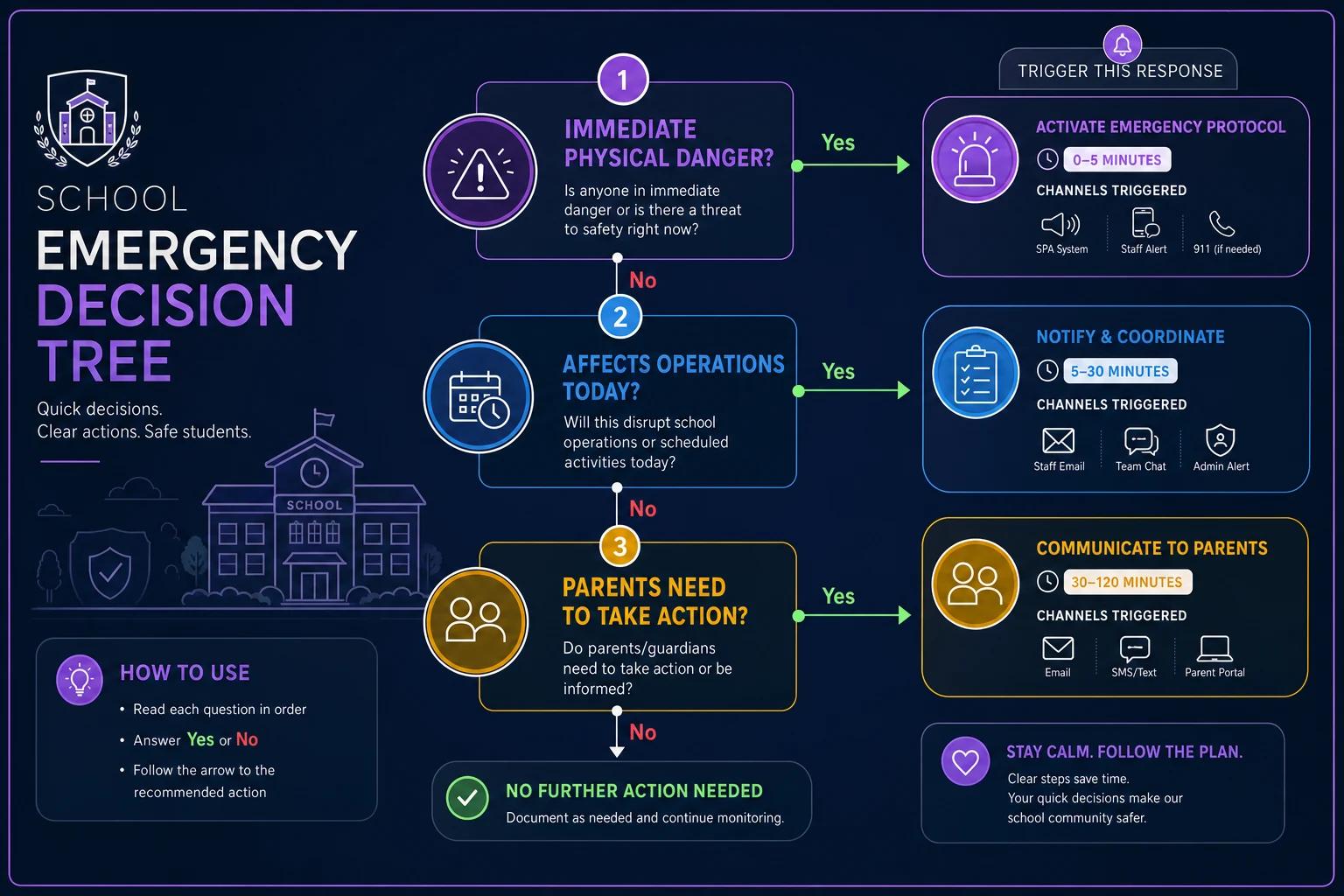
Start with just three decision points:
-
Point 1
Is there immediate physical danger?
- Yes → Critical protocol (all channels, immediate) - No → Continue to Point 2 -
Point 2
Does this affect normal operations today?
- Yes → High/Moderate protocol based on timing - No → Continue to Point 3 -
Point 3
Do parents need to take action?
- Yes → Moderate protocol with clear action steps - No → Low protocol, information only
That's it. Three questions that can be answered in under 30 seconds even when your hands are shaking.
A small rural district in Idaho implemented this simplified tree after their previous 16-page emergency manual proved worthless during a water main break. The office staff had spent 23 minutes trying to figure out which notification level applied while parents started showing up to collect their kids based on rumors. Now their average decision-to-notification time is under 3 minutes for any scenario.
The Privacy Minefield Nobody Talks About
Here's an uncomfortable truth about parent emergency communication workflows—the faster you need to communicate, the more privacy regulations you're probably violating. FERPA, COPPA, state privacy laws... they weren't written with split-second emergency notifications in mind.
The classic violation happens with group messaging. A school needs to notify all baseball team parents about a bus breakdown. Someone creates a group text. Suddenly every parent can see every other parent's phone number. One divorced parent didn't want their ex to have their new number. Another parent is in witness protection. A third is dealing with a stalking situation. The school just created three potential lawsuits while trying to communicate about a simple delay.
Even automated systems create privacy risks. Last spring, a district's emergency notification system had a configuration error that included student names in the SMS messages about a shelter-in-place order. "Your student [NAME] is safe and sheltering in place" seemed helpful until parents realized anyone who intercepted or saw those messages now knew which kids attended that school. For families dealing with custody disputes or protection orders, this breach was devastating.
The solution isn't to slow down communication—it's to build privacy protection into the workflow from the start. Every message template needs to be pre-vetted for FERPA compliance. Contact lists need segregation between general and restricted-access families. The system needs to handle divorced parents with different notification preferences without revealing one parent's information to the other.
Pre-vet and version-control emergency templates so sensitive identifiers are automatically removed from mass messages before sending.
Schools using AI-powered operational platforms can build these privacy safeguards directly into the communication workflow. The system automatically strips identifying information from mass messages, maintains separate contact channels for restricted families, and creates an audit trail showing exactly what information was shared and when. This isn't about adding complexity—it's about building compliance into the speed of your response.
Creating Auditable Logs Without Slowing Response Time
After every school emergency, someone—usually a lawyer or an angry school board—wants to know exactly who was notified, when they were notified, and what they were told. Most schools discover their "comprehensive" communication log consists of one administrative assistant's handwritten notes and a collection of "sent" emails scattered across four different accounts.
The audit trail for your parent emergency communication workflow can't be an afterthought. It needs to capture every decision and action without adding friction to the actual communication process. This means automatic logging, not manual documentation that someone has to remember to do while managing a crisis.
-
Timestamp of initiating event
-
Who made the decision to communicate
-
Which urgency level was selected and why
-
Message content for each channel
-
Delivery confirmation for each recipient
-
Failed delivery attempts and retry actions
-
Follow-up communications and timing
-
Any deviation from standard protocol
One district outside Philadelphia thought they had solid documentation until a parent sued after their special needs student was left on campus during an evacuation. The district claimed they notified all parents within 4 minutes. The parent claimed they never received notification. The district's "proof" was a screenshot of an email showing it was sent. They couldn't prove delivery, couldn't show whether the parent's phone number was in the SMS system, couldn't demonstrate that the automated call actually connected.
They lost the lawsuit.
The same situation with proper audit logging would show the SMS bounced because of an incorrect number, the email went to spam, and the automated call rang but wasn't answered. More importantly, it would have flagged these failures in real-time, triggering alternate contact methods for any parent not successfully reached within the critical window.
When Parallel Communication Channels Create Chaos
Schools love redundancy in their parent emergency communication workflow—send everything through multiple channels to make sure the message gets through. Except when those parallel channels aren't perfectly synchronized, they create more confusion than clarity.
This happened during a lockdown drill that wasn't supposed to be a drill. The automated SMS system sent "This is a drill" at 10:14 AM. The email system, running 90 seconds behind, dropped the word "drill" due to a template error. The automated phone calls, triggered manually by a different staff member, announced an actual lockdown. Parents received three conflicting messages within 3 minutes.
The parking lot turned into chaos. Parents who got the SMS thought it was practice. Parents who got the email thought it was real. Parents who got the phone call were already driving to the school. The principal spent the next two hours doing damage control instead of managing what turned out to be an actual (though non-violent) security situation.
Your workflow needs a single source of truth that feeds all channels simultaneously. When the message is approved and triggered, every channel receives identical information at the same time. No manual copying between systems. No separate templates that might differ. No opportunity for human error to create conflicting narratives.
This is where AI-assisted operational platforms prove their value. Instead of maintaining separate systems for SMS, email, voice, and app notifications, everything flows from a single decision point. The AI ensures message consistency across channels while adapting the format for each medium—short and urgent for SMS, more detailed for email, clear and slow for voice calls. The human makes one decision, approves one message, and the system handles the rest.
Building Response Teams That Don't Freeze
The best parent emergency communication workflow means nothing if the people executing it panic when reality hits. Most schools assign emergency communication roles based on job titles—principal makes decisions, assistant principal approves messages, office manager sends notifications. Then the emergency happens while the principal is at a district meeting, the assistant principal is observing classes, and the office manager is out sick.
Effective teams are built on capabilities, not titles. You need three roles that can be filled by anyone trained:
The Decider: Makes the urgency call and approves message content. This person needs authority but more importantly needs training on the three-question decision tree. Could be a principal, could be a senior teacher, could be the head custodian if they're the most senior person on site.
The Executor: Triggers the actual communications through your systems. They need technical competence and steady hands, not necessarily seniority. Often your best executor is whoever is most comfortable with technology under pressure.
The Monitor: Tracks delivery confirmation, handles failed notifications, and manages the audit trail. This person needs attention to detail and the ability to spot problems quickly.
Each role needs at least three people trained to fill it. Not "aware of" the role—actually trained, with hands-on practice using the systems during non-emergency times.
A middle school in Arizona runs monthly "communication drills" where they simulate different emergency scenarios with different staff available. The January drill assumes the principal and assistant principal are both off-campus. The February drill assumes the main office is inaccessible. The March drill assumes phone systems are down. These aren't announced in advance—staff show up to work and find a note saying "You're in charge of emergency communications today. There's been an incident."
The first drill was a disaster. The third was messy but functional. By the sixth drill, their average notification time was under 2 minutes regardless of who was available.
The Real Cost of Getting This Wrong
Schools underestimate the true cost of a failed parent emergency communication workflow because they only count the immediate aftermath—angry parents, bad press, maybe a lawsuit. The real damage runs much deeper and lasts much longer.
Trust evaporates instantly and rebuilds slowly. After Franklin Middle School's gas leak fiasco, enrollment dropped 11% the following year. Parents didn't explicitly say they were leaving because of communication failures, but the exit surveys showed a pattern—"looking for a school that prioritizes student safety" and "need better communication from administration."
The operational burden multiplies too. Once parents lose faith in official channels, they create their own. Unofficial Facebook groups spring up where rumors spread faster than facts. Parents exchange personal cell numbers with teachers, who then get bombarded with texts during any unusual situation. The main office gets calls about every siren, every police car, every unusual sound from the playground.
One elementary school principal described it perfectly: "After our communication breakdown during the power outage, I spend about 6 hours every week just managing parental anxiety that wouldn't exist if they trusted our emergency communications. That's 6 hours not spent on instruction, not spent on staff development, not spent on student support. It's just damage control, week after week."
Legal costs pile up whether you get sued or not. Insurance premiums increase after communication-related incidents. The district requires new training, new systems, new oversight—all of which costs money and time. The general counsel starts reviewing every communication template, adding weeks to any process change.
Technology Integration Without Losing Human Judgment
The most sophisticated parent emergency communication workflow will fail if it removes human judgment from the equation. Full automation seems attractive—no delay, no human error, perfect consistency. But emergencies are messy, contextual, and often require nuance that no automated system can provide.
The balance point is AI-assisted operational software that amplifies human decision-making rather than replacing it. The human makes the critical judgments—is this situation dangerous? What do parents need to know? What tone is appropriate? The technology handles the execution—formatting messages for different channels, managing contact databases, ensuring delivery, maintaining audit trails.
During a recent incident involving a social media threat, a high school used their AI-powered platform to adapt their standard "lockdown" messaging based on the specific situation. The human administrator indicated this was a "precautionary lockdown due to non-specific online threat" rather than an active danger situation. The AI adjusted the urgency level, modified the message tone to be concerning but not panic-inducing, and added specific instructions about student cell phone use during lockdown.
Parents were informed but not panicked. They knew their kids were safe, understood why the lockdown was happening, and weren't rushing to the school demanding information. The situation that could have created chaos instead became a controlled, measured response that parents actually praised afterward.
This kind of integrated system also handles the messy realities of modern school operations. Split custody arrangements where mom gets emergency texts but dad gets emails. Spanish-speaking families who need translated messages. Parents who've opted out of automated calls but need SMS for true emergencies. The AI manages these complexities in the background while humans focus on managing the actual emergency.
Moving Forward: Your Next Steps
If your school's parent emergency communication workflow still relies on email lists and phone trees, you're not prepared for the next crisis. The question isn't whether you'll face an emergency requiring rapid parent notification—it's when, and whether you'll be ready.
Start with an honest assessment. Run an unannounced drill next week. Pick a random Tuesday morning, simulate a moderate emergency, and see how long it takes to notify all parents. Track everything—decision time, message crafting, channel activation, delivery confirmation. The results will probably disturb you.
Then fix the biggest gaps first. Usually that's the channel priority matrix—getting SMS capability if you don't have it, ensuring you can reach parents within 2 minutes for critical events. Build your simplified decision tree. Train multiple people on each role.
Most importantly, invest in systems that create automatic audit trails without slowing response time. Whether that's AI-powered operational software or improving your existing platforms, you need technology that documents everything while letting humans focus on human decisions.
The parents in your district trust you with their children every day. When something goes wrong, they need to know immediately, accurately, and reliably. Your parent emergency communication workflow isn't just about sending messages—it's about maintaining the trust that makes everything else in education possible. The investment you make in getting this right pays dividends not just in crisis prevention, but in the daily confidence parents have in your schools.
Because when those 47 minutes pass and parents still don't know their children are safe, you've broken something that no amount of explanations can fully repair. Build the workflow now, before you need it. Your future self—and hundreds of parents—will thank you.
Ready to optimize your school operations?
Join hundreds of schools using GoSkoly to save time, improve collaboration, and enhance student outcomes.